Thread Starter
 miccom
(@miccom)
maybe this can help:
Trace for /opt/virtual-domains/www.greensmilies.com/index.php
Total Elapsed Time = 1.31
Total System Time  = 0.09
Total User Time    = 1.14

        Real         User        System             secs/    cumm
%Time (excl/cumm)  (excl/cumm)  (excl/cumm) Calls    call    s/call  Memory Usage Name
--------------------------------------------------------------------------------------
45.1 0.54 0.56  0.56 0.59  0.00 0.00  2745  0.0002   0.0002            0 preg_replace
5.8 0.09 0.09  0.06 0.06  0.01 0.01  8474  0.0000   0.0000            0 strlen
5.8 0.07 1.40  0.07 1.22  0.00 0.10    35  0.0021   0.0377            0 require
3.9 0.04 0.04  0.04 0.04  0.00 0.00    83  0.0006   0.0006            0 base64_decode
3.2 0.04 0.04  0.04 0.04  0.00 0.00  3354  0.0000   0.0000            0 substr
2.6 0.01 0.10  0.03 0.09  0.00 0.02   785  0.0000   0.0001            0 WP_Object_Cache->get
2.6 0.01 0.05  0.03 0.06  0.00 0.01  3142  0.0000   0.0000            0 CachedFileReader->seekto
2.3 0.02 0.02  0.03 0.03  0.00 0.00  1780  0.0000   0.0000            0 preg_match
1.9 0.02 0.02  0.02 0.02  0.00 0.00  1814  0.0000   0.0000            0 str_replace
1.6 0.03 0.03  0.02 0.02  0.00 0.00   546  0.0000   0.0000            0 is_string
1.6 0.02 0.67  0.02 0.64  0.00 0.02  1828  0.0000   0.0004            0 apply_filters
1.6 0.02 0.02  0.02 0.02  0.00 0.00  2168  0.0000   0.0000            0 trim
1.6 0.02 0.02  0.01 0.01  0.01 0.01  1784  0.0000   0.0000            0 preg_quote
1.3 0.00 0.00  0.01 0.01  0.00 0.00   154  0.0001   0.0001            0 merge_filters
1.0 0.01 0.07  0.01 0.05  0.00 0.01  3147  0.0000   0.0000            0 CachedFileReader->read
1.0 0.01 0.01  0.00 0.00  0.01 0.01  1783  0.0000   0.0000            0 htmlspecialchars
1.0 0.01 0.01  0.01 0.01  0.00 0.00  1040  0.0000   0.0000            0 is_array
1.0 0.00 0.00  0.01 0.01  0.00 0.00   333  0.0000   0.0000            0 in_array
1.0 0.01 0.01  0.01 0.01  0.00 0.00   760  0.0000   0.0000            0 is_null
0.6 0.01 0.01  0.01 0.01  0.00 0.00   248  0.0000   0.0000            0 defined
Thread Starter
miccom
(@miccom)
OK, I think we found the “problem”. I use my Blog to present my Smilies and I added each Smilie to the wpsmiliestrans-array in functions.php. So the array has 1.800 lines. 😀
If I remove all Smilies from the array, the load goes done significantly!
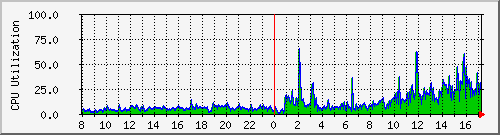
But, as you can see in my cpu load graph:
http://www.greensmilies.com/wp-content/uploads/2008/01/cpu-day19-22.png
the load without the large array is much higher than under 2.0.11 with the large array!
Why it was better under 2.0.11?
Any ideas, what I can do? I don’t wanna remove the smilies, because they are the topic of my blog and I used them in hundreds of topics…
My Server-Admin also said me, that a lexer is faster than a parser and WP should use it… just his 2 cents.
For examlpe: http://greg.chiaraquartet.net/archives/138-PHP_ParserGenerator-and-PHP_LexerGenerator.html
Thanks for reading! 🙂
/edit:
I use a dedicated server with an AMD Athlon(tm) 64 X2 Dual Core Processor 4600+ (2400 mhz) and 2 gigs of ram.
Thread Starter
miccom
(@miccom)
Nobody?
🙁
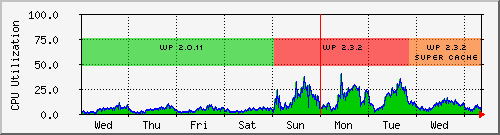
Here are some more cpu load statistics. The show WP 2.0.11, WP 2.3.2 and WP 2.3.2 with the Wp Super Cache Plugin:
http://www.greensmilies.com/wp-content/uploads/2008/01/080117-24_cpu-week.png
Same traffic and smiley array as under WP 2.0.11, will explode the load under WP 2.3.2. Super Cache did a good job but 2.0.11 was better…
Thread Starter
miccom
(@miccom)
k, still no reply, continuing one-on-one interview. 😀
As I wrote above, I extended the wpsmiliestrans-array in functions.php up to 1.800 lines. Since I removed all Smilies from this array and replaced them with only 20 Smilies, the cpu load goes down. I also use WP Super Cache now.
The load goes down, but is still higher than under 2.0.11, I hope, it will be better under 2.5