Hi,
thanks for your question, and sorry for the trouble.
The cause for this seems to be the Horizontal Scrolling checkbox. For some reason, the DataTables JS library can not properly calculate or set the width for the data rows and the header.
My suggestion here would be to turn off the “Horizontal Scrolling” checkbox on the table’s “Edit” screen and instead try the scroll mode that the Responsive Tables Extension from https://tablepress.org/extensions/responsive-tables/ offers for horizontal scrolling. As that uses a different technical method, it will not show this weird behavior.
Regards,
Tobias
Hi again,
ah, hold on. I just noticed that you are not using that “Horizontal Scrolling” checkbox, but the TablePress Fixed Columns Extension.
My suggestion will therefore not work.
Instead, you might have to remove the CSS code that assigns those columns widths, or you might have to play with the values, i.e. make them larger, until things fit.
Regards,
Tobias
Tobias et. al.,
Been monkeying around with just this table to isolate any experiments. I have tried many pxs and %s and nothing seems to have any effect.
My headers are still not lining up and my URLs are still not breaking. Code applying to the table:
.tablepress-id-71 thead th,
.tablepress-id-71 tbody td, {
	text-align: center;
}

}
.tablepress-id-71 .column-8,
.tablepress-id-71 .column-9,
.tablepress-id-71 .column-11, {
	width: 300px !important;
	word-break: break-word !important;
	overflow-wrap: break-word !important;
	word-wrap: break-word !important;
	display: inline-block !important;
}
Just for thoroughness, perhaps the way I imported might have something to do with this. I did not use CSV because I have commas within my content. I don’t know JSON. And when I tried the .xls versions they did something to the accents for other languages (I forgot exactly what at the moment). So htm/html was what I chose; .htm created in Google Sheets and exported to a .zip group of .htms. When imported using Tablepress, the carefully chosen column widths for my many columns were gone. And my URLs refuse to break no matter how !important; I make the breaks.
Currently only TablePress, TablePress Extension: DataTables FixedColumns, and TablePress Extension: Responsive Tables are activated.
Any thoughts would be welcome.
Hi,
the problem might be an extraneous comma that you are adding in your code, e.g. in
.tablepress-id-71 .column-11, {
There must never be a comma , directly before the {.
Please try again after removing all of those.
Regards,
Tobias
Tobias’s catch of my stray comma was great and opened up the problem to what really needs to be done.
The word-break CSS works but no matter what, I can’t get width to work no matter my settings (px, %). The result is a narrow column about four characters wide no matter what the width setting
I have been commenting out and adding back in combinations of the following CSS on this table;
/*.tablepress-id-71 .column-8,*/
.tablepress-id-71 .column-9,
.tablepress-id-71 .column-11 {
	width: 150px;
	word-break: break-word;
	/*overflow-wrap: break-word;*/
	/*word-wrap: break-word;*/
}
A picture of column 8 without word-break versus column 9 with word-break can be seen here.
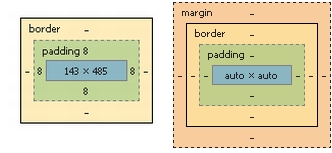
By the way, the inspect element computed box in Chrome for a text cell versus the URL cells looks like this. Text cells have specific widths (set automatically by TablePress?) versus the URL cells which are set to automatic ‘auto x auto’ no matter whether word-break is applied to them or not.
For my benefit, and hopefully others, some thinking out loud here; CSS styles can be set by WordPress, WordPress theme stylesheet, and TablePress – did I miss any? There is something cascading downward that probably has a higher priority over width that is preventing the CSS width set in TablePress from working.
In addition, word-break is taking its cues from…well, not sure what. Container size? Wrapper? ??? How does it choose where to break? Is there TablePress / DataTables box size coding that I should bang my head against?
Hi,
good to hear that the suggestion with the comma helped!
For the width, I suggest to really set a width for each column, in pixels, and with the !important command. Some columns don’t seem to have a width set, which could lead to this behavior.
Those CSS styles can be set by the theme, by any plugin (unlikely here), including TablePress, and (and that’s important!) the browser, with its default style.
All TablePress CSS is in the /css/default.css files, your “Custom CSS”, plus the Extension’s CSS files. Except for your “Custom CSS”, nothing should affect the column widths however, except maybe the width: 100% setting for the full table, which should however not matter here, as DataTables overrides it with an inline style.
Regards,
Tobias
Well, setting specific column width with px works within the visible envelope but scroll doesn’t work anymore. It is as if container now becomes just the visible area. Is the 100% width NOT overridden by DataTables? Latest table result here.
Hi,
ok, we could now also try forcing a width on the actual table element. For that, can you try to also add
#tablepress-71 {
  width: 2000px !important;
}
? (The 2000px should probably be close to the sum of the individual widths for the columns. I just used 2000px for quick testing here.)
Regards,
Tobias
Done! You rock Tobias! If I was writing a BuzzFeed headline about your plug-in, it would go something like “The one WordPress Plug-in that Restores your Faith in Humanity!” Rated five stars and some additional appreciation already sent your way!
Hi,
no problem, you are very welcome! 🙂 Good to hear that this helped!
Best wishes,
Tobias