Can you clarify what you mean by inventory page?
I apologize, I was referring to the shop page:
http://www.barrgo.com/equipment/
Basically the images on the URL above previously had three rows and four columns on a standard screen size.
Without me making any changes in the stylesheet or settings in Woocommerce the images became so large that there is now only two columns.
I played around with the CSS for that section and even when I lower it to 10% there are still only two columns.
https://www.dropbox.com/s/mg5zldg751va3vq/Capture.JPG?dl=0
The change occurred without any changes to the CSS. All that happen was a wordpress upgrade and a Woocommerce upgrade.
The same thing is happening on the individual product pages and category pages:
http://www.barrgo.com/equipment/1991-fruehauf-crude-oil-tank-trailer/
http://www.barrgo.com/equipment-category/crude-oil-tank-trailers-for-sale/
All of the images are over sized and there have been zero changes to the CSS in the past three months. It is riding off a child theme so I do not believe that is the issue.
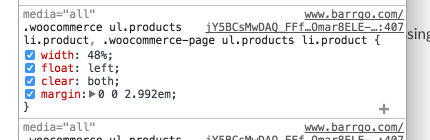
I have screenshot the style for you, so it is the issue. You are running a minify script though – so thats preventing me from seeing which css sheet its coming from. Disable the minify script.
Okay the minify settings have been turned off.
Thanks again for the help.
No changes needed.
Once I update to the latest version of WooCommerce which out a few minutes ago the problem corrected.
Thanks!
Good, but we didn’t fix it :p
This is extremely strange but it reverted back the “enlarged image” state…
Here is the only things that have been done since it was rendering correctly:
– Updated Contact Form DB
– Cleared Page Cache (W3TC)
What could possibly cause the image size to change?
Would I need to disable minify again to check?