viewing the itsec_logs file
-
Hello,
I’m using iThemes 4.6.8 and have set the log files to be saved in the MySQL database.
I am trying to view these, by inspecting the table itsec_log. However the field (Log_data) contains a large quantity of information, which I would like to be able to see in a readable manner-can someone more technical than I tell me what is the info converted to? it does not seem to be standard Json, nor CSV.
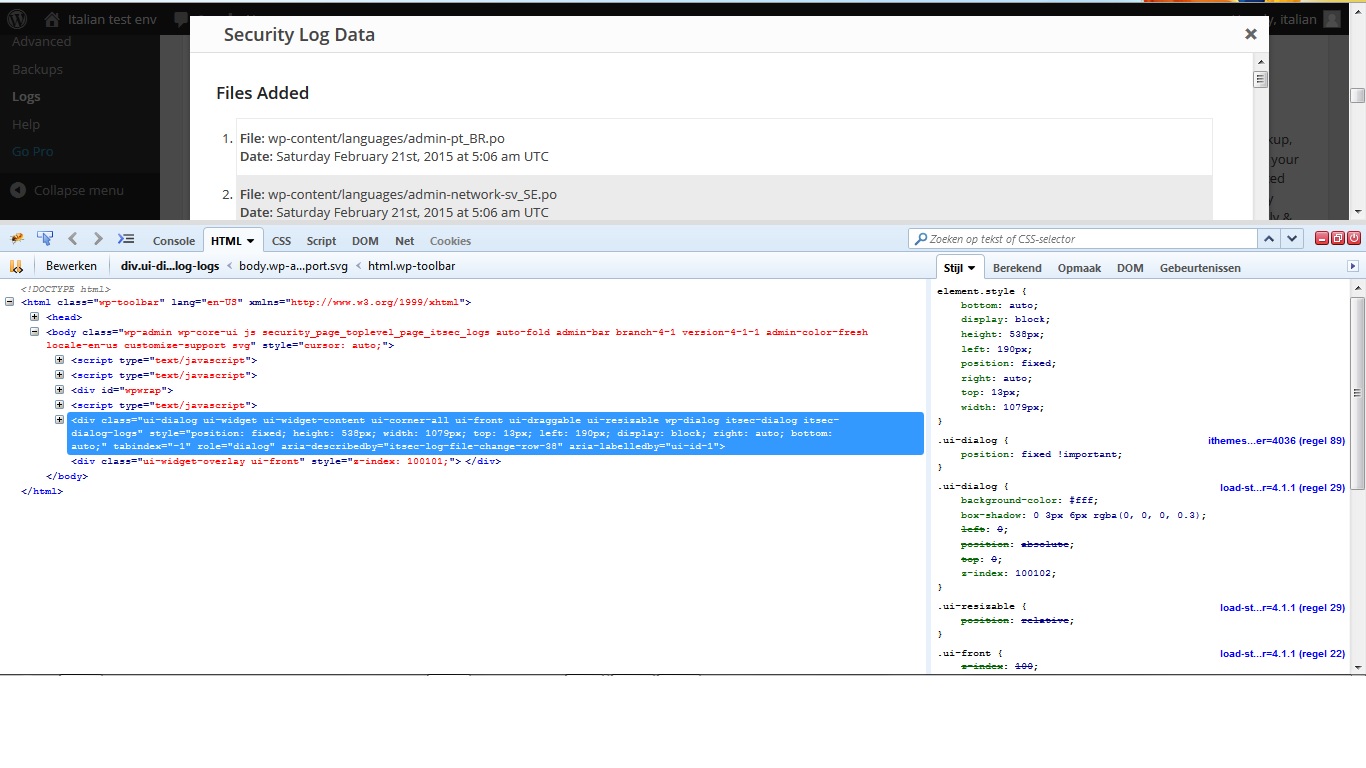
Also, when I try the other method of going to wordpress->Security->Logs (iThemes) and selecting “File Change History” (which I am interested in reviewing) the data is displayed in a “poorly” formatted frame; I’ve tried this in IE, Firefox and Chrome, and all give the same result. example:

-
The data stored in the field Log_data is the result of the PHP serialize() function.
To convert it back to a readable format use a code snippet like this:
<?php
$info = 'a:1:{i:0;a:2:{s:6:"status";s:7:"Success";s:7:"details";s:46:"emailed to backup recipients and saved locally";}}';

echo '<pre>';
print_r( unserialize($info) );
echo '</pre>';
?>
About the poorly formatted file change details frame, after looking at your printscreen and comparing it with the same screen in my env I think there is probably some conflicting css from another plugin causing this.
I’ve attached an example printscreen from my env displaying some css using Firefox FireBug browser plugin. Compare it with yours.
thank you dwinden for your help.
I have compared my css settings to yours (via f12 in Firefox), and yes indeed, the window size settings are different.
So you reckon this is because of another plug-in conflicting with iThemes?
Please position the mouse cursor on top of the file name (jquery-ui.css) right behind the .ui-corner-all class name. A tool tip will show us the full path to the jquery-ui.css file. It could be pointing to a plugin or theme folder which includes its own jQuery install …
The jQuery jquery-ui.css file is normally not included in a WP 4.1.1 install …
Also notice in my printscreen that the iTSec jQuery dialog box only uses styles from the following files:
ithemes.css
load-styles.phpWordPress uses the load-styles.php script for concatenating a whole bunch of .css files (including wp-includes/css/jquery-ui-dialog.min.css or
wp-includes/css/jquery-ui-dialog.css) for performance reasons.dwinden
Pls see below: http://i.imgur.com/cIgiKHK.jpg
Is this what you meant? I hovered over jquery-ui.css
(For others following this thread I found a nice online tool that helps with “deserializing php” http://i-tools.org/unserialize )
Regards…
Yessss, but it turns out the plugin or theme responsible for loading the jquery-ui.css file is using it from Google (ajax.googleapis.com).
So this way we still don’t know what plugin or theme is causing the issue.Anyway I’m sure it’s caused by another plugin or theme.
If that plugin or theme would load the jquery-ui.css (and perhaps other files as well) only when it’s really needed the iTSec plugin layout would not have any problems with it.Find the plugin\theme, find the file in that plugin\theme where the jquery-ui.css file is loaded from Google (ajax.googleapis.com)
and then temporarily disable it (This might break the plugin\theme functionality so beware). Then test the iTSec plugin log dialog box to see whether it is displayed correctly.You could achieve similar test results by temporarily disabling other plugins and\or choosing a standard WordPress theme to be active.
Good luck.
dwinden
Can you pls be a bit more specific as to the troubleshooting steps required to find which plugin is conflicting with iThemes:
-specifically “Find the plugin\theme, find the file in that plugin\theme where the jquery-ui.css file is loaded from Google “
Do you want me to search the ftp-folder : /wp-content/plugins/ for files calling/using jquery-ui.css ?
I’m pretty new to the wordpress environment, but with a little help can get around.
Many thanks.
Yes, but not only in the plugins folder. Search in the themes folder as well.
It’s worth it as I was able to reproduce the issue just by loading the jquery-ui.css file from Google …Keep me posted. Just interested to hear whether it’s a plugin or theme.
dwinden
Found it:
Under \plugins\indeed-custom-login\files\css\jquery-ui.css
So the plugin: “indeed custom login” is using it (ver 2.3)
http://wpindeed.com/?page_id=180
I have disabled and then deleted the plug-in, but it seems I am still seeing the log file windows as per my original screenshot.
The problematic jquery-ui.css file is being loaded by a plugin (or theme) from a Google server …
So removing a plugin that includes the jquery-ui.css file will not fix the issue … Though it won’t hurt either …
Did you stop searching after the first search hit … ?
Keep searching. There must be another one …
Remember you are not searching for the jquery-ui.css file in your WordPress file system. Search for ANY (plugin or active theme) file that contains a reference to the jquery-ui.css file and\or ajax.googleapis.com server … preferably a combination of those 2.
dwinden
Just to clarify what you are looking for. I used these 2 lines to load the jquery-ui.css file from Google:
wp_register_style( 'google_jquery_ui', 'http://ajax.googleapis.com/ajax/libs/jqueryui/1.10.3/themes/smoothness/jquery-ui.css', array(), $itsec_globals['plugin_build'] );
wp_enqueue_style( 'google_jquery_ui' );
Searching for the strings ajax.googleapis.com and\or jquery-ui.css should allow you to find the file responsible for loading the jquery-ui.css cascading stylesheet from Google. When you find that file it will point to a plugin or theme.
dwinden
Have you been able to find anything ?
dwinden
I have done the search, but not sure what exactly to look for.
I searched for “jquery-ui” in both the plugin’s and themes folder.I have attached the few files that mentioned these terms-pls see: https://www.dropbox.com/s/vp9np6n5nr9o4v1/jquery%20error.zip?dl=0
The structure of the files, is exactly how I found them on my webserver.
hope these help; with more instructions, I’m willing to do further tests/searches.
I’m sorry to say this is not getting us any further.
I think the best search method is to login to your (probably Linux) server using ssh (if available) and then perform a search using the Linux grep command. For example:
grep -i -r “ajax.googleapis.com” /full/path/to/wp/install/wp-content/*.php
I haven’t tested the above grep command so it may need some tweaks.
Alternatively you could try and deactivate all plugins except iTSec.
Assuming it’s not the active theme causing the issue the iTSec log formatting should be ok now.
Then start activating plugins one by one and keep checking the iTSec log formatting …dwinden
I did a search for “ajax.googleapis.com” as a text search and nothing found.
Did you look at the files I attached previously? these files contained references to “jquery-ui”
Yes, I looked at those files but it’s not what we are looking for.
What we are looking for is probably in a .php file. So any .css files are irrelevant.It looks like we are stuck on this search. I’m thinking of other methods to move this topic forward. Don’t want to give up as I’m confident this issue can be resolved …
Yesterday I even installed several plugins you seem to have in your env. I was able to get a list of installed plugins from one of your previously posted screenshots. Though I’m aware it is not the full list of installed plugins in your env.
Only “Indeed Custom Login” plugin loads a jquery file from the Google ajax.googleapis.com server (and this was just in the login screen). However it wasn’t the jquery-ui.css file. But it could be loading additional files from ajax.googleapis.com server once logged in …
Then again you already tested disabling\removing that plugin …
Also since it’s a paid plugin I can’t dig in any further …Plugins checked:
Smart Youtube (installed)
WP Google Map (installed)
WP Avatars (installed)
Indeed Custom Login (login screen only at online demo)To speed up the process I’m thinking of either giving me access to the WP Dashboard env so I can have (just) a look around. Or doing a TeamViewer session which will allow me to look over your shoulders while logged into the WP Dashboard.
Let me know how you wish to proceed.
dwinden

The topic ‘viewing the itsec_logs file’ is closed to new replies.