Hi zonboss
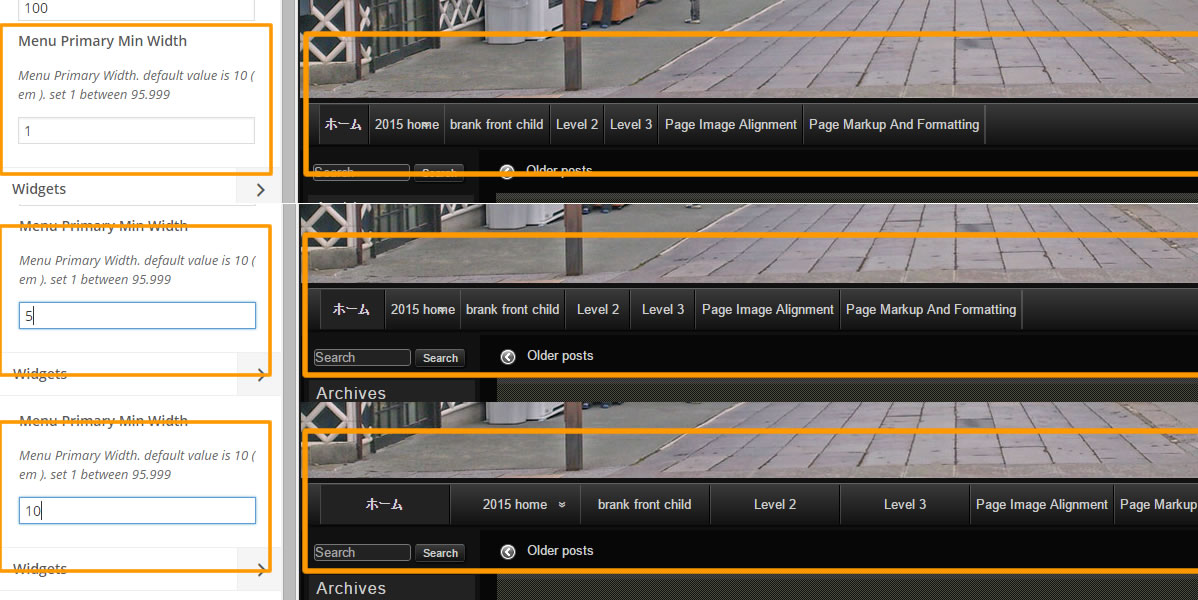
Newest Raindrops is changed menu width settings.
Dashboard / Appearance / Customize
Select Navigation , Menu Primary Min Width set 10.
see
http://www.tenman.info/wp3/manualraindrops/files/menu-primary-min-width.jpg
Thank you.
i have the value “raindrops_color_ja” in the Min Width. If i change it to a number i get an error “Warning: call_user_func_array() expects parameter 1 to be a valid callback, function ‘raindrops_menu_primary_min_width_validate’ not found or invalid function name in /home/missoweb1/public_html/wp-includes/plugin.php on line 213”
Maybe, I think the update has been performed incomplete
reason function ‘raindrops_menu_primary_min_width_validate’ is added newestversion.
Please open style.css
comments
/*
Theme Name: raindrops
Theme URI: http://www.tenman.info/wp3/raindrops/
Description: This theme can change freely fonts,layout,color scheme and header image for each post,page. The google fonts, you can use freely in the post more than 90percent of the fonts.Color scheme and layout, you can freely change from theme customizer.For more updates, please make sure to open the link of the changelog from the help tab of this theme page.Add new post, so also to help tab of edit post page has been described how to use tips, please visit
Author: Tenman
Author URI: http://www.tenman.info/wp3/
Version: 1.269
Tags: black, blue, gray,....
*/
Change from Version: 1.269 to Version: 1.268
then To display the blog, please log in again dashboard
You can again update the Raindrops 1.269.
Thank you.
ok so if i understood well i was supposed to activate the parent theme and set the stylesheet to version 1.268. then update again.
THat is what i did. But when i activate my child theme io still dont have menus
Sorry Try Menu Primary Min Width set 10.
And Prease check Menu Primary Font Size value 100 ?
If blank then set 100.
when i do that in the child theme it gives me again that error from earlier- see above —
maybe i can send you login to look at it ?
when i do that in the child theme it gives me again that error from earlier- see above —
I do not know why an error, in the process of updating some of the themes, it has been confirmed that the message came that please update theme again
Direct cause the menu does not appear
#access a{ font-size:0%}
force showing menu
add style.css
#access a{
    font-size:100%!important;
}
I reccomend
add check
customize / font / basefont size
customize / navigation / show hide settings
appearance / menu / primary navigation check box
Thank you.
thank you … the code did it.
at least good enough for now. I look into it more tomorrow as it is 2 am here now.
THanks again .. you rock !