Hi Yascin,
You shouldn’t change the lines in the code to translate the plugin. Instead use language files.
If you do translate in the code, the next time you update, that translation will be gone.
If you’ve made an full translation, you could send the files to me, so I can include them in the source so others can use it too.
Here’s an WordPress guide on how to translate with Poedit.
Hello, where can I translate?
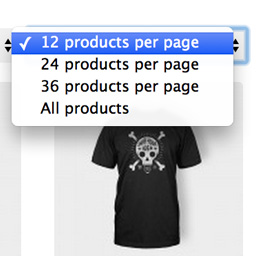
“12 products per page”
“All products per page”
Didn’t find it in po files
Hi CMERTI,
The .po files indeed do not state ’12 products per page’, look for the ‘%s products per page’.
This makes sure that any number is translated correctly instead only the default ones.
If you’ve translated the entire plugin and want to share it with others, please contact me so I can put it in the source.
Thanks!
Jeroen
Thx, found it!
But there is little problem. I translated it into russian, and word “products” in second option (“All products per page”) should be in other declension, but it’s copying the 1 option ‘products per page’
Hi CMERTI,
I’m not sure what you mean, but I think you mean that the word ‘All’ is not translated right?
In the .po file you will also find the word ‘All’ which you can translate and will show up in the dropdown.
Hope this helps, let me know!
Jeroen
Jeroen,
I expalined incorrect.
So, in .po we have “%s products per page” and in dropdown we got then “%number% products per page”
Also we got “All” and in dropdown “All products per page”
I need to change products, but have no idea how to do it, because in russian there should be another form of word “products” when used with russian word “all”
HI CMERTI,
Thanks for clarifying!
Ok, that not something I accounted for when developing (or knew that was needed). You can do the following modifications to make it work for you:
Replace line 66 in /objects/wppp-dropdown.php with the following:
$ppp_text = apply_filters( 'wppp_ppp_text', __( '%s products per page', 'wppp' ), $value );
Then add the following to your themes functions.php:
add_filter( 'wppp_ppp_text', 'wppp_custom_text', 10, 2 );
function wppp_custom_text( $text, $value ) {

	if ( '-1' == $value ) :
		$text = 'Your translation';
	endif;

	return $text;

}
Of course translate the ‘Your translation’ part of the code 🙂
Let me know if this helped!
Thanks! Jeroen
Jeroen,
Works fine! Many thanks to you!
Hi Yascin,
Haven’t heard from you yet, let me know if you still need help!
Thanks!
Jeroen