• Resolved alytahaha5

    (@alytahaha5)


    My website it masuc.org, and I recently downloaded this theme, and I love it. It’s really simple and customizable.

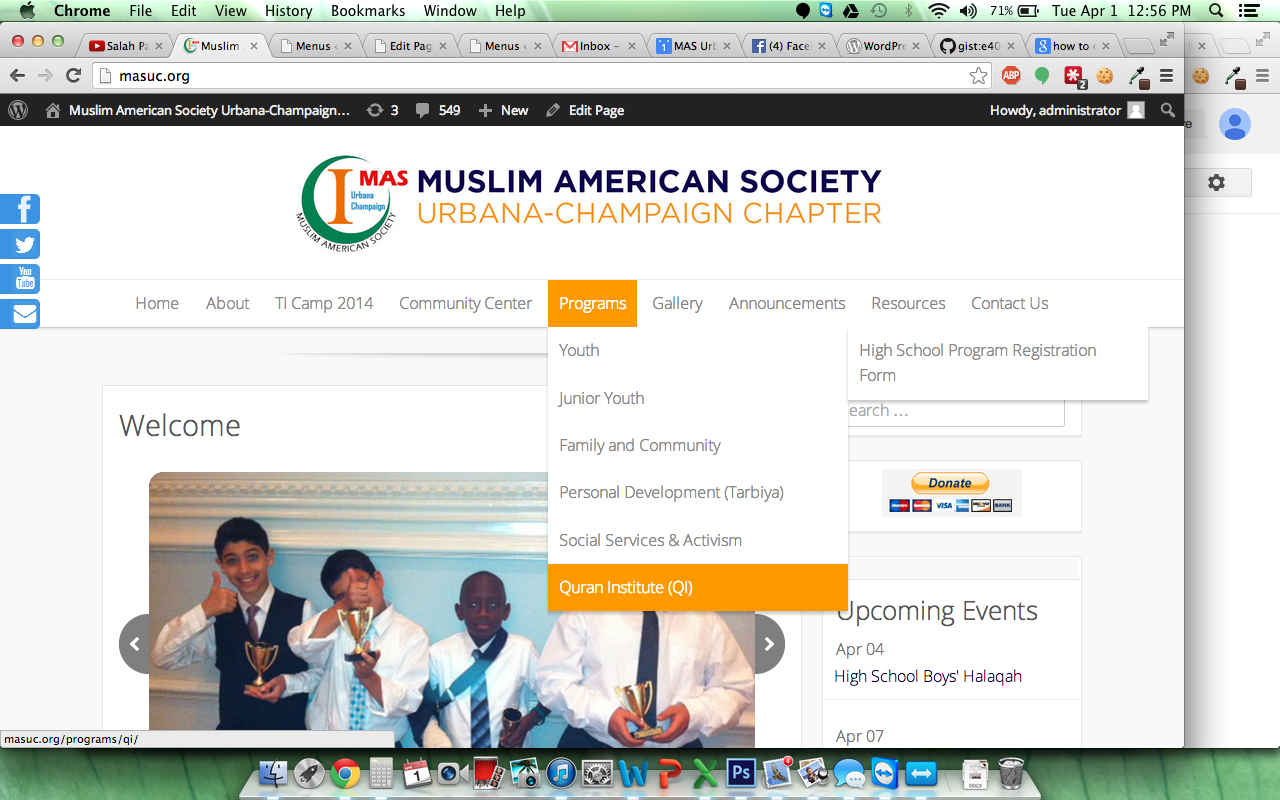
    But the problem I have is when dealing with subpages (subpages of subpages, actually). When I hover over the parent page, and then hover over the subpage, the sub-subpage appears. It works fine, but the sub-subpages are always resting at the top of the nav menu.

    So when a subpage is lower on the list, the sub-subpages are not accessible. I’ve included a picture to clarify a bit.

    http://masuc.org/wp-content/uploads/2014/04/Screen-Shot-2014-04-01-at-12.56.02-PM.png

    Thanks

Viewing 15 replies - 1 through 15 (of 21 total)
  • Theme Author iografica

    (@iografica)

    Thanks for the segnalation, please, update to latest version to fix it

    Thread Starter alytahaha5

    (@alytahaha5)

    Thanks for the reply. But now, the sub-sub page is showing up at the very bottom of the list of sub-pages instead of the top, which doesn’t fix the problem.

    Theme Author iografica

    (@iografica)

    Oh, you’re right. There is a small error in the css, I will check and i will correct the problem at the next update. Thanks

    Thread Starter alytahaha5

    (@alytahaha5)

    Hi,

    I reinstalled the update, but the problem hasn’t been fixed yet. Is there some code that I can insert to get it fixed?

    Thanks

    Theme Author iografica

    (@iografica)

    have you the latest version of the theme? can you link me your website?

    Thread Starter alytahaha5

    (@alytahaha5)

    Hi,

    Yeah I just updated.

    my website is http://www.masuc.org.

    Theme Author iografica

    (@iografica)

    Ok, try with this css:
    .main-navigation ul ul ul {
    top: auto !important;
    }

    Let me know if works

    Thread Starter alytahaha5

    (@alytahaha5)

    Yes! That fixes the issue! Thanks!

    Just one smaller problem though, the sub-sub page is slightly higher than it should be. Is there a way to fix this? If not, that’s fine.

    Theme Author iografica

    (@iografica)

    Oh that’s great!
    The problem is due because the title is too long and can’t be displayed in one line. You can try to add a smaller menu title for the page!

    Thread Starter alytahaha5

    (@alytahaha5)

    Ahh, but what about when you scroll over “Commmunity Center” under “Community Center”? That’s one one line, but it’s still elevated.

    Thanks

    Theme Author iografica

    (@iografica)

    Mmh ok, try to add this style to fix it:
    .main-navigation ul ul ul {
    margin-top:-40px;
    }

    Thread Starter alytahaha5

    (@alytahaha5)

    Oh sorry I meant under “About”>”About Our Local Chapters”>”Board of Trustees”

    But the problem is still persistent.

    Theme Author iografica

    (@iografica)

    Ok, is the same, add this in css:
    .main-navigation ul ul ul {
    top: auto !important;
    margin-top:-40px!important;
    }
    Let me know if works

    Thread Starter alytahaha5

    (@alytahaha5)

    It doesn’t change anything. Should I be deleting the other 2 codes you told me to add?

    Theme Author iografica

    (@iografica)

    Yes, replace old css with the new

Viewing 15 replies - 1 through 15 (of 21 total)

The topic ‘Problem with nav menu’ is closed to new replies.