Adding Second Button to one Slide in Slider?
-
My clients wants two buttons on one of the slider slides. Anyone know how I can make this happen?
Thanks!

-
Hi @primasilva, you might want to use this snippet to do this
http://www.themesandco.com/snippet/adding-secondary-button-slider-pure-javascript/Thanks for using the theme
Awesome, thanks for the help & for creating such a great theme 🙂
Hey, so I used your snippet and ran into another problem – the extra button now also appears in the nav menu :-/
Link to site?
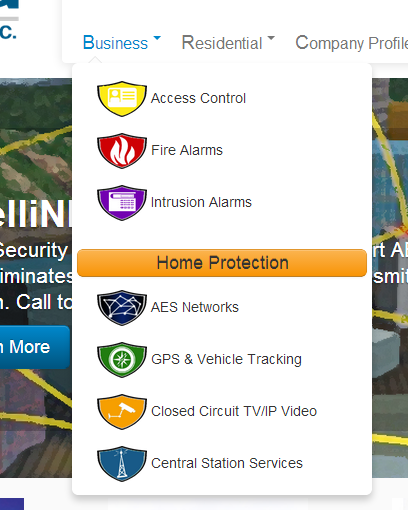
If you look in the nav menu at Business->Intrusion Alarms, you can see the extra Home Protection button
Can’t see it. Have you tried clearing your cache?
This snippet might improve your menu dropdown
Thanks, I’m fine with my dropdown. But the extra button is still there. See image below
^ The orange one that says Home Protection.
As a short fix, try this:
#menu-item-284 > a {
  display: none;
}
but still haven’t diagnosed the root cause or filled the white space this creates
Can’t spot a CSS issue. What’s in your functions.php around this extra button?
#menu-item-279, #menu-item-282, #menu-item-280, #menu-item-986 {
  position: relative;
  top: -40px;
}
closes the gap.
This a solution, but I’m not happy with it!!
Thanks SO much for your help, that works for now at least!
I used the code in the snippet nikeo provided:
/** * Adds another button to Customizr slider */ add_action('wp_footer' , 'add_secondary_button_to_a_slide'); function add_secondary_button_to_a_slide() { ?> <script type="text/javascript"> jQuery(document).ready(function () { ! function ($) { //prevents js conflicts "use strict"; var target_original_button_link = '<?php echo get_permalink(71) ?>'; var new_btn_content = ' <a class="btn btn-large btn-warning" href="<?php echo get_permalink(128) ?>">Home Protection</a>'; //checks if the target slide url exists first if ( $('a[href="'+ target_original_button_link +'"]').length === 0 ) return; //adds the new button html content after the original button $('a[href="'+ target_original_button_link +'"]').after(new_btn_content); }(window.jQuery) }); </script> <?php }Ugh… it still shows in the collapsed menu, though >.<
Shoot, nevermind, that was a no-go. That CSS also removed the Intrusion Alarms button that I need. So the new Home Protection button must actually be appended to the Intrusion Alarms one?
OK, I’ve asked Nic to take a look as it may be a bug in his snippet. Hang in there!
Hi @primasilva, your feedback helped me to fix a tiny issue in the snippet!
Here’s the updated code that should prevent the button to be displayed in the menu :add_action('wp_footer' , 'add_secondary_button_to_a_slide'); function add_secondary_button_to_a_slide() { ?> <script type="text/javascript"> jQuery(document).ready(function () { ! function ($) { //prevents js conflicts "use strict"; var target_original_button_link = '<?php echo get_permalink(2) ?>'; var new_btn_content = ' <a class="btn btn-large btn-warning" href="<?php echo get_permalink(9) ?>">Call to action #2</a>'; //checks if the target slide url exists first if ( $('a[href="'+ target_original_button_link +'"]' , '#customizr-slider' ).length === 0 ) return; //adds the new button html content after the original button $('a[href="'+ target_original_button_link +'"]' , '#customizr-slider').after(new_btn_content); }(window.jQuery) }); </script> <?php }Thanks
@rdellconsulting : thanks for reporting as always!


The topic ‘Adding Second Button to one Slide in Slider?’ is closed to new replies.