OMG – cool site (even cooler thing to do)! I’m a Bikram yogi too – 10+ years! I’ve been to quite a few studios around the US…and thought about doing some Bikram Road Trips…
Anyway, as to your site, I’m not super familiar with this theme, but I think what you need to do is make a page (under pages) for the home page – you may have that already done, but make sure you select the Home Page Template in the template pull down on the right side of the page screen.
Then go to Settings > Reading and select Static Home page and select that page you made.
Then go to Widgets and add the widgets to show up on the home page (they’ll also show up on full-width template pages).
I think that’s what you’re asking about?
So glad you like the site…wow 10 years…awesome. Maybe we can meet up at a class during my travels. If you know any really awesome studios let me know.
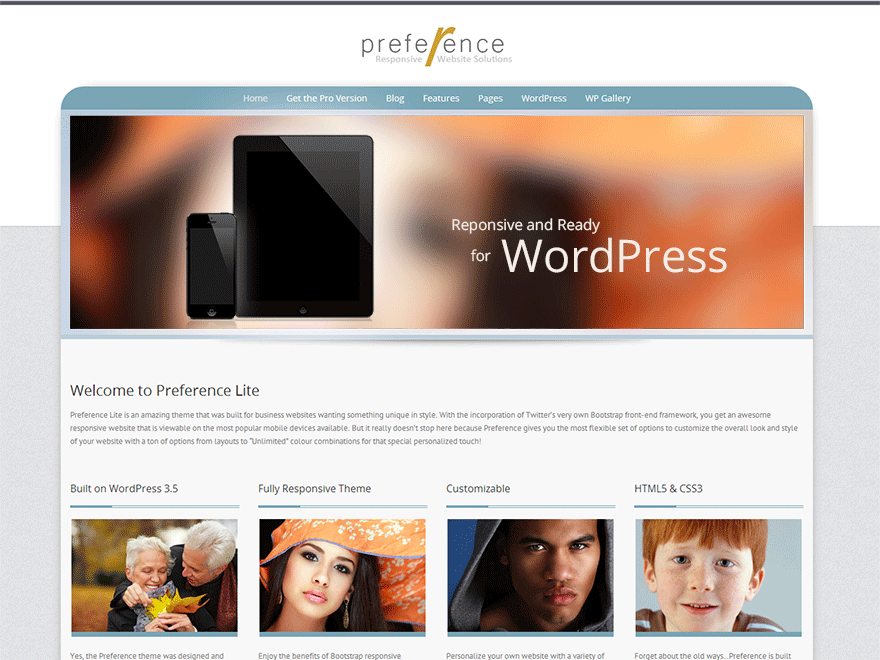
So I tried your suggestion and I don’t think I did it right. I want my page to look like this page http://demo.styledthemes.com/preference/
When you scroll at the bottom of this link and you see what looks to me like posts that have the image and an intro and you click on the image to get to the post… that’s what I’m trying to achieve. I think it may be called inline columns …I’m not sure. Sorry I’m not more advanced..lol
Maybe we can meet up at a class during my travels. If you know any really awesome studios let me know.
That would be fun – I know some great ones – my home studio in San Jose, CA is awesome… Truckee/Reno, Seattle (Fremont location), Bend, OR …
Those are the widgets I was talking about earlier – it’s just that you have to put a linked image in the widget to link to the post. So you’d need to first put a text widget in the “Bottom 1” space – right side of the widget screen – and in that widget put:
<a href="URL OF THE POST YOU ARE LINKING TO"><img src="URL OF THE IMAGE YOU WANT TO PUT IN THIS WIDGET" alt="IMAGE DESCRIPTION" /></a>
So here’s an example from your site – though you might need to use a smaller image – and you can pick any image you want:
<a href="http://www.bkroundtheworld.com/bikram-yoga-east-harlem-430-pm-class/"><img src="http://www.bkroundtheworld.com/wp-content/uploads/2013/06/subway.png" alt="subway"></a>
Try putting that in a text widget – and then see how the home page looks. But you first do need to go through the steps I posted about so that will show up on the home page.
I think I’m slacking off here as I did not see this posting, lol, oops!
Anyway, the link of the demo is actually for the Pro version of Preference but I can definitely help you out to get it like the Lite version demo http://demo.styledthemes.com/preference-free/
You will need to do the static front page setup which it appears you have already. On the demo, I used the Full width page template and then the four items you see with the images and text, I used a text widget for each and published them to the Bottom 1, 2, 3, and 4 positions. To get you started, here is the code for the first widget:
<p><img src="http://demo.styledthemes.com/preference-free/wp-content/uploads/fp1.jpg" width="265" height="180" alt="gallery1tn" class="imageborder" style="display: block; margin-left: auto; margin-right: auto;" />
</p>
<p>Yes, the Preference theme was designed and built on WordPress 3.5 to take advantage of the newest and greatest features that comes with it. Plus, you can use popular plugins as well!</p>
Also, setup tutorials for this theme can be found here if you were unable to locate them:
http://www.styledthemes.com/preference-lite-setup
Thanks so much…sorry I was slacking but I ended up figuring this out. Now do you know of a widget that i can use to do the flash in my header to switch images on the header?? bkroundtheworld.com
Hello…hope all is well and hope you are still doing Bikram. Wondering about my pages. I added a page today and when I look at my site, there is a huge gap in the page. Can you help me with this?