• Resolved tkalfaoglu

    (@tkalfaoglu)


    Hi there. Great software! I have a small issue:
    If a field is marked as “link”, and the link contains
    http://” up front, it seems nothing is displayed on the page.

    The URL field of my records in my table have things like:
    abc.com
    abcdef.com
    http://www.blah.com
    http://www.blabla.com

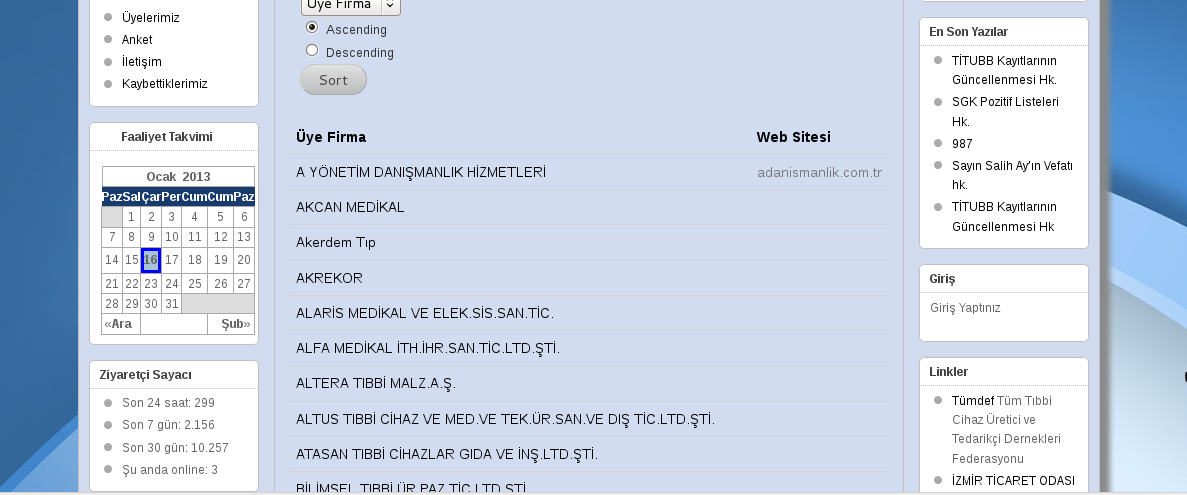
    and only the abc.com and abcdef.com links are displayed on the page.. The other ones show an empty cell.

    I tried with and without “make clickable” plugin. it didnt help.

    So I defined it as a “text line” and that shows all of them.
    However, even with “make clickable” plugin, none of them are clickable in that case..

    PS: Perhaps having an www up front is also a factor, I am not really sure.. Those do not seem to show up either 🙁

Viewing 5 replies - 1 through 5 (of 5 total)
  • Plugin Author Roland Barker

    (@xnau)

    It looks like you have the lintext and the URL reversed in your link fields.

    “Make clickable” looks for the “http://” only. The www won’t affect it either way.

    Care to share a link so we can see what’s happening on the page?

    Thread Starter tkalfaoglu

    (@tkalfaoglu)

    Ok, here for example.. make clickable is active (but still links are not clickable):
    http://www.egemedikalder.org/?page_id=847

    (But that field is set as textline — otherwise, if I set that field to “link”, then the URL’s you see there all vanish — except the first line’s.. the adadanismanlik.com survives for some reason!)

    Here is how it looks if I set that field as “link” instead of text-line: http://www.kalfaoglu.com/field-set-as-link.png

    I did a “List Participants” and found two entries that said “array” instead of a real url. I fixed those, so all the entries now have http://www. up front..

    Plugin Author Roland Barker

    (@xnau)

    Because of the way the the data is stored for a “link” field is different from a “text-line” field, you will run into trouble if you switch the field type between these two when you have data in the database.

    You should choose which field type you want to use, then you will have to set those fields to the correct value for all your records.

    Thread Starter tkalfaoglu

    (@tkalfaoglu)

    The data was originally inserted as an “import from CSV” operation.
    I had the field defined as “link” to begin with. When they did not show, I switched to text-line, which showed the links, but they were unclickable. What shall I do now? Drop the data and re-insert from CSV? I believe I’ll get the same results.

    Plugin Author Roland Barker

    (@xnau)

    You do have to choose one or the other, depending on how you want it to display. Probably the simplest is to use a text field and then just make sure that the data for each field is only the URL.

    Importing into “link” type fields from raw data would require special preparation of the data, and this is where things went wrong for you.

Viewing 5 replies - 1 through 5 (of 5 total)

The topic ‘links are not displayed’ is closed to new replies.