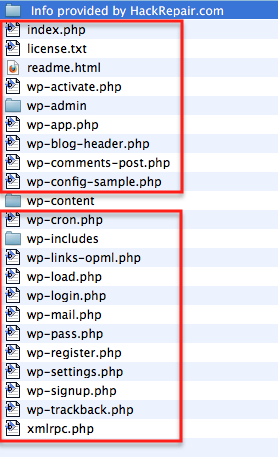
Thanks songdogtech. I will read through the elements you listed. Host has been notified and I have been waiting for their feedback for 2 days.
Hi,
Someone has damaged some of your WordPress files it appears, so do the following:
1. Note the version of WordPress you are running.
2. Download the “virgin” copy of your current version form here:
https://wordpress.org/download/
3. Extract the backup, then upload just the wp-admin, wp-includes and all of the files in the main directory over your current installation, like my picture shows here:
http://tvcnet.net/images/tutorials/2012-03-13_0906.png
I believe that should do the trick. 🙂
@tvcnet: there’s no sense in spamming all the hacking threads with the same info others have posted and adding links to your own business, too.
Besides, your “instructions” are not complete and are a waste of time when it comes to thoroughly cleaning a hacked site.
Thanks for the response. I tried the method posted by tvcnet but without any success. They probably got into my contents folder also. Still no way to get into my admin or website. It is extremely difficult to find what script might be wrong in the contents folder especially if your level of qualifications is very average.
I also read the elements recommended by songdogtech but didn’t find any complementary elements than running through all scripts. Any other suggestions?
If you still cannot log into your admin then I agree it does sound like there is a problem with your theme.
Any possibility you can download a copy of the theme from original theme site then FTP upload the files on top of these within your theme directory?
Since you’ve now overwrote the core files, then in theory if you overwrite your theme files you should be able to once again log into your admin.