What folder did you upload the theme to? WordPress looks for themes in a specific place. From the root of your WordPress installation, the theme folder needs to be in wp-content/themes/<themename>/.
yes I used that folder ” wp-content/themes/classica/” but it’s not showing up in my WordPress….
Did you upload a file like classica.zip? Or is it an actual folder with files inside?
I uploaded the individual folders into the “classica” directory. Did I do it correctly?
Well, I don’t know the exact structure of the Classica theme that you downloaded, but in order for WordPress to correctly find your theme, at a minimum you need a style.css file, like this: wp-content/themes/classica/style.css.
The most likely scenario that I can think of is that you unintentionally duplicated the classica folder, so you have wp-content/themes/classica/classica/, or something similar.
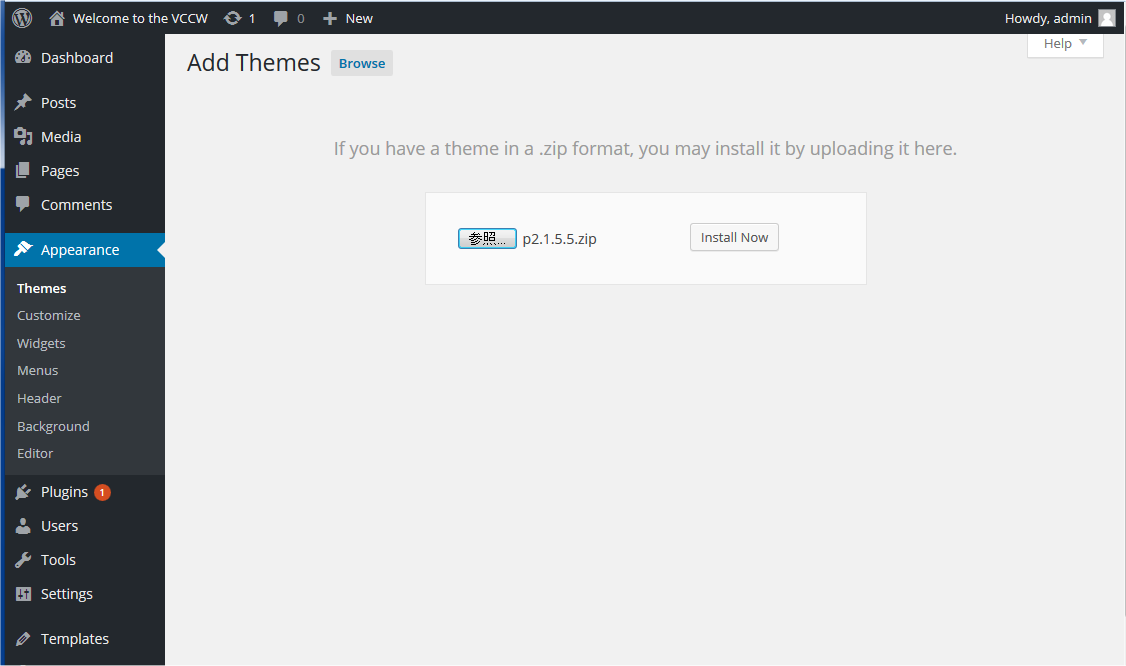
If you downloaded your theme as a zip file, it may be easier to let WordPress do the uploading for you. From the Admin interface, click on Appearance > Themes > Install Themes, then click on the Upload link. You can then browse for the zip file, and WordPress will take care of the rest.
Unfortunately, I tried doing it from the Admin part to upload it, but there is no link that says “Install Themes.” I am using WordPress 3.1. I do have the zipfile of the theme.
How do I get that link so I can “Install Themes”?
At the top of the themes page are two large Tabs. The first one says “Manage Themes” and the second one says “Install Themes”. The coloring is a light gray, so it may be easy to overlook.
Alternatively, you can navigate to the page manually by typing in the link in your browser: http://www.your-site.com/wp-admin/theme-install.php.
Yes, I know. I only have the “Manage Themes” tab, but not the “Install Themes” tab. I tried finding it, but it’s missing and I’ve read on other blogs and saw what it’s suppose to look like: http://codex.wordpress.org/images/a/ad/appearance-install-theme-manual-step2.png
I don’t know why it’s missing….
Are you an admin of your WordPress install? What about manually entering the address as I suggested?
Yes, I am the admin. I tried entering the link you sent with my name filled in (http://margaret-peng.com/wp-margaretpeng/theme-install.php) and it says the page doesn’t exist…
What’s going on with my WordPress?
I just tried that link and it says: “link cannot be found.” I can send you an image to show you what my page looks like… there is no tab that says “Install Themes”
I have changed it to Twenty Ten theme. What do I do now?
Are you able to use the previous link, or does it still say that the page cannot be found? If not found, can you post a screenshot of your admin page?