colormag-econs.css
-
When I try to edit with Elementor Pro (latest version), the page or post freezes while loading. After several warnings about slowdowns from my browsers (latest versions, no ad blockers), I can finally edit. This doesn’t happen in Elementor’s safe mode. Checking with the browser console indicates that:
“There is a loading failure in the theme’s CSS file (/wp-content/themes/colormag/inc/elementor/assets/css/colormag-econs.css), returning an invalid response (MIME type text/html, typical of a 404 error page or resource not found).”The page I need help with: [log in to see the link]

-
Obviously, when editing, nothing is noticeable on the front end.
Hi miguelcera,
Thank you for the detailed report, and for confirming that this does not affect the front end.
We tried to edit a page using the latest version of Elementor on our end, but the page edited correctly without any issue. For your confirmation, please check this screen recording: https://jam.dev/c/8e714170-8fde-485f-bdae-c5bf4654c783
Since we are unable to replicate this on our end, it is likely something specific to your site’s setup. Could you please try the following steps?
Deactivate the ColorMag theme once and reactivate it again, as this can sometimes regenerate missing or cached asset references. Also, please try clearing your site cache, browser cache, and any server level cache if applicable.
If the issue continues, please try a conflict test by switching to a default WordPress theme temporarily and checking if the same freeze happens with Elementor. This will help us determine whether another plugin is involved.
Please let us know the results after trying these steps.
Best regards
Hi, thanks for replying. First, I’ll tell you what I did after explaining the issue, and it still persists when I edit a page or post:
- I downloaded and installed again the latest versions of Elementor (the latest version of the standard version, 4.2.2, and the security version of the Pro version, 4.2.3).
- I downloaded again the latest version of ColorMag, 4.2.2.
- I deactivated all plugins except Elementor and Elementor Pro.
- Regarding the initial problem where I was looking for the folder (/wp-content/themes/colormag/inc/elementor/assets/css/colormag-econs.css), I found it in the ColorMag zip file in the colormag/inc/compatibility folder and placed it where it was supposed to be.
NOW!! only when editing pages or posts :
- The problem is slowdown and buffering (it’s almost impossible to work in Chrome; in Firefox, both are the latest versions and I have no ad blockers, and at one point I even had no antivirus installed. I have to wait a while for the “slow page” warnings to stop). This happens when “saving and…” “Exit”
- This occurs in the case of pages with multiple elements, such as posts with 2 or 3 containers.
- I disabled Elementor’s beta options and told it to regenerate Elementor files when syncing the folder.
- I tested with the Hello Elementor theme and in Elementor safe mode, and the error does not occur.
- I enabled Firefox hardware acceleration.
- PHP – The PHP memory configuration is 1024M, which is excessive, but at least I’m testing with that.
display_errors = Off
max_execution_time = 300
max_input_time = 60
max_input_vars = 6000
memory_limit = 1024M
post_max_size = 256M
session.gc_maxlifetime = 1440
session.save_path = “/var/cpanel/php/sessions/ea-php84”
upload_max_filesize = 256M
zlib.output_compression = Off
Hi @miguelcera,
Thank you for the very detailed testing and for confirming each step you have taken. This is extremely helpful.
Since the issue does not occur with the Hello Elementor theme or in Elementor’s safe mode, but does occur specifically when ColorMag is active, this points to a conflict coming from the ColorMag theme itself, rather than Elementor, another plugin, your browser, or your PHP configuration, all of which you have already ruled out.
To investigate this further on our end, could you please share the browser console output (Console tab) and the Network tab activity captured while editing one of the specific pages or posts where the slowdown happens, ideally right as you click “Save” and “Exit”? This will help us see exactly which request or script is taking longer or failing during that action.
If possible, could you also share a link to one of the specific pages or posts that shows this issue? A screen recording of the slowdown happening would also be very helpful. You can use the jam.dev browser extension to easily capture and share this with us.
We appreciate your patience and thorough troubleshooting, and we will look into this further once we have this information.
Best regards
Hi, sorry for the delay in replying. I tried Jam, which only works well in Chrome, but there are two problems:
- It doesn’t show the error message that Chrome displays about waiting or closing.
- I clicked “wait” a bunch of times and it never exited the loop.
- In Chrome, it’s impossible to modify even the homepage or any other page or post, as the message shown in this image is constantly displayed. It’s IMPOSSIBLE TO WORK.
I looked for a screen recorder to show what Firefox does, which, all things considered, at least lets me work. - In Chrome, it’s impossible to modify even the homepage or any other page or post, as the message shown in this image is constantly displayed. It’s IMPOSSIBLE TO WORK. : https://vuelodelaesfinge.com.ar/img/chrome.jpg
- I can share the video capture I managed to upload to MediaFire:
https://www.mediafire.com/file/1oar8q4b8g2ewg0/error_web_16-00-52.mp4/file - IMPORTANT NOTE: I HAVE THE SAME COMBINATION OF ELEMENTOR AND ELEMENTOR PRO IN THEIR LATEST VERSIONS AS OF TODAY (SEPTEMBER 1, 2026) ON THE WEBSITE HOSTELDERETA.COM.AR, WITH LESS MEMORY ALLOCATED BY PHP, SAME HOSTING SERVER, AND THERE It works perfectly, without interruptions, and I can use it in Chrome and Firefox without any problems.
The problem is purely with vuelodelaesfinge.com.ar
-
This reply was modified 1 week ago by
miguelcera.
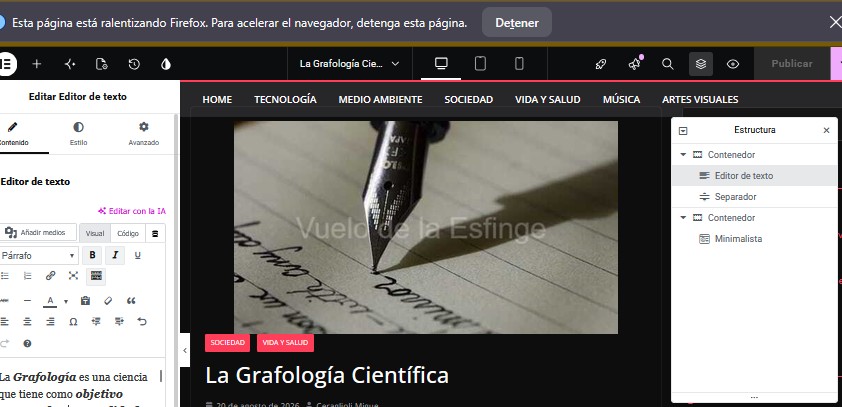
Hello again, I’ve also taken a screenshot of the error in Firefox. As you can see from the structure box, it’s not a huge issue.
https://vuelodelaesfinge.com.ar/img/firefox.jpg
GRACIAS

You must be logged in to reply to this topic.