Hello, We use the Events Manager in a multi site environment. I have global table option activated to share the events over multiple subsites. On a subsite I would like to list the events for a certain category. Now all the events from multiple subsites are shown, even if the category 206 is not selected. This behavior changed after the last update to 7.4.2 I use the following shortcode on the subside. [event_list category=”206″]
What also changed is that I can no create and select categories on subsites, in the past it was only possible on the main site. Can someone help us. With regards, Sjoerd Takken
This topic was modified 2 weeks, 3 days ago by sjoerdtakken.
The page I need help with: [log in to see the link]
Make sure you use the straight quotes and not the “curly” quotes and also there’s a typo in your shortcode (it’s events_list, not event_list). Should be: [events_list category=”206″]
Try using the category slug instead of the category id and see if that works
As a troubleshooting step you could try resynchronizing your Global Multisite Settings: In Network Admin > Events Manager > Settings > Multisite Options, toggle and re-save your Global Tables and Category sharing settings.
I now tried this with the slug [events_list category=”solawi”], but it doesn’t make sense. I already use [events_list] instead of [event_list], I wrote it wrong in this forum.
Does it not break the actual events if I toggle and re-save the Global Tables ? I am afraid to test this in the Production environment.
I now tried to toggle the Global Tables and it didn’t make a difference afterwards. I now trustet the action, because in the description on the settings they wrote that it is possible.
When you set the global table option all the events will be stored in a single global table. An event can be created in a particular blog (either the main site or a subsite) the event in the table gets tagged with the blog_id. The blog_id for the main site is 1. Let’s say you have one subsite with a blog_id equal to 2. When you create an event in the subsite it will only be seen in that subsite and if you create an event in the main site it will only be shown on the main site and the same thing goes for event categories. Creating categories in subsites was always supported (as well as on the main site). By default [events_list category=206] on a subsite will only show events created on that subsite with the category 206. If you want to display events from the main site or from another subsite you need to use the blog parameter to specify which blog the events should come from.
I tried this myself in Events Manager 7.4.2. I created a category in the main site with a category of “3”. The main site is blog 1. I then created two events on the main site, one with category 3 and one without a category. On the subsite I used [events_list blog=1 category=3] and it correctly just showed the event from the main site that had category 3 assigned to the event. If I just use [events_list] it only shows events from the subsite (not from the main site). If I create a second subsite the [events_list] only shows events created on that subsite ([events_list category=3] doesn’t show any events since there’s no category with an id of 3 on this subsite).
So, I was unable to reproduce the problem you describe. Maybe there’s some database corruption on your website?
I tried different shortcodes with blog=”1″ or blog=”2″ of blog=”3″ but it doesn’t make a difference, still all the events of the blog 3 are shown, that is very strange.
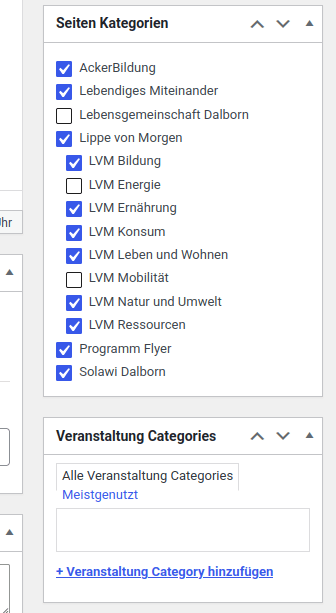
When I edit the event on the subside it is also strange that there are two metaboxes shown with categories, one are Page Categories (that are the event categories from the main blog) and the other are the Event Categories.
This reply was modified 1 week, 6 days ago by sjoerdtakken.
I wasn’t able to reproduce this problem. If you create a new WordPress site and provide step by step instructions for recreating the problem then I will try to figure out what is causing the problem.