• Hello,

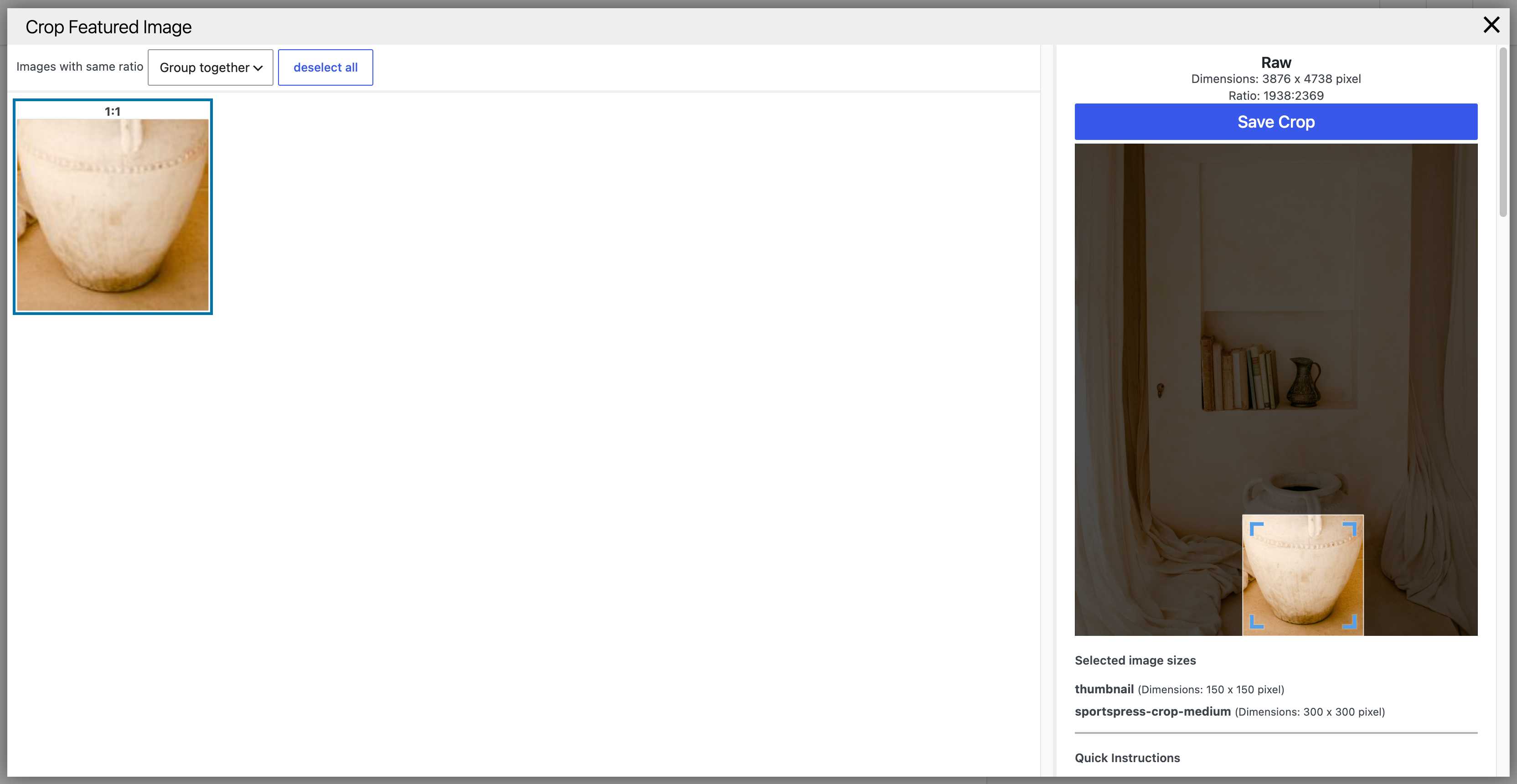
    I’ve been using this awesome plugin for many months now, but today I started experiencing the following issue: when I crop an image, the image crop doesn’t correspond to the area that I select.

    I didn’t add any new plugins and the issue doesn’t seem to occur on my local site copy. Any thoughts?

    SUCCESS Temporary directory exists
    SUCCESS Copy testfile to temporary directory
    SUCCESS Testfile was successfully added to media-library. (ID:6868)
    SUCCESS Cropping the file
    SUCCESS Cropped image dimensions are correct.
    SUCCESS Test-attachement successfull deleted (ID:6868)
    SUCCESS Remove testfile from temporary directory
    INFO Tests complete
    INFO ----- System -----
    INFO Crop-Thumbnails 1.9.7
    INFO PHP 8.4.23
    INFO PHP memory limit 1536M
    INFO Server LiteSpeed
    INFO WP_Image_Editor_Imagick (choosed WordPress imageeditor class for jpg)
    INFO ----- Active Plugins -----
    INFO - advanced-custom-fields/acf.php
    INFO - all-in-one-wp-migration/all-in-one-wp-migration.php
    INFO - crop-thumbnails/crop-thumbnails.php
    INFO - crowdsignal-forms/crowdsignal-forms.php
    INFO - favicon-by-realfavicongenerator/favicon-by-realfavicongenerator.php
    INFO - google-site-kit/google-site-kit.php
    INFO - litespeed-cache/litespeed-cache.php
    INFO - members/members.php
    INFO - sportspress-for-soccer/sportspress-for-soccer.php
    INFO - sportspress-pro/sportspress-pro.php
    INFO - wordpress-seo/wp-seo.php
    INFO ----- Image Sizes -----
    INFO {"width":150,"height":150,"crop":true,"name":"thumbnail","id":"thumbnail"}
    INFO {"width":512,"height":512,"crop":false,"name":"medium","id":"medium"}
    INFO {"width":768,"height":0,"crop":false,"name":"medium_large","id":"medium_large"}
    INFO {"width":768,"height":768,"crop":false,"name":"large","id":"large"}
    INFO {"width":1536,"height":1536,"crop":false,"name":"1536x1536","id":"1536x1536"}
    INFO {"width":2048,"height":2048,"crop":false,"name":"2048x2048","id":"2048x2048"}
    INFO {"width":300,"height":300,"crop":true,"name":"sportspress-crop-medium","id":"sportspress-crop-medium"}
    INFO {"width":300,"height":300,"crop":false,"name":"sportspress-fit-medium","id":"sportspress-fit-medium"}
    INFO {"width":128,"height":128,"crop":false,"name":"sportspress-fit-icon","id":"sportspress-fit-icon"}
    INFO {"width":32,"height":32,"crop":false,"name":"sportspress-fit-mini","id":"sportspress-fit-mini"}

    Thanks!

    • This topic was modified 2 weeks, 5 days ago by danis039. Reason: Added log
Viewing 7 replies - 1 through 7 (of 7 total)
  • Thread Starter danis039

    (@danis039)

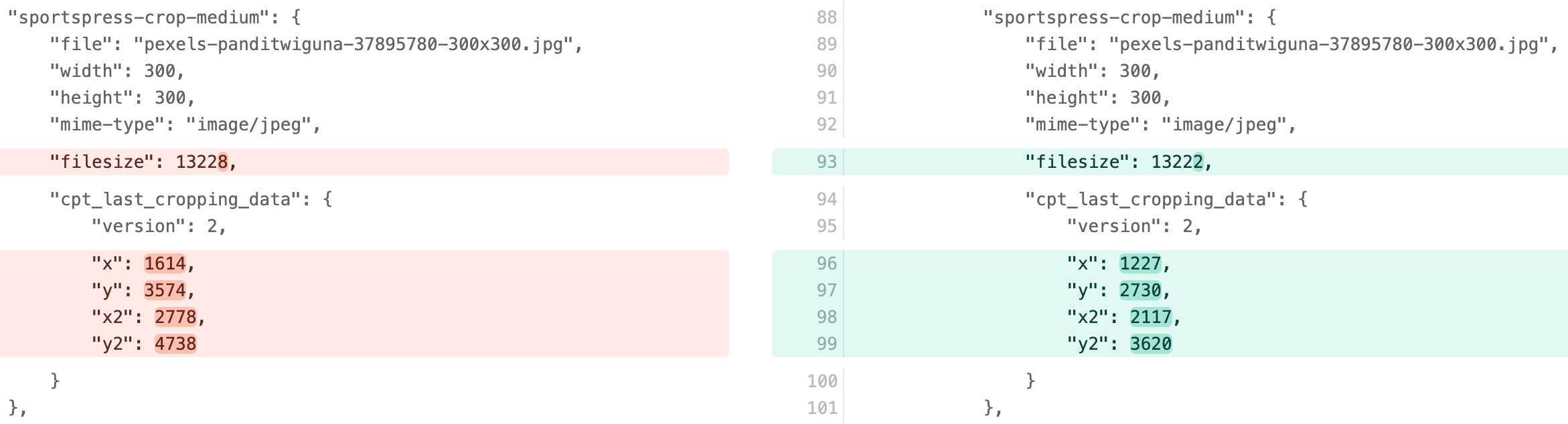
    Please find below the data debug diffs for local (correct) vs. production (incorrect) environments:

    As you can see, the selection is considerably different between environments.

    The JS debug didn’t show any significant differences.

    This diff was done already after updating to WordPress 7.1, which shows the same issue as with the previous version.

    Adding the UI diff as well (local vs. production):

    Plugin test diff between environments (local vs. production):

    • This reply was modified 2 weeks, 5 days ago by danis039. Reason: Added UI diff
    • This reply was modified 2 weeks, 5 days ago by danis039. Reason: Added plugin test diff
    Thread Starter danis039

    (@danis039)

    I’ve noticed this issue happens for images which have a width greater than around 1600 px. If the image is up to 1600 px wide, the crop works as expected 😳 The bigger the image resolution the bigger the crop position error. Any ideas?

    I’ve updated to PHP 8.5.7 and the issue persists.

    Thread Starter danis039

    (@danis039)

    Any support out there?

    I cloned my production site to my local machine and I see locally everything still works as expected, while in production the problem persists. I’ve disabled all plugins that I use in production only, but no luck. The plugins are the same in both environments now (with LiteSpeed Cache disabled).

    Production:

    SUCCESS Temporary directory exists
    SUCCESS Copy testfile to temporary directory
    SUCCESS Testfile was successfully added to media-library. (ID:6945)
    SUCCESS Cropping the file
    SUCCESS Cropped image dimensions are correct.
    SUCCESS Test-attachement successfull deleted (ID:6945)
    SUCCESS Remove testfile from temporary directory
    INFO Tests complete
    INFO ----- System -----
    INFO Crop-Thumbnails 1.9.7
    INFO PHP 8.5.7
    INFO PHP memory limit 1536M
    INFO Server LiteSpeed
    INFO WP_Image_Editor_Imagick (choosed WordPress imageeditor class for jpg)
    INFO ----- Active Plugins -----
    INFO - advanced-custom-fields/acf.php
    INFO - all-in-one-wp-migration/all-in-one-wp-migration.php
    INFO - crop-thumbnails/crop-thumbnails.php
    INFO - crowdsignal-forms/crowdsignal-forms.php
    INFO - favicon-by-realfavicongenerator/favicon-by-realfavicongenerator.php
    INFO - members/members.php
    INFO - sportspress-for-soccer/sportspress-for-soccer.php
    INFO - sportspress-pro/sportspress-pro.php
    INFO ----- Image Sizes -----
    INFO {"width":150,"height":150,"crop":true,"name":"thumbnail","id":"thumbnail"}
    INFO {"width":512,"height":512,"crop":false,"name":"medium","id":"medium"}
    INFO {"width":768,"height":0,"crop":false,"name":"medium_large","id":"medium_large"}
    INFO {"width":768,"height":768,"crop":false,"name":"large","id":"large"}
    INFO {"width":1536,"height":1536,"crop":false,"name":"1536x1536","id":"1536x1536"}
    INFO {"width":2048,"height":2048,"crop":false,"name":"2048x2048","id":"2048x2048"}
    INFO {"width":300,"height":300,"crop":true,"name":"sportspress-crop-medium","id":"sportspress-crop-medium"}
    INFO {"width":300,"height":300,"crop":false,"name":"sportspress-fit-medium","id":"sportspress-fit-medium"}
    INFO {"width":128,"height":128,"crop":false,"name":"sportspress-fit-icon","id":"sportspress-fit-icon"}
    INFO {"width":32,"height":32,"crop":false,"name":"sportspress-fit-mini","id":"sportspress-fit-mini"}

    Local:

    SUCCESS Temporary directory exists
    SUCCESS Copy testfile to temporary directory
    SUCCESS Testfile was successfully added to media-library. (ID:6947)
    SUCCESS Cropping the file
    SUCCESS Cropped image dimensions are correct.
    SUCCESS Test-attachement successfull deleted (ID:6947)
    SUCCESS Remove testfile from temporary directory
    INFO Tests complete
    INFO ----- System -----
    INFO Crop-Thumbnails 1.9.7
    INFO PHP 8.5.3
    INFO PHP memory limit 256M
    INFO Server nginx/1.26.1
    INFO WP_Image_Editor_Imagick (choosed WordPress imageeditor class for jpg)
    INFO ----- Active Plugins -----
    INFO - advanced-custom-fields/acf.php
    INFO - all-in-one-wp-migration/all-in-one-wp-migration.php
    INFO - crop-thumbnails/crop-thumbnails.php
    INFO - crowdsignal-forms/crowdsignal-forms.php
    INFO - favicon-by-realfavicongenerator/favicon-by-realfavicongenerator.php
    INFO - members/members.php
    INFO - sportspress-for-soccer/sportspress-for-soccer.php
    INFO - sportspress-pro/sportspress-pro.php
    INFO ----- Image Sizes -----
    INFO {"width":150,"height":150,"crop":true,"name":"thumbnail","id":"thumbnail"}
    INFO {"width":512,"height":512,"crop":false,"name":"medium","id":"medium"}
    INFO {"width":768,"height":0,"crop":false,"name":"medium_large","id":"medium_large"}
    INFO {"width":768,"height":768,"crop":false,"name":"large","id":"large"}
    INFO {"width":1536,"height":1536,"crop":false,"name":"1536x1536","id":"1536x1536"}
    INFO {"width":2048,"height":2048,"crop":false,"name":"2048x2048","id":"2048x2048"}
    INFO {"width":300,"height":300,"crop":true,"name":"sportspress-crop-medium","id":"sportspress-crop-medium"}
    INFO {"width":300,"height":300,"crop":false,"name":"sportspress-fit-medium","id":"sportspress-fit-medium"}
    INFO {"width":128,"height":128,"crop":false,"name":"sportspress-fit-icon","id":"sportspress-fit-icon"}
    INFO {"width":32,"height":32,"crop":false,"name":"sportspress-fit-mini","id":"sportspress-fit-mini"}

    Here’s the diff between environments:

    Something else I should be looking at?

    Plugin Author Volkmar Kantor

    (@volkmar-kantor)

    This is very strange – why on earth should the image sizes be different directly after upload? Did you double check?

    Ok here my wild guesses:

    • the lightspeed-cache plugin messes with the image – it is not longer located on the correct file-path or have a different image-size than in the images-metadata (in the db)
    • the lightspeed server has not the same php-packages as your local server

    Did you experience any problems if you crop the hole image with the internal (wordpress) media editor?

    Thread Starter danis039

    (@danis039)

    Thanks for your reply.

    What do you mean by “why on earth should the image sizes be different directly after upload”?

    I’ve deactivated LightSpeed Cache from Production for testing purposes (as seen in the log) and the issue still persists. The crop works fine for images with a width smaller than 1600 px but not for larger images. It looks like the selected crop area in the UI doesn’t get mapped correctly to the proper coordinates. I tried different browsers, same problem.

    The internal WordPress crop functionality works as expected:

    “the lightspeed server has not the same php-packages as your local server” – any specific packages I should be looking for?

    Plugin Author Volkmar Kantor

    (@volkmar-kantor)

    @danis039

    Sorry, I misread that. I thought the uploaded image would have a different size after the upload (I misread the first code comparison).

    Could you please:

    • Upload another image to test/production
    • compare the information displayed in “JS-Debug” (before cropping) between test and prod (it’s best to replace the domains in both versions with a neutral domain so that you can really see only the relevant differences)

    I’m currently assuming the following issue:

    • In the backend, the server is incorrectly recording the metadata (specifically, the image size).
    • The frontend continues to operate based on these incorrect image dimensions, resulting in incorrect final outputs.

    ————-
    Other tests / checks:

    • Please also deactivate the “grouping” and test if this is change something. (Reason: maybe the grouping is doing something wrong)
    • Please paste the following code in the functions.php of your theme. And check your wp-debug.log after you uploaded an image – normaly there should be something like “big_image_size_threshold: 2560”. Let me know if its instead stand at 1600. (Reason: the 1600 is nowhere to be found in my plugin – my guess is that the bug is only present if the plugin uses the large images size instead of the original image size)
    add_filter( 'big_image_size_threshold', function($threshold) {
    error_log('big_image_size_threshold: '.$threshold);
    return $threshold;
    }, 9999999, 1);
    Thread Starter danis039

    (@danis039)

    No different sizes detected after upload. There is one difference though between all “gcd” fields. Local (left) is an integer, while prod (right) is a string. Not sure how relevant that might be? This doesn’t happen on other fields.

    Grouping has no effect on the outcome.

    I see this on both environments after uploading any image, regardless of size:

    big_image_size_threshold: 2560

    The 1600px value I mentioned is not an exact value, just a reference I found after some tests. Probably 1601px works fine as well, but with 1650px, for example, I started seeing an incorrect crop.

Viewing 7 replies - 1 through 7 (of 7 total)
You must be logged in to reply to this topic.