• Resolved peopleinside

    (@peopleinside)


    Hi, I hope you are well. Thank you for your plugin!
    I have the following issue with Hestia Theme:

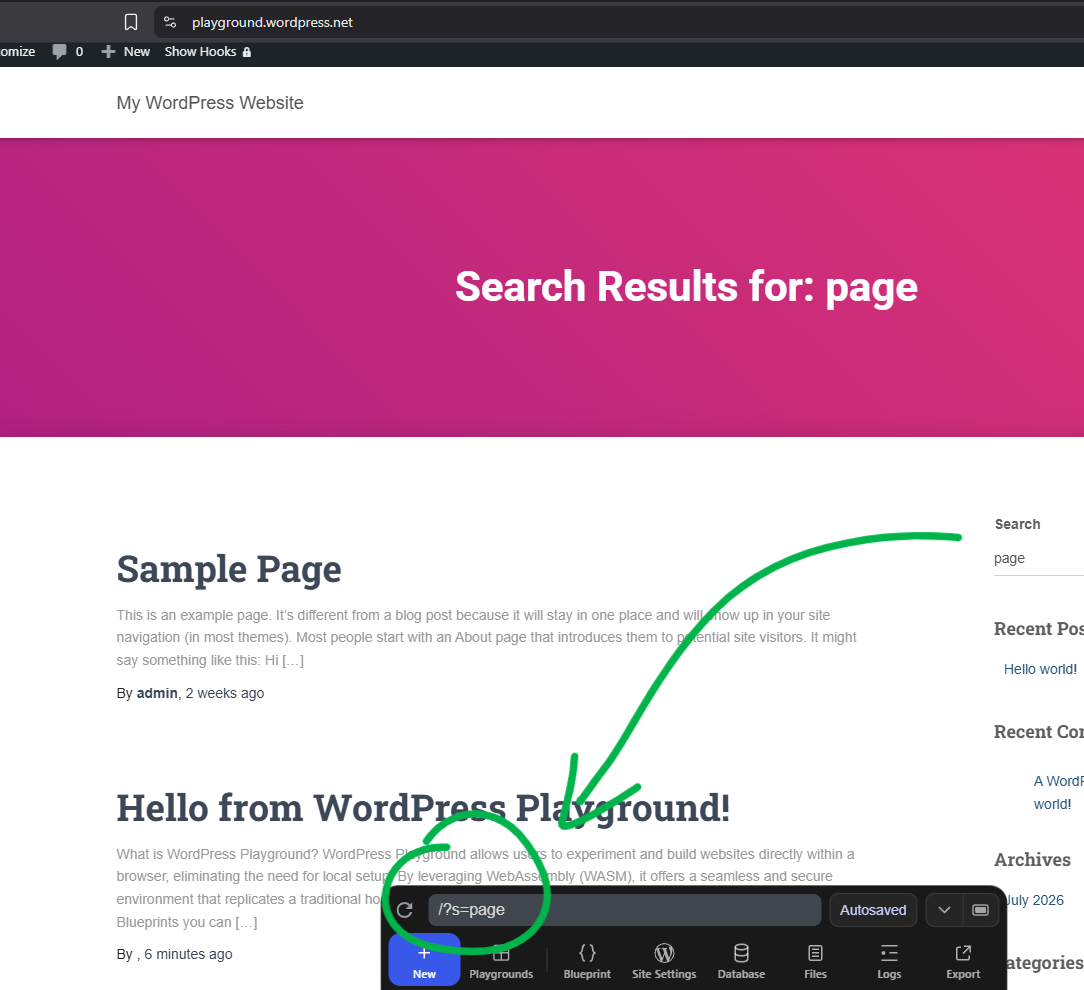
    When I search something in the website using the search function showed in the front-end Hestia template (navigation on top or blog page) a long token is added to the URL.

    This is very bad when the URL is used to be shared. Can this behavior be resolved?

    I’m able to reproduce also on https://playground.wordpress.net just installing and activating Hestia theme and your plugin then going on the home page and in the search box search something.

    Any help to resolve this will be appreciated

    Deactivating your plugin resolve the issue but leave the website unprotect from spam.

    If the second screen is not visible you can see here: https://i.postimg.cc/qR2gM5KK/Screenshot-2026-07-31-141236.png

    • This topic was modified 1 week, 2 days ago by peopleinside. Reason: Fixing screenshots
    • This topic was modified 1 week, 1 day ago by peopleinside. Reason: Fix

    The page I need help with: [log in to see the link]

Viewing 3 replies - 1 through 3 (of 3 total)
  • Thread Starter peopleinside

    (@peopleinside)

    While I hope in a fix I have added the following snippet to fix the issue:

    add_action( 'template_redirect', 'rimuovi_gdpr_token_dalla_ricerca' );
    function rimuovi_gdpr_token_dalla_ricerca() {
    if ( is_search() && isset( $_GET['s'] ) && isset( $_GET['gdpr_pow_token'] ) ) {

    $search_query = get_search_query();
    $clean_url = get_search_link( $search_query );
    wp_redirect( $clean_url, 301 );
    exit;
    }
    }
    Plugin Author Matthias Nordwig

    (@matthiasnordwig)

    Hi @peopleinside,

    Thank you — and thanks especially for the crystal-clear reproduction (Hestia + Playground made this trivial to pin down).

    This is fixed in the version I just released (5.1). The cause was exactly what you saw: the invisible token was being added as a hidden field to every form, including GET forms like the Hestia search box — and on a GET form a hidden field becomes a visible URL parameter (?s=…&gdpr_pow_token=…). In 5.1 the token is only added to POST forms, so search URLs stay clean. The plugin only ever checks POST submissions anyway, so nothing is lost on the protection side.

    Once you update to 5.1 you can remove your template_redirect snippet — it’s no longer needed. (Small heads-up if you keep it in the meantime: a 301 is cached permanently by browsers/proxies, so a 302 would be safer for a temporary redirect.)

    Best regards,
    Matthias

    Thread Starter peopleinside

    (@peopleinside)

    Hi @matthiasnordwig Matthias 😊🌸💖
    I’m very happy to read you and I hope you are well.

    Thank you, the fix in the version 5.1 seems fix also all submission that was set as spam in Forminator.
    I restored the plugin update. I’m happy to see your reply and a fix.

    I read that you wanted to abandon this plugin and it would have been a real disaster without it. I tried looking for alternatives but nothing works so well. Despite the AI era your plugin is terrific and works very well. Thank you for keeping it active and for fixing the problem.

    💖

    All the best!

Viewing 3 replies - 1 through 3 (of 3 total)

You must be logged in to reply to this topic.