• Resolved Andrew Wilder

    (@eatingrules)


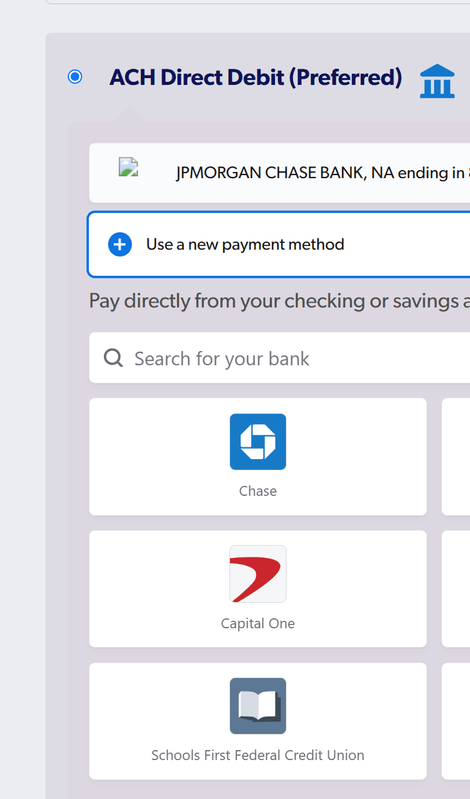
    I just updated from Payment Plugins to 4.0.7, and found that in checkout the image for JP Morgan Chase Bank is missing next to my saved ACH payment method. It’s being called from this path:

    /wp-content/plugins/woo-stripe-payment/assets/img/jpmorgan%20chase%20bank,%20na.svg

    I checked the folder on disk, and the image does indeed appear to be missing. Was it accidentally removed?

Viewing 11 replies - 1 through 11 (of 11 total)
  • Thread Starter Andrew Wilder

    (@eatingrules)

    trying to add a screenshot, hope this goes through

    Plugin Author Clayton R

    (@mrclayton)

    Hi @eatingrules

    Thank you for contacting Payment Plugins. That is not an image that has ever existed in the plugin. What appears to be happening is the bank type is JP Morgan and so the image url is being dynamically generated based on the payment method type.

    Let me have this looked at. The ACH icon, https://plugins.trac.wordpress.org/browser/woo-stripe-payment/tags/4.0.7/assets/img/ach.svg, should be showing for saved payment methods.

    Kind Regards

    Thread Starter Andrew Wilder

    (@eatingrules)

    Hi @mrclayton, thanks for the quick reply!

    That ACH icon is indeed showing in the main ACH heading (you can see it in my screenshot)… It’s the icon next to the specific bank where it’s trying to load the bank-specific SVG. πŸ€·β€β™‚οΈ

    Plugin Author Clayton R

    (@mrclayton)

    Hi @eatingrules

    What’s happening is the saved payment method icon is being generated based on the token’s brand. The fix for this is to use a static value instead.

    I’ve created an issue for this and it will be resolved in 4.0.8.

    Kind Regards

    Thread Starter Andrew Wilder

    (@eatingrules)

    Cool. For what it’s worth, when I expand the “Use a new payment method” section, it shows icons correctly. Maybe you can reference those same ones? (though they’re hotlinked directly from Stripe.)

    https://b.stripecdn.com/connections-statics-srv/assets/BrandIcon--morganchase-4x.png
    Plugin Author Clayton R

    (@mrclayton)

    Hi @eatingrules

    Thank you for that info. The issue with using the Stripe URL is if they ever change their asset path, that would break the plugin integration.

    I’ll have this researched to see if the dynamic icon will work well or we should use a static icon like in the gateway label.

    Kind Regards

    Thread Starter Andrew Wilder

    (@eatingrules)

    Sounds good, thanks!

    Plugin Author Clayton R

    (@mrclayton)

    Hi @eatingrules

    Are you able to share a product page url to your site? If you want to keep it private you can create a support ticket via the Stripe plugin support widget.

    Kind Regards

    Thread Starter Andrew Wilder

    (@eatingrules)

    Sent! 😊

    Thread Starter Andrew Wilder

    (@eatingrules)

    I just updated to 4.0.8 and that fixed it. Thanks so much for addressing this so quickly! 😊

    Plugin Author Clayton R

    (@mrclayton)

    Hi @eatingrules

    Thank you for confirming.

    Kind Regards

Viewing 11 replies - 1 through 11 (of 11 total)

You must be logged in to reply to this topic.