Error creating post/page on my site
-
Hello,
I can’t create a new post or page.
It happened unexpectedly. I hadn’t published anything on the site for about a year. Then, when I decided to create a new page, I saw this error.
I’m seeing this error: “There has been a critical error on this website. Please check your site admin email inbox for instructions. If you continue to have problems, please try the support forums.”.
Running the latest version of WordPress.
All plugins are updated (I also tried renaming the plugins folder).
PHP version 8.2.What could be the issue?

-
The reason for the error should be visible in the error log. You can find it in your hosting area. If necessary, the support of your hosting can help you.
Alternatively, you could also enable debugging in WordPress. How to do this is described here: https://developer.wordpress.org/advanced-administration/debug/debug-wordpress/ – also here the support of your hosting can help you if necessary to edit the file accordingly.
In both cases you should be able to see what the cause is in the logfile.
I added “WP_DEBUG” to the wp-config.php file, but the error log file didn’t appear.
In addition to setting
WP_DEBUG, you must also setWP_DEBUG_LOG. Then, reload the page to trigger the error. After that, adebug.logfile should appear in thewp-contentdirectory.After that, a debug.log file should appear in the wp-content directory.
No such file((
I tried adding these lines:
// Enable Debug logging to the /wp-content/debug.log file
define( ‘WP_DEBUG_LOG’, true );// Enable Debug logging to the /wp-content/debug.log file
define( ‘WP_DEBUG_LOG’, true );And these too:
// Disable display of errors and warnings
define( ‘WP_DEBUG_DISPLAY’, false );
@ini_set( ‘display_errors’, 0 );// Use dev versions of core JS and CSS files (only needed if you are modifying these core files)
define( ‘SCRIPT_DEBUG’, true );I don’t know if you just copied it wrong, but something’s still off. The correct version would be:
// Enable Debug logging
define( 'WP_DEBUG', true );

// Enable Debug logging to the /wp-content/debug.log file
define( 'WP_DEBUG_LOG', true );
And if that just won’t work, contact your hosting provider’s support team to request their error log, which should actually contain that information.
Oh my god, really… Thanks so much for your help!
Judging by the errors, it seems like the problem is with the theme? That’s odd, since I didn’t make any changes. The problem with creating new pages/posts just appeared out of the blue.
[10-Jul-2026 08:32:01 UTC] PHP Notice: Function _load_textdomain_just_in_time was called incorrectly. Translation loading for thenevedomain was triggered too early. This is usually an indicator for some code in the plugin or theme running too early. Translations should be loaded at theinitaction or later. Please see Debugging in WordPress for more information. (This message was added in version 6.7.0.) in /var/www/site_user/data/www/***/wp-includes/functions.php on line 6170
[10-Jul-2026 08:32:01 UTC] PHP Warning: Attempt to read property "post_type" on null in /var/www/site_user/data/www/***/wp-includes/post.php on line 7961
[10-Jul-2026 08:32:01 UTC] PHP Warning: Attempt to read property "post_type" on null in /var/www/site_user/data/www/***/wp-includes/post.php on line 7962
[10-Jul-2026 08:32:01 UTC] PHP Warning: Attempt to read property "ID" on null in /var/www/site_user/data/www/***/wp-includes/post.php on line 7966
[10-Jul-2026 08:32:01 UTC] PHP Warning: Attempt to read property "post_type" on null in /var/www/site_user/data/www/***/wp-includes/post.php on line 8228
[10-Jul-2026 08:32:01 UTC] PHP Warning: Attempt to read property "post_type" on null in /var/www/site_user/data/www/***/wp-includes/theme.php on line 3642
[10-Jul-2026 08:32:01 UTC] PHP Warning: Attempt to read property "post_type" on null in /var/www/site_user/data/www/***/wp-includes/theme.php on line 3868
[10-Jul-2026 08:32:01 UTC] PHP Warning: Attempt to read property "post_type" on null in /var/www/site_user/data/www/***/wp-includes/post.php on line 5883
[10-Jul-2026 08:32:01 UTC] PHP Warning: Attempt to read property "ID" on null in /var/www/site_user/data/www/***/wp-includes/post.php on line 5883
[10-Jul-2026 08:32:01 UTC] PHP Warning: Attempt to read property "post_type" on null in /var/www/site_user/data/www/***/wp-includes/post.php on line 5182
[10-Jul-2026 08:32:01 UTC] PHP Warning: Trying to access array offset on value of type null in /var/www/site_user/data/www/***/wp-content/mu-plugins/wpengine-common/plugin.php on line 1648
[10-Jul-2026 08:32:01 UTC] PHP Fatal error: Uncaught Error: Attempt to assign property "post_content" on null in /var/www/site_user/data/www/***/wp-admin/includes/post.php:817
Stack trace: 0 /var/www/site_user/data/www/***/wp-admin/includes/dashboard.php(563): get_default_post_to_edit('post', true) 1 /var/www/site_user/data/www/***/wp-admin/includes/template.php(1458): wp_dashboard_quick_press('', Array) 2 /var/www/site_user/data/www/***/wp-admin/includes/dashboard.php(274): do_meta_boxes(Object(WP_Screen), 'side', '') 3 /var/www/site_user/data/www/***/wp-admin/index.php(204): wp_dashboard() 4 {main}
thrown in /var/www/site_user/data/www/***/wp-admin/includes/post.php on line 817
[10-Jul-2026 08:32:20 UTC] PHP Notice: Function _load_textdomain_just_in_time was called incorrectly. Translation loading for thenevedomain was triggered too early. This is usually an indicator for some code in the plugin or theme running too early. Translations should be loaded at theinitaction or later. Please see Debugging in WordPress for more information. (This message was added in version 6.7.0.) in /var/www/site_user/data/www/***/wp-includes/functions.php on line 6170
[10-Jul-2026 08:32:21 UTC] PHP Notice: Function _load_textdomain_just_in_time was called incorrectly. Translation loading for thenevedomain was triggered too early. This is usually an indicator for some code in the plugin or theme running too early. Translations should be loaded at theinitaction or later. Please see Debugging in WordPress for more information. (This message was added in version 6.7.0.) in /var/www/site_user/data/www/***/wp-includes/functions.php on line 6170
[10-Jul-2026 08:32:23 UTC] PHP Notice: Function _load_textdomain_just_in_time was called incorrectly. Translation loading for thenevedomain was triggered too early. This is usually an indicator for some code in the plugin or theme running too early. Translations should be loaded at theinitaction or later. Please see Debugging in WordPress for more information. (This message was added in version 6.7.0.) in /var/www/site_user/data/www/***/wp-includes/functions.php on line 6170
[10-Jul-2026 08:32:23 UTC] PHP Notice: Function _load_textdomain_just_in_time was called incorrectly. Translation loading for thenevedomain was triggered too early. This is usually an indicator for some code in the plugin or theme running too early. Translations should be loaded at theinitaction or later. Please see Debugging in WordPress for more information. (This message was added in version 6.7.0.) in /var/www/site_user/data/www/***/wp-includes/functions.php on line 6170
[10-Jul-2026 08:32:23 UTC] PHP Notice: Function _load_textdomain_just_in_time was called incorrectly. Translation loading for thenevedomain was triggered too early. This is usually an indicator for some code in the plugin or theme running too early. Translations should be loaded at theinitaction or later. Please see Debugging in WordPress for more information. (This message was added in version 6.7.0.) in /var/www/site_user/data/www/***/wp-includes/functions.php on line 6170
[10-Jul-2026 08:32:24 UTC] PHP Warning: Attempt to read property "post_type" on null in /var/www/site_user/data/www/***/wp-includes/post.php on line 7961
[10-Jul-2026 08:32:24 UTC] PHP Warning: Attempt to read property "post_type" on null in /var/www/site_user/data/www/***/wp-includes/post.php on line 7962
[10-Jul-2026 08:32:24 UTC] PHP Warning: Attempt to read property "ID" on null in /var/www/site_user/data/www/***/wp-includes/post.php on line 7966
[10-Jul-2026 08:32:24 UTC] PHP Warning: Attempt to read property "post_type" on null in /var/www/site_user/data/www/***/wp-includes/post.php on line 8228
[10-Jul-2026 08:32:24 UTC] PHP Warning: Attempt to read property "post_type" on null in /var/www/site_user/data/www/***/wp-includes/theme.php on line 3642
[10-Jul-2026 08:32:24 UTC] PHP Warning: Attempt to read property "post_type" on null in /var/www/site_user/data/www/***/wp-includes/theme.php on line 3868
[10-Jul-2026 08:32:24 UTC] PHP Warning: Attempt to read property "post_type" on null in /var/www/site_user/data/www/***/wp-includes/post.php on line 5883
[10-Jul-2026 08:32:24 UTC] PHP Warning: Attempt to read property "ID" on null in /var/www/site_user/data/www/***/wp-includes/post.php on line 5883
[10-Jul-2026 08:32:24 UTC] PHP Warning: Attempt to read property "post_type" on null in /var/www/site_user/data/www/***/wp-includes/post.php on line 5182
[10-Jul-2026 08:32:24 UTC] PHP Warning: Trying to access array offset on value of type null in /var/www/site_user/data/www/***/wp-content/mu-plugins/wpengine-common/plugin.php on line 1648
[10-Jul-2026 08:32:24 UTC] PHP Fatal error: Uncaught Error: Attempt to assign property "post_content" on null in /var/www/site_user/data/www/***/wp-admin/includes/post.php:817
Stack trace: 0 /var/www/site_user/data/www/***/wp-admin/post-new.php(66): get_default_post_to_edit('page', true) 1 {main}
thrown in /var/www/site_user/data/www/***/wp-admin/includes/post.php on line 817
[10-Jul-2026 08:32:26 UTC] PHP Notice: Function _load_textdomain_just_in_time was called incorrectly. Translation loading for thenevedomain was triggered too early. This is usually an indicator for some code in the plugin or theme running too early. Translations should be loaded at theinitaction or later. Please see Debugging in WordPress for more information. (This message was added in version 6.7.0.) in /var/www/site_user/data/www/***/wp-includes/functions.php on line 6170
[10-Jul-2026 08:34:41 UTC] PHP Notice: Function _load_textdomain_just_in_time was called incorrectly. Translation loading for thenevedomain was triggered too early. This is usually an indicator for some code in the plugin or theme running too early. Translations should be loaded at theinitaction or later. Please see Debugging in WordPress for more information. (This message was added in version 6.7.0.) in /var/www/site_user/data/www/***/wp-includes/functions.php on line 6170
[10-Jul-2026 08:35:11 UTC] PHP Notice: Function _load_textdomain_just_in_time was called incorrectly. Translation loading for thenevedomain was triggered too early. This is usually an indicator for some code in the plugin or theme running too early. Translations should be loaded at theinitaction or later. Please see Debugging in WordPress for more information. (This message was added in version 6.7.0.) in /var/www/site_user/data/www/***/wp-includes/functions.php on line 6170
[10-Jul-2026 08:35:12 UTC] PHP Notice: Function _load_textdomain_just_in_time was called incorrectly. Translation loading for thenevedomain was triggered too early. This is usually an indicator for some code in the plugin or theme running too early. Translations should be loaded at theinitaction or later. Please see Debugging in WordPress for more information. (This message was added in version 6.7.0.) in /var/www/site_user/data/www/***/wp-includes/functions.php on line 6170
[10-Jul-2026 08:38:58 UTC] PHP Notice: Function _load_textdomain_just_in_time was called incorrectly. Translation loading for thenevedomain was triggered too early. This is usually an indicator for some code in the plugin or theme running too early. Translations should be loaded at theinitaction or later. Please see Debugging in WordPress for more information. (This message was added in version 6.7.0.) in /var/www/site_user/data/www/***/wp-includes/functions.php on line 6170
[10-Jul-2026 08:38:59 UTC] PHP Notice: Function _load_textdomain_just_in_time was called incorrectly. Translation loading for thenevedomain was triggered too early. This is usually an indicator for some code in the plugin or theme running too early. Translations should be loaded at theinitaction or later. Please see Debugging in WordPress for more information. (This message was added in version 6.7.0.) in /var/www/site_user/data/www/***/wp-includes/functions.php on line 6170No, you can ignore all those notices and warnings for now. They’re annoying, but they’re not the cause of the error.
As for the error, it manifests as a fatal error. And that, in turn, is strange. Because it points to a line in a WordPress core file that doesn’t even contain the necessary code. Which version of WordPress are you using? That might explain the discrepancy – and perhaps the error as well.
As a test, you can also try deactivating all plugins. They might be to blame. And yes, you could also try switching themes, but Neve is actually quite widely used, and it would be strange if it were causing the problem.
I deleted the wp-config file and regenerated it.
I tried updating htaccess to the default one.
I tried renaming the plugins folder.
I tried changing the theme.
I changed the PHP version to 8.0 (previously it was 8.2).The latest version of WordPress (7.0.1).
Here’s the latest debug output right after clicking the create new post button:
[10-Jul-2026 09:29:48 UTC] PHP Notice: Function _load_textdomain_just_in_time was called incorrectly. Translation loading for the
nevedomain was triggered too early. This is usually an indicator for some code in the plugin or theme running too early. Translations should be loaded at theinitaction or later. Please see Debugging in WordPress for more information. (This message was added in version 6.7.0.) in /var/www/site_user/data/www/***/wp-includes/functions.php on line 6170
[10-Jul-2026 09:29:48 UTC] PHP Warning: Attempt to read property “post_type” on null in /var/www/site_user/data/www/***/wp-includes/post.php on line 7961
[10-Jul-2026 09:29:48 UTC] PHP Warning: Attempt to read property “post_type” on null in /var/www/site_user/data/www/***/wp-includes/post.php on line 7962
[10-Jul-2026 09:29:48 UTC] PHP Warning: Attempt to read property “ID” on null in /var/www/site_user/data/www/***/wp-includes/post.php on line 7966
[10-Jul-2026 09:29:48 UTC] PHP Warning: Attempt to read property “post_type” on null in /var/www/site_user/data/www/***/wp-includes/post.php on line 8228
[10-Jul-2026 09:29:48 UTC] PHP Warning: Attempt to read property “post_type” on null in /var/www/site_user/data/www/***/wp-includes/theme.php on line 3642
[10-Jul-2026 09:29:48 UTC] PHP Warning: Attempt to read property “post_type” on null in /var/www/site_user/data/www/***/wp-includes/theme.php on line 3868
[10-Jul-2026 09:29:48 UTC] PHP Warning: Attempt to read property “post_type” on null in /var/www/site_user/data/www/***/wp-includes/post.php on line 5883
[10-Jul-2026 09:29:48 UTC] PHP Warning: Attempt to read property “ID” on null in /var/www/site_user/data/www/***/wp-includes/post.php on line 5883
[10-Jul-2026 09:29:48 UTC] PHP Warning: Attempt to read property “post_type” on null in /var/www/site_user/data/www/***/wp-includes/post.php on line 5182
[10-Jul-2026 09:29:48 UTC] PHP Fatal error: Uncaught Error: Attempt to assign property “post_content” on null in /var/www/site_user/data/www/***/wp-admin/includes/post.php:817
Stack trace: 0 /var/www/site_user/data/www/***/wp-admin/post-new.php(66): get_default_post_to_edit(‘page’, true) 1 {main}thrown in /var/www/site_user/data/www/***/wp-admin/includes/post.php on line 817
Is there a problem with the database…
-
This reply was modified 13 hours, 29 minutes ago by
JOHN S..
Oh, there’s complete nonsense going on in the database.
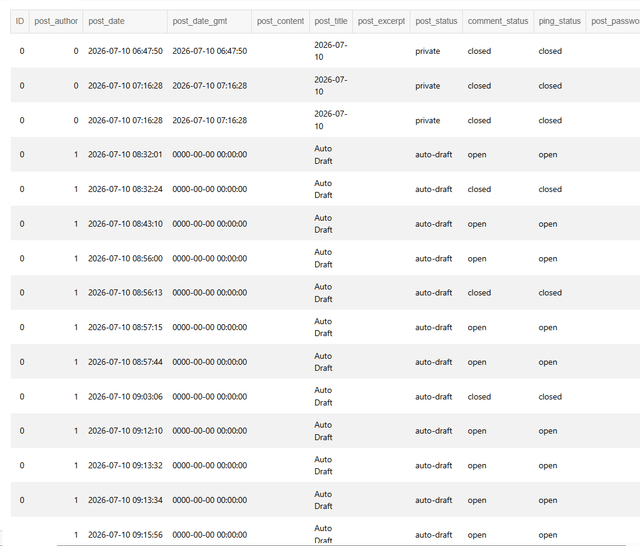
Maybe someone will find this useful.
This helped:
Fix the Database Auto-Increment
If you recently migrated your site, changed hosting, or updated MySQL, the primary key or
AUTO_INCREMENTrule on your posts table may have been stripped away.- Log into your hosting panel and open phpMyAdmin.
- Select your WordPress database from the left sidebar.
- Open the
wp_poststable. - Click the Structure tab at the top.
- Look at the
IDrow. Under the Extra column, it must sayAUTO_INCREMENT. - If it is blank, click Change on that row, look for the A_I checkbox, check it, and save.
The “critical error” message is only a generic notification and doesn’t indicate the actual cause. To identify the issue, I’d recommend the following:
- Enable WordPress debugging by setting
WP_DEBUGandWP_DEBUG_LOGtotrueinwp-config.php, then reproduce the issue and review the/wp-content/debug.logfile (or your server’s PHP error log). - Since you’ve already ruled out plugins, temporarily switch to a default WordPress theme (such as Twenty Twenty-Five) to determine whether the active theme is responsible.
- Verify that your theme and any custom code are fully compatible with PHP 8.2. If possible, you could also test with PHP 8.1 for comparison.
- Check your browser’s Developer Tools (Console and Network tabs) for any failed REST API requests or JavaScript errors when opening the editor.
If you can share the exact fatal error from the debug log or PHP error log, it will be much easier to identify the root cause.
-
This reply was modified 13 hours, 29 minutes ago by


You must be logged in to reply to this topic.