• Resolved FireMyst

    (@firemyst)


    HI everyone:

    I’ve noticed on my admin posts listing page, “total views” and “today’s views” is always 0 now and never changes.

    On any post of page, it doesn’t matter where I visit from, it always says, “(Visited 1 times, 1 visits today)”. DOesn’t matter if I ping it from different computers/networks or not.

    Under the settings, I’ve tried each of the following methods, and neither makes a difference:

    REST API based: Uses the REST API to record visits
    Query variable based: Uses query variables to record visits
    Ajaxurl based: Uses admin-ajax.php which is inbuilt within WordPress to process the tracker

    I have WP 6.9 and WP Rocket caching plugin installed. After every change, in WP Rocket I click to have it clear and preload the cache.

    When I view the plugin’s page, I do not see any errors indicating missing tables. The only message I find is on the import/export settings that says, “WordPress Popular Posts plugin is not active and no WPP tables were found in the database. Import is not possible.” I’m not trying to import anything so that shouldn’t matter.

    What could be the issue?

Viewing 15 replies - 1 through 15 (of 24 total)
  • Plugin Author Ajay

    (@ajay)

    1. Please can I have your site URL to check?
    2. When you visit the Tools Page, can you see anything in the funnels table? What happens when you click sync funnel?

    Thread Starter FireMyst

    (@firemyst)

    When I clicked “Sync Funnel”, the “total views” and “today’s views” captured their numbers. However, on the post page itself, it still says, “(Visited 1 times, 1 visits today)” despite the total views now showing 32 in the “all posts” listing.

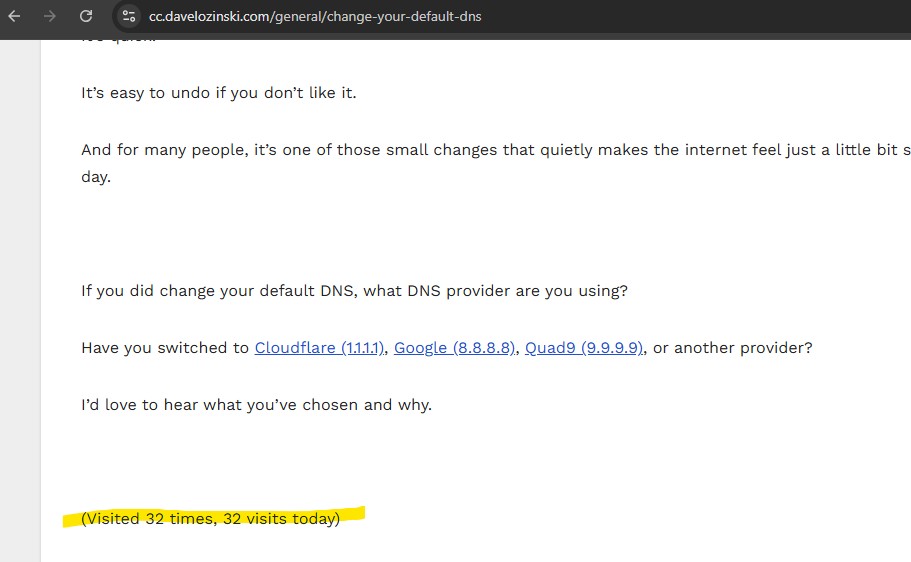
    This is the page that shows nothing but “Visited 1 times, 1 visits today” despite whatever counter method I use:

    https://cc.davelozinski.com/general/change-your-default-dns

    This is the rest of the information from the Tools page:

    Status Database version Installed version 7.0 / Current version 7.0 top_ten table Installed
    Entries: 253 | Size: 19 KB top_ten_daily table Installed
    Entries: 527,695 | Size: 50 MB top_ten_visits_funnel table Installed
    Entries: 0 | Size: 16 KB top_ten_visits_log table Installed
    Entries: 1,215 | Size: 144 KB Maintenance cron Not scheduled Aggregation cron Scheduled
    Runs: Every 2 Minutes
    Next run: in 1 day

    Plugin Author Ajay

    (@ajay)

    Thanks. It looks like the tracking is working well with the funnel table populated.

    I also checked your site and can see the tracker working.

    I also see you have WP Rocket installed. Are you able to see what the results show if you turn on Always display latest post count in the Top 10 Settings page?

    • This reply was modified 2 months, 2 weeks ago by Ajay.
    Thread Starter FireMyst

    (@firemyst)

    Under the “Counter/Tracker” tab on the settings page, I have the following enabled now:

    Always display latest post countModified from default setting This option uses JavaScript and will increase your page load time. Turn this off if you are not using caching plugins or are OK with displaying older cached counts.

    I’ve cleared the WP Rocket and other caches.

    As you can see now, no page counts are shown on the sample URL I provided.

    Plugin Author Ajay

    (@ajay)

    @firemyst
    It looks to me like this JS is pulling the latest count – showed 32 today when I viewed the link above.

    It looks like WP Rocket might be defering the JS which is causing an issue. I don’t use it, but is there a place in the Settings where you can exclude JS and if so, can you exclude “view_counter=1”?

    Thread Starter FireMyst

    (@firemyst)

    So I found and disabled that “defer js” setting in WP Rocket. The count is showing for me on the page now.

    However, here’s what’s interesting. Even though I hit it from two different browser on one laptop, and another browser from my phone, the count showed 32 for me as well for every load.

    I went back, cleared all WP Rocket caches, did the “Sync funnel now”, and the number hasn’t changed.

    What’s even more intriguing is in the WordPress All Posts Page, the “Total Views” and “Today’s Views” both show “56”.

    So how does the page count say, “Visited 32 times, 32 visits today” when the posts page says “56” across the board?

    • This reply was modified 2 months, 2 weeks ago by FireMyst. Reason: Updated with Screen capture
    • This reply was modified 2 months, 2 weeks ago by FireMyst.
    Plugin Author Ajay

    (@ajay)

    I just checked your site again, and I can now see it’s gone up to 60 from 32, which is where it had been stuck.

    By any chance, do you have some aggressive query caching (e.g. redis opcode cache) that is returning a cached value of the count and then updates after a while?

    Thread Starter FireMyst

    (@firemyst)

    The WordPress Admin area isn’t cached, so I’m curious how would that explain the counts on the WordPress Posts page? “Today’s Views” and “total views” shouldn’t be the same.

    I started this discussion before today, so the “today’s views” shouldn’t be the same as “total views” should it?

    EDIT: Ah, maybe it should since the first posting here where the numbers started showing was 20 hours ago, so it hasn’t quite been 24 hours (possibly). Let’s see what happens later today or this evening.

    • This reply was modified 2 months, 2 weeks ago by FireMyst.
    Plugin Author Ajay

    (@ajay)

    What is the count that you can see for the post in the Posts page in the admin area? And how close is it to the one displayed on the site?

    I see them at 68 right now. For other pages, there is a difference between the overall and daily counts.

    I do have a feeling on the frontend that there is some kind of query caching even in the dynamic mode which is why it doesn’t refresh instantly (or even after 5-7 min).

    Thread Starter FireMyst

    (@firemyst)

    Today this is what I see in the admin area:

    Screen capture above. Both numbers now say 72. As you can see, both counters are incrementing the same. I clicked the “sync funnel”, refreshed, and still the same count.

    On the actual page itself, I see different numbers – 68 for both. I cleared both WP Rocket’s cache and refreshed the page.

    The site is also using CloudFlare, and we have purged all their caches. Also with each update, we do a “custom purge” on the URL https://cc.davelozinski.com/general/change-your-default-dns to make sure that specific URL is cleared.

    Either way, regardless of caching, both the “total count” and “today count” numbers should NOT be updating by the same amount on either the page or within the admin area. To me that clearly indicates there’s a bug somewhere in the logic. It looks to me like the daily counter isn’t resetting to zero; or it is but is being overridden by the total count somewhere.

    As of this moment, my first reply after your first reply was posted 1 day and 15 hours ago. At that point, we had 32 views on the counter. A day has since passed. So I would expect the total counter in the admin area to still say 72, but the “today view” counter to be 40 (72 – 32 from the 1 day 15 hours ago).

    Plugin Author Ajay

    (@ajay)

    Please can you tell me what you have set for Default custom period range under Counter/Tracker tab?

    I’m wondering if that is the issue.

    Otherwise we’ll need to do some digging with Query Monitor on the page above where you have the screenshot to check what query is generated for that column.

    1. Install Query Monitor
    2. Goto the Admin posts page and search for that post name so only that is displayed
    3. In the query list: Database Queries > Filter by component > Top 10
    4. Give me the queries for WebberZone\Top_Ten\Database::get_count().

    I’m looking for:

    SELECT cntaccess
    FROM wp_top_ten
    WHERE postnumber = 7612
    AND blog_id = 1
    
    SELECT SUM(cntaccess)
    FROM wp_top_ten_daily
    WHERE postnumber = 7612
    AND blog_id = 1
    AND dp_date >= '2026-07-05 0:0:0'
    
    Thread Starter FireMyst

    (@firemyst)

    For “Default custom period range“, I have days: 90, hours 0;

    INstalling the Query monitor, NOTHING comes up under “Query by component”.

    There’s “Database queries (185)” and under that we have “Duplicate queries (46)”, “Queries by caller”, “Queries by component”. The latter two have no numbers next to them.

    When I view the overall list of “Database queries (185)”, the “component” column is blank the whole way down.

    Plugin Author Ajay

    (@ajay)

    The 90 days is the reason why the daily isn’t showing as Daily. Please can you change that to 1 and check again.

    I’m releasing a new version – hopefully in the next 48-72 hours where this is being renamed from Daily to Custom.

    Thread Starter FireMyst

    (@firemyst)

    I changed it to 1, but it’s still not working entirely.

    On the actual page itself, it says, “(Visited 101 times, 1 visits today)”. In the posts listing, under total views it says, “101”; under “daily views” it says “0”.

    I waited over 5 hours. Then I clicked the “sync funnel” and “daily views” updated to “1”.

    I thought the “sync funnel” cron job runs every hour? Or do I have to change a setting under the “maintenance” tab? I didn’t think the sync-funnel has options under the maintenance tab.

    Plugin Author Ajay

    (@ajay)

    You shouldn’t need to run the sync funnel manually. It is set to run every 3 minutes.

    Would you be able to check this one please to verify this runs. Go to the Tools page as you had earlier and see what the Sync Funnel message says about the next run.

    Hopefully you still see the funnel table has hits. If not please browse your site logged out or in an incognito/private window and refresh the tools page.

    Also what kind of caching system do you have?

    After/within 3 minutes, the funnel should empty and the daily and overall tables are incremented.

Viewing 15 replies - 1 through 15 (of 24 total)

The topic ‘“Today’s VIews” count is always zero in admin in v4.3.1’ is closed to new replies.