Another issue is: also if the custom user profile page and user all list page is not used so it’s used the default WordPress template with your plugin, and if the plugin User Switching is used, when switch to another user will be not showed correctly the banner on top to return to the initial account.
User Switching is a plugin that allow to log as another user and usually show a banner on top on the admin side to return to the original account. With your plugin this banner notification are not showed correctly so as there is no link to return and a wrong short notification is showed but not clickable and then immediately hidden is not possibile to return to the initial account.
Fortunately opening the website preview show a small link on the bottom left and in this case is possibile switch back from the front end website but not in the admin where your plugin is active 😊 this behavior is an issue caused by the YooAdmin template as the notification showed is showed for some seconds without the link to return back then hidden.
When YooAdmin show a notification just for 2 seconds should be also a place where user can check this notification or should stay on the bell icon until the user never delete them. So there are two issue with the notification: wrong notification that miss the original link to return back and a notification that is showed for some seconds, very few then is hidden without a way to read it again and without user has deleted them.
Another issue that should be noted: while you are editing a snippet on the plugin code snippet if you made an edit then save then without reload or change the page you do another edit to the code and save again the page get broken.
I also don’t like to be forced to have a connect account button in the admin bar. Can’t hide this and also if I deactivate your custom admin bar there is a very bad “disable focus” button that cannot be hidden and disturb also the mobile admin bar. This is a good reason to unistall for now. I hope you can fix this issues 😊
Another issue is that your plugin show a user profile that is not the real user profile used by WordPress. For example I use the plugin Simple User Avatar. With your plugin the avatar on top is not the real avatar used by WordPress. This is confusing.
Hi,
Thank you again for taking the time to test YOOAdmin and for sharing such detailed feedback.
We carefully reviewed all of the points you reported and worked through them immediately. Most of the issues and compatibility concerns you mentioned have already been addressed and will be included in YOOAdmin 1.5.14.
Regarding the Login Experience and Users Experience options, we were unable to reproduce a situation where those settings are automatically re-enabled after being properly saved. The save logic appears to be working correctly, so there may be other factors involved such as caching, skipping a wizard step, or exiting the wizard before completing the save process. We will continue monitoring this area and investigate further if additional reports appear.
We also reviewed the Login Security widget and related notices. The security features in YOOAdmin are designed to protect WordPress login flows in general, including wp-login.php where applicable, and are not limited to the custom YOOAdmin login experience. The security widget itself can also be hidden if desired.
Demonstration:
https://yooadmin.io/share/2026-06-07.gif
For user profiles, avatars, and third-party integrations, we have improved compatibility with WordPress hooks and user-related integrations. This includes better support for plugins that extend user profiles, avatars, and account-related actions. We have also improved compatibility with integrations similar to User Switching by relying more heavily on standard WordPress hooks and menus.
At the same time, while we continue improving compatibility, it is not possible to guarantee 100% compatibility with every third-party plugin. When compatibility issues are identified, our goal is to solve them in a general way that benefits the wider WordPress ecosystem rather than implementing one-off fixes for individual plugins.
Regarding interface customization requests such as Connect Account, Focus Mode controls, branding elements, and other workspace components, several of these options are being considered as part of our future white-label and advanced customization roadmap.
We truly appreciate your feedback. It helped us identify several areas for improvement, and many of those improvements were implemented within less than 24 hours and are already scheduled for the upcoming 1.5.14 release.
If you would like to test the update immediately once it is published, you can install it manually. WordPress.org recently introduced a delay before plugin updates are distributed to sites, so automatic update availability may take up to 24 hours after release. Version 1.5.14 has already been submitted and should become available through the normal update channel soon.
We believe all reported items have now been addressed, improved, or added to our roadmap. If you discover any new issue after testing 1.5.14, please feel free to open a new support topic.
Thank you again for your support, testing, and detailed reports.
Best regards,
Rami Obeidat
YOOPixel
Hi, thank you for the reply.
I tested the version 1.5.14 that’s already available and still found it has issues.
YooAdmin has a function active by default to use a custom profile and users page. The avatar uploaded on that page is just used for the admin side? If the reply to this is yes then need install and use a plugin like Simple User Avatar. This plugin gives the advantage to allow to select an avatar from the WordPress Media Library and to set the avatar also to be used in WordPress, for example on comments.
Your plugin on my test still not show an option to manage this kind of avatar. I see that you added on a drop down menu located on your custom user page to use a third part plugin image but for me this is not working.
I still see the small issue with the dark mode on the snippet plugin and the error that broke the page when a snippet is edited and saved two times.
This new version of Yooadmin 1.5.14 seems also broken the avatar that was working before with the plugin mentioned above that now is no more saved and showed in the user profile.
I dont know how you tested but the update seems cause more issue then before about avatar.
Consider this feedback is only for you I mean that I will be currently not affected by this issue because currently I returned to a different interface. Those feedback is just to you to improve.
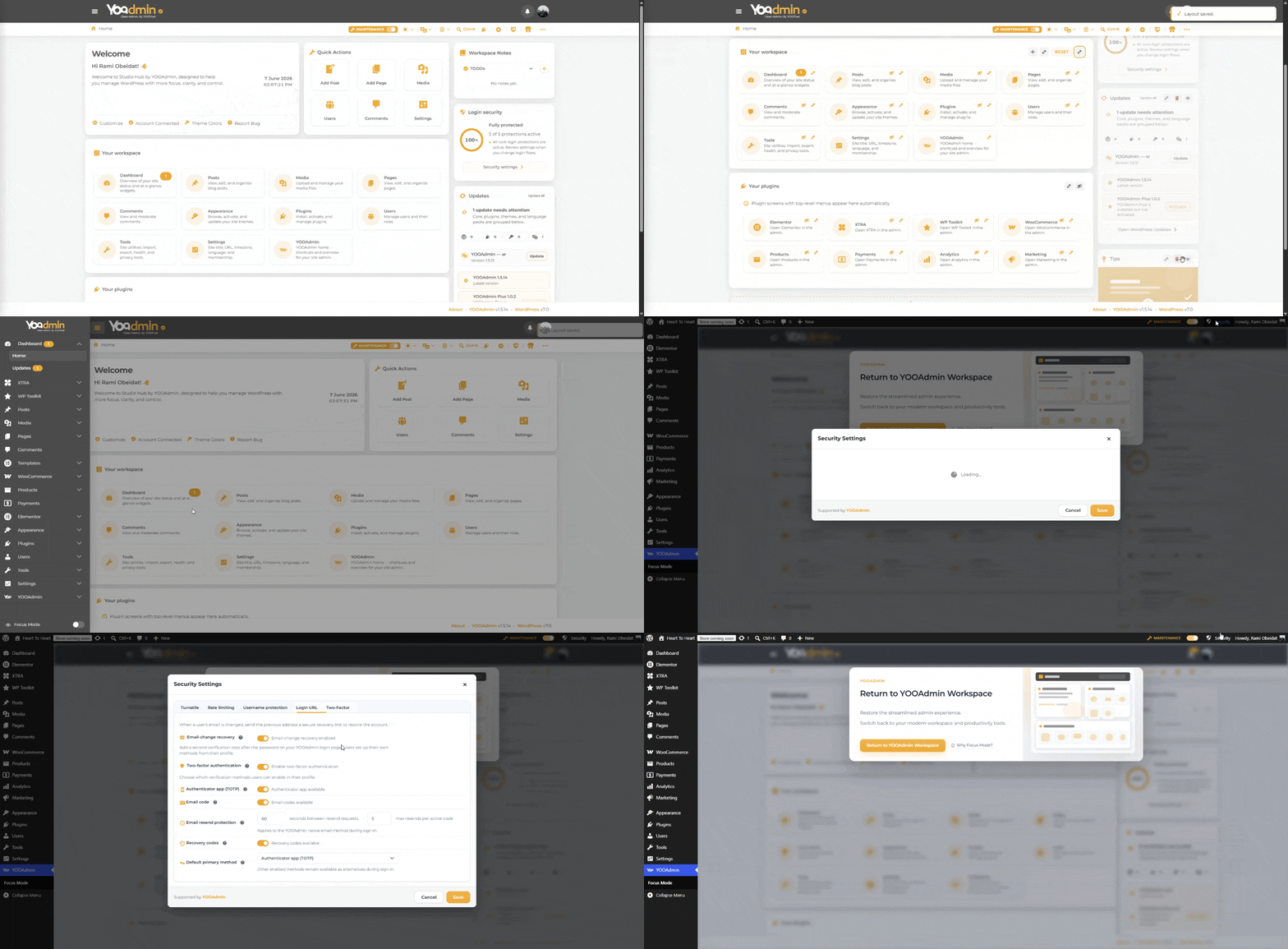
You can see some GIFT of the issues here
The avatar is not correctly showed at the top right, even in the page there are issues on display the correct image and selection also did not work. When I see the correct avatar on the page I expect to see also on the top right.
About the widget and the GIF you shared I’m asking why the pencil icon to edito widget are not available in some widget and user has to know that for hide a widget that has not this pencil they will need click on another widget that has the pencil. Very hard to me to understood this and I can discover this only from your GIF. If I was a real user I just think that widget without a pencil icon to edito cannot me hidden or deleted.
The switch to user seems has been improved. I did not tested deep but seems to work.
Hi,
I reviewed the avatar-related reports and made additional compatibility improvements for the next update.
Please note that YOOAdmin focuses on compatibility through native WordPress hooks and APIs rather than providing dedicated support for individual third-party plugins. While compatibility is continuously improved, support for every plugin cannot be guaranteed.
The reported issues have been reviewed and any relevant improvements will be included in future updates.
Thank you for taking the time to share your feedback.