Hello @twinturbo,
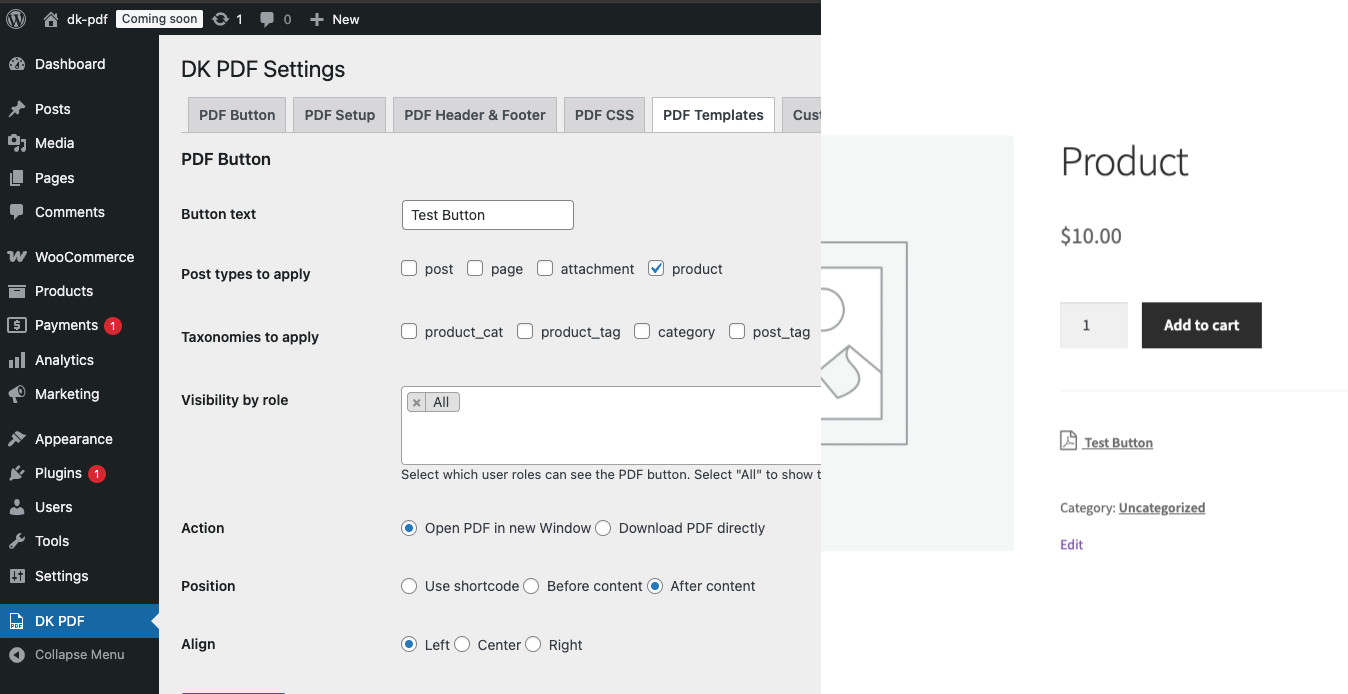
I’ve just checked but I’m not able to reproduce, by the screenshot it seem it is from a WooCommerce product page but you mention that the issue is with the frontpage… when you have time please let me know your configuration, plugins, etc… and the steps to reproduce it, so I’ll give another check, thanks.
Hello dinamiko,
Thank you for your quick reply.
You are right; it is on the product page.
Config is like this:
https://pasteboard.co/hnm3UAWRl8d8.png
But the result on the product page is like the image in the original post.
@twinturbo I have just checked with the same configuration but I can not reproduce, it has to be something else… do you have any multilanguage plugin active like Polylang? if so, try to deactivate it temporarily to see if issue persist or not and let me know. If persist try to deactivate other plugins/theme temporarily to see if we can detect which one having the conflict with, thanks.
https://dinamiko.dev/temp/pdf-button-text.jpg
Hello @dinamiko,
you hit the right spot. If I disable Polylang, the correct text is shown. Any idea how I can fix this with Polylang enabled?
@twinturbo I’ve found the issue with Polylang and hopefully fixed it, when you have time please give it a try with this package and let me know:
https://github.com/Dinamiko/dk-pdf/releases/download/2.4.0-rc1/dk-pdf.zip
@dinamiko, thank you for your reply. Unfortunately this 2.4.0rc1 does not fix this issue.
https://pasteboard.co/Slfxdlk5HGhT.png
If I disable polylang I get the correct text.
Another issue with this 2.4.0rc1 is that is does not honor the templates I’ve put in the theme in the folder dkpdf/default. It uses the default templates in plugins/dk-pdf/templates/default
@twinturbo thanks for checking, I’ll need a bit more time to figure out the problem… in the meantime try to revert to 2.3.0 and in your theme change the code in dkpdf/dkpdf-button.php from this:
// check if we're using polylang plugin
if( function_exists( 'pll_register_string' )  ) {

	// get button text setting value from polylang
	$pdfbutton_text = pll__( 'PDF Button' );

} else {

	$pdfbutton_text = sanitize_option( 'dkpdf_pdfbutton_text', get_option( 'dkpdf_pdfbutton_text', 'PDF Button' ) );

}
To just this:
$pdfbutton_text = sanitize_option( 'dkpdf_pdfbutton_text', get_option( 'dkpdf_pdfbutton_text', 'PDF Button' ) );
This will get the PDF button text value from the setting directly. Also keep in mind that you can use any text in this template, so feel free to add your own custom translation code to this template.
Also thanks for let me know about theme overrides not working in 2.4.0-rc1, I’ll check that and fix it before release.
-
This reply was modified 3 months, 2 weeks ago by
 dinamiko.
-
This reply was modified 3 months, 2 weeks ago by dinamiko.
Regarding the template overrides, try to add the templates into “dkpdf” without “default” directory, e.g., your-theme/dkpdf/dkpdf-button.php
@dinamiko, thank you for checking this. I reverted back to 2.3.0 and modified the button template. Now it’s working as expected.
Thanks again for this nice plugin and your support.