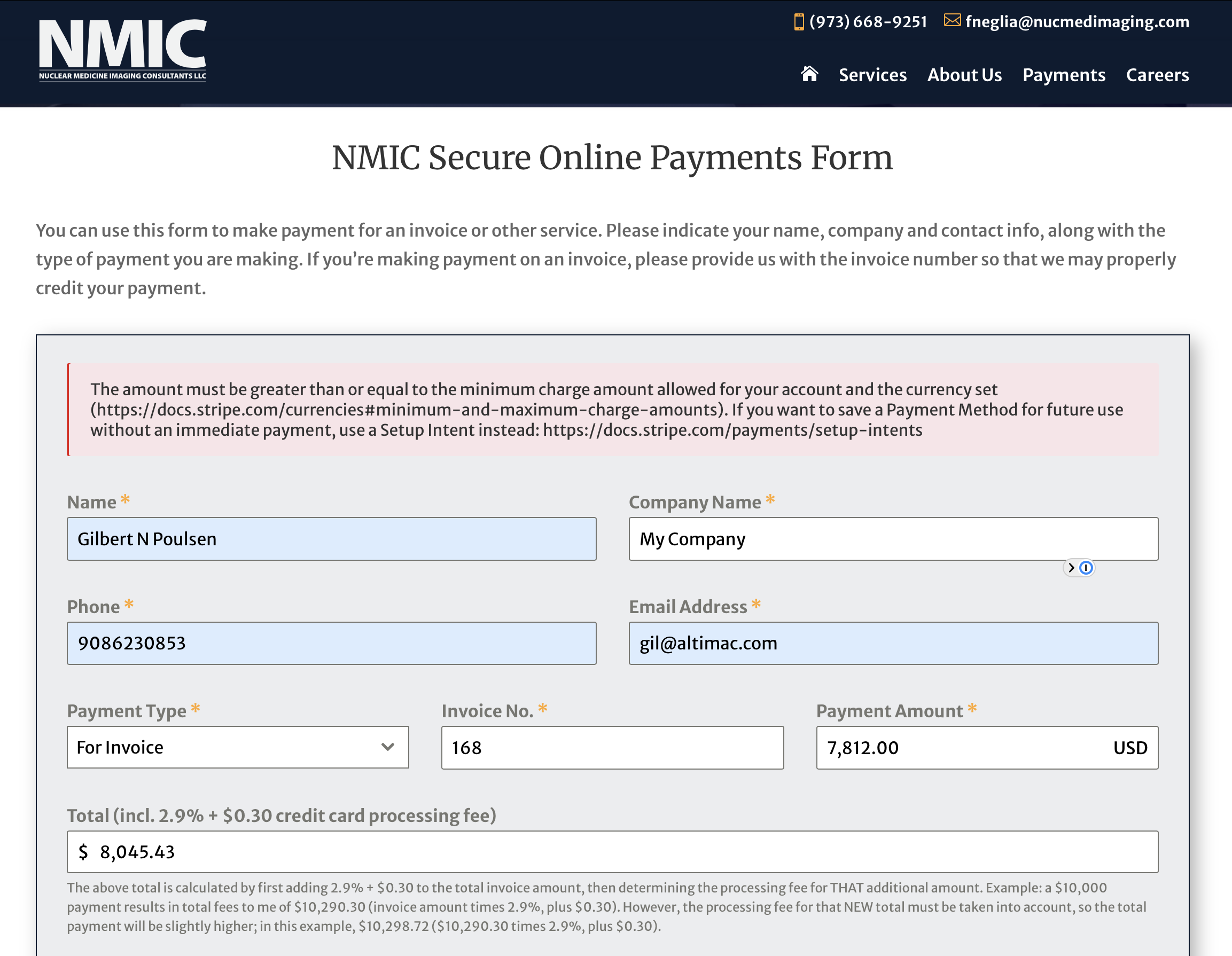
Stripe error: “amount must be greater than or equal to the minimum charge…”
-
Hi, folks. Not sure exactly when this started happening, but I have two payment forms on a client’s site that are similar and both use Stripe for processing. Up until now, I used a Total field that was hidden until the user entered a payment amount for an invoice, and form submissions/payments have been working fine, but now any attempt to submit a completed form results in the following error:
“The amount must be greater than or equal to the minimum charge amount allowed for your account and the currency set (https://docs.stripe.com/currencies#minimum-and-maximum-charge-amounts). If you want to save a Payment Method for future use without an immediate payment, use a Setup Intent instead: https://docs.stripe.com/payments/setup-intents”
I did have a min/max amount set in the Amount field, which was >1 and < 11000, so I removed that as a test, and the error still occurred. I tried removing some fields, saving the form, and adding them back in, but none of that worked either. The only way I was able to correct the issue was to remove the condition from the Total field, so that it’s always visible, and that allowed the form to submit successfully. When I restored the condition to hide the Total field until Amount is populated, the error returned.
So based on that and a few scattered reports of similar issues that a few Forminator users reported, it looks like if any of the fields used in a calculation to determine the total to be processed by Stripe causes the submission to fail?
Any information or guidance you can provide on this is much appreciated; i have uploaded a screen capture of the error, and an export of the form, to my cloud if that assists you in troubleshooting:
https://media.altimac.com/images/forminator-invoice-payments-form-export.txt
https://media.altimac.com/images/stripe-error.png


You must be logged in to reply to this topic.