Broken Attribute Links
-
Hoping you can help. Whenever we update from Woo 9.4.3 to any recent versions on one of our client’s sites, our store attribute links break. We have an attribute called ‘Brand’, they can all still be accessed and edited in the backend but when viewing the pages on the frontend, we get a ‘Page Not Found’ message. I have tried refreshing permalinks in case they were an issue, but the links remain broken.
-
This topic was modified 1 year ago by
simondb.
-
This topic was modified 1 year ago by

-
Hi there!
Since the issue occurs after updating from WooCommerce 9.4.3 to a more recent version, I suggest creating a staging site and deactivating all plugins on the staging site. Then, update WooCommerce to the latest version (9.7.1) and check if you still face the same issue. For more details on how to run a conflict test you can use this article.
https://woocommerce.com/document/how-to-test-for-conflicts/If the issue persists even after deactivating all plugins, please go to Settings → Permalinks, click Save Changes, and then check if the attribute links work.
If that does not help, could you please confirm whether the attributes you are referring to were created using a plugin or if they are the default WooCommerce attributes?
Also, I’d like to understand your site properly. Please share with us the necessary information below for us to investigate the issue further:
- System Status Report which you can find via WooCommerce > Status
- Fatal error logs (if any) under WooCommerce > Status > Logs.
Please use https://pastebin.com/ or https://gist.github.com/ and share a link to that paste in reply here. Once we have more information, we’ll be able to assist you further.
Hi there,
We haven’t heard back in a bit, so I’ll go ahead and mark this as resolved for now. If you’d like to pick things back up later, we’re just a message away!
If you have a moment, we’d really appreciate a review: https://wordpress.org/support/plugin/woocommerce/reviews/#new-post
Hi, I have done as advised on a staging version of the website. All plugins except for Woocommerce where and are disabled, upon updating from Woo 9.4.3 to the current version, the attribute links once again broke. I have flushed the permalinks and again this had no effect. I believe the attributes were indeed created via Woo itself.
Example: https://eqsuk72355.e.wpstage.net/brand/mettler/
To view staging you will need Username: blogvault and Password 1b15c70e.
The live site which hasn’t been updated shows what should display and that the links are functioning: https://eqsuk.com/brand/mettler/
System report for staging site: https://pastebin.com/grJADkvT
Hi there!
Thank you for sharing the details. I have checked the system status report, and I can see that the WooCommerce database and WordPress are still not using the updated version. Could you please update both the WooCommerce database and WordPress and see if that resolves the issue?
You can update the database version by going to WooCommerce → Status → Tools. There, you will find the Update Database button. Click on that button to update the database.Alternatively, you can try accessing your database directly to check for any pending notifications. Here’s how:
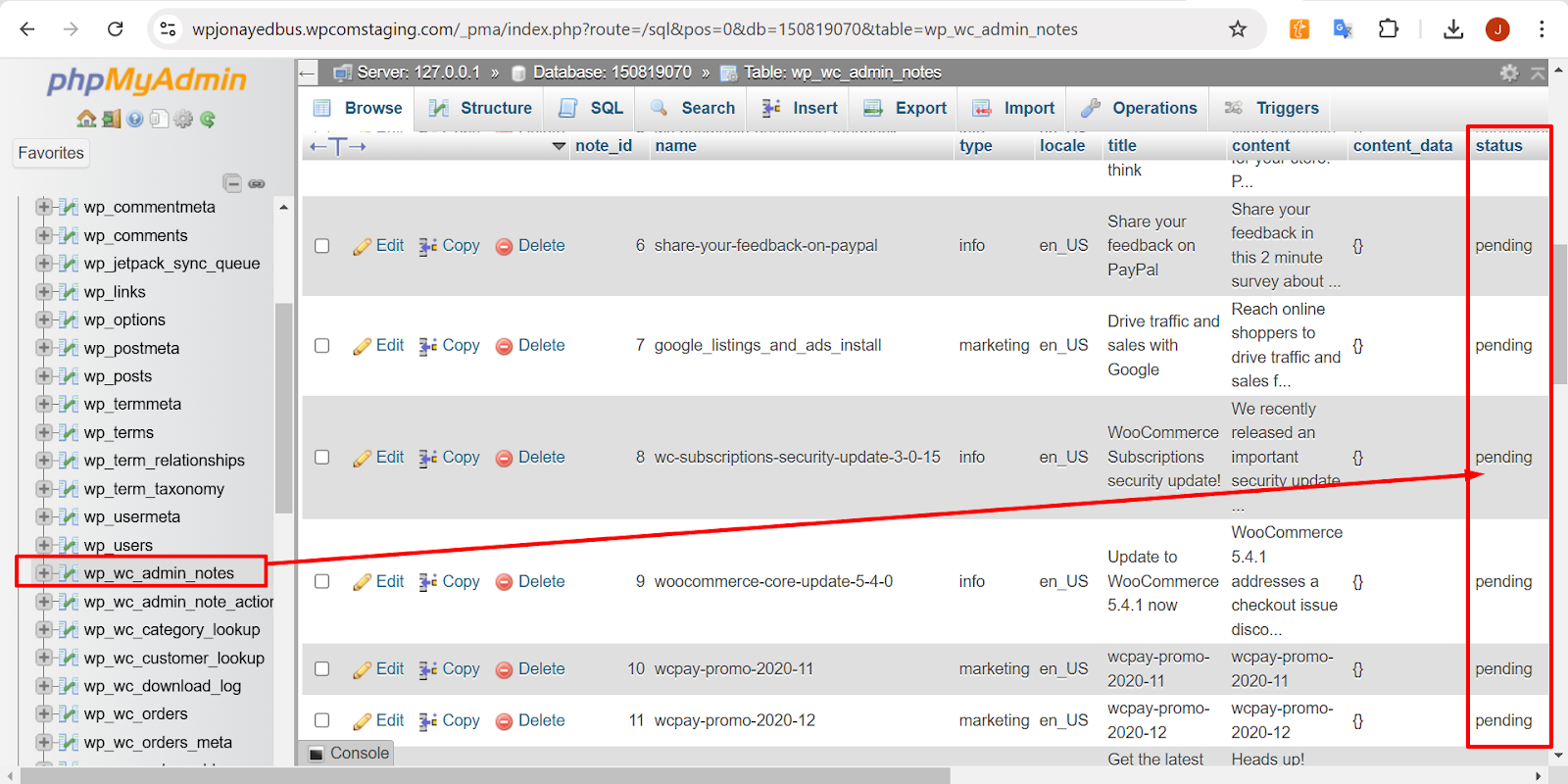
- Go to your WP database and locate the
wp_wc_admin_notestable. - Look for any entries related to the database update and check if the status is set to Pending.
- If so, you can manually change the status to Actioned to see if this resolves the issue.
The table structure should look something like this:
Also, please try to resave the permalink settings on your staging site and see if that resolves the issue. To do this, go to Settings → Permalinks, click Save Changes, and then check if the attribute links work.
If you’re still facing the same issue, could you please confirm whether you created those attributes using the default WooCommerce settings or a custom plugin?
The more information we have, the more accurately we can assist you.
Thank you!
Hi,
I’ve ran the database update manually via the woo options as advised, WordPress is now at 6.8.1, and the permalinks have been resaved but the issue still persists.
I’ve found that table in PHP MyAdmin and a there are over 200 records, with most having the status of pending or unactioned. I’m not sure which specific ones I need to focus on changing manually.
I didn’t build the site, but my assumption is that the attributes were created through Woo itself. Is there a way to establish that for sure though?Hi there,
Thank you for the update and for detailing the steps you’ve taken so far, including running the database update, updating WordPress to 6.8.1, and resaving permalinks. I understand the issue is still persisting, and that you’ve found over 200 records in the database, with most showing a status of “pending” or “unactione”. These records could be related to unfinished actions or incomplete processes.
For testing purposes, I created an attribute named “Brand” and was able to replicate the issue on my site as well. It seems that the new “Brand” feature introduced in WooCommerce version 9.4 is causing this issue. By default, this feature uses the “brand” base, and as a result, the attribute created with that slug is not functioning properly.
To resolve this temporarily, could you please go to your site’s Dashboard, navigate to Settings > Permalinks, and find the Product brand base option? Set the value to “test”, then try accessing the attribute link again to see if that resolves the issue for you.
Here’s a screenshot showing how to change the Product brand base value:
🔗 ScreenshotLet me know how it goes or if you need further assistance!
-
This reply was modified 11 months ago by
shahzeen(woo-hc).
Hi,
I can confirm that this has resolved the issue thankfully.
Hi @simondb,
Thank you so much for following up and confirming that the fix worked on your end. I’m happy to hear that updating the Product brand base setting resolved the issue with the broken attribute links.
If there’s anything else you’d like to explore, or if new questions come up as you continue working on the site, feel free to reach out again anytime. We’re always happy to help!
In the meantime, if we’ve been able to assist you, we’d really appreciate a quick review here: https://wordpress.org/support/plugin/woocommerce/reviews/#new-post
Wishing you a smooth rest of the day!



The topic ‘Broken Attribute Links’ is closed to new replies.
