• Resolved GregW

    (@gwmbox)


    I wish to use a custom field (business name) for my permalinks, I can set the business name to the permalink but it adds %20, e.g. my%20custom%20thing. Is there a way to remove the %20 and insert a dash instead?

    Or is there a way I can get the username to be automatically generated from the business name field?

    Or is there way when they type in their own username, that if there are spaces it either removes the spaces or gives a warning that there can be no spaces, only alpha and dashes?

    Thanks

    • This topic was modified 1 year, 6 months ago by GregW.
    • This topic was modified 1 year, 6 months ago by GregW.
Viewing 15 replies - 1 through 15 (of 19 total)
  • @gwmbox

    The %20 is added to the $slug by a rawurlencode.

    You can update the $slug and replace %20 with a dash by using this filter:

    https://ultimatemember.github.io/ultimatemember/hooks/um_custom_meta_permalink_base_generate_user_slug.html

    Thread Starter GregW

    (@gwmbox)

    Do I need to edit that code to assign the custom meta value, as it did not work form me?

    Thread Starter GregW

    (@gwmbox)

    Hi @missveronicatv , just a follow up if possible as I could not get that to work by just adding it to my functions.php file, unless I need to edit it to something else? I have set the Profile Permalink Base to Business_Name but when used it still shows the %20 for spaces in that name.

    Is there a way I can get the permalink to use a dash “-” in place of the %20 and validate it is unique, if not unique append a number OR allow user to edit it (the permalink?).

    So if my business name is Blue Giraffe, the permalink will be /blue-giraffe, but if someone else then has the same name (very rare) it will be /blue-giraffe-2 or can they edit it to something they want, e.g. blue-giraffe(-bob).

    Thanks

    P.S. If I need paid support to help me here please let me know. I do have an expired extension I don’t use, but may use again, if I renew will that avail me to the support I need as above?

    • This reply was modified 1 year, 6 months ago by GregW.
    • This reply was modified 1 year, 6 months ago by GregW.
    • This reply was modified 1 year, 6 months ago by GregW. Reason: add more info

    @gwmbox

    No, you can’t use the Business_Name if it’s not unique.
    I will add a Permalink setting to the “Unique User Account ID” plugin,
    where the meta_key option will give you the unique format required.

    https://github.com/MissVeronica/um-unique-user-account-id

    @gwmbox

    The update with a permalink option for the plugin “Unique User Account ID” is now ready for download.

    https://github.com/MissVeronica/um-unique-user-account-id

    Thread Starter GregW

    (@gwmbox)

    @missveronicatv do I create field for the unique id before I add this plugin?

    I’m obviously a tad dumb as not 100% sure what I enter in those settings (3 boxes).

    @gwmbox

    do I create field for the unique id

    No

    Form ID:prefix or meta_key format

    4844 : meta_key : Business_Name : - : permalink

    Replace 4844 with your Registration form ID

    Number of digits

    No value is required for permalink mode

    Unique User Account ID meta_key

    You can use my_um_permalink for example

    Thread Starter GregW

    (@gwmbox)

    Ok so I tried it, I get the unique ID working but not the permalink

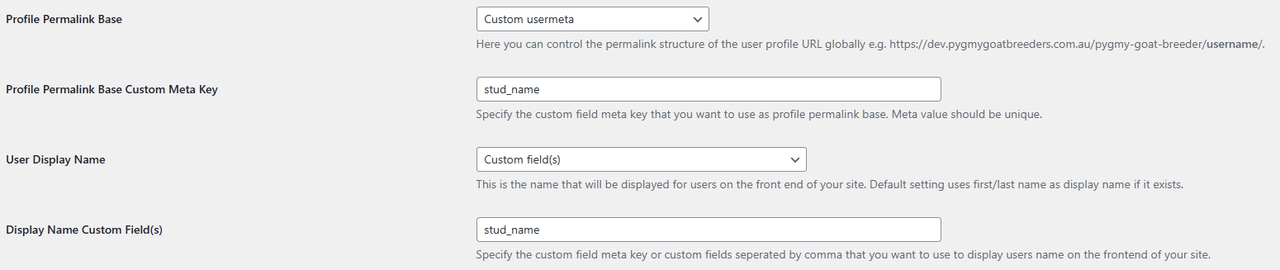
    My Settings in UM

    General > User

    and

    I get the PGBA00001 ok, but the stud_name still has %20 and no –

    @gwmbox

    Form ID:prefix or meta_key format: Remove 51 : PGBA
    Profile Permalink Base Custom Meta Key: Replace stud_name with um_unique_account_id

    Thread Starter GregW

    (@gwmbox)

    @missveronicatv

    Many thanks, it is working perfectly now.

    • This reply was modified 1 year, 6 months ago by GregW.
    Thread Starter GregW

    (@gwmbox)

    Hi again @missveronicatv

    Just came across an issue where if a business name has a non alpha/numeric value, e.g. mikes

    It will not work and causes it to not work.

    How do I clean the permalink to remove the non alpha/numeric symbols that may be used in a business name

    @gwmbox

    You can try an update of the plugin
    with removal of non alpha/numeric characters in permalink mode.

    https://github.com/MissVeronica/um-unique-user-account-id

    Thread Starter GregW

    (@gwmbox)

    @missveronicatv thanks that worked but now it removes the dash also from the url.

    It was The Lolly Shop – which was converted to the-lolly-shop

    But now if it has a character like ‘, e.g. John’s Lolly Shop – it is now johnslollyshop no dashes.

    Can we have the dash back? 🙂

    • This reply was modified 1 year, 5 months ago by GregW.
    • This reply was modified 1 year, 5 months ago by GregW.

    @gwmbox

    Yes, you are right and this update is tested OK with your John’s Lolly Shop

    https://github.com/MissVeronica/um-unique-user-account-id

    Thread Starter GregW

    (@gwmbox)

    @missveronicatv I am not sure you understood my request, or I can’t explain it better.

    Initially we had the %20 in the slug, e.g. Business%20Name

    That was fixed by converting the spaces (%20) with a dash e.g. business-name

    Then if a name contained a non alpha/numeric character )e.g. ‘ )it would remove them, so Lolly’s becomes lollys, but if the full name is Lolly’s Something it now also removes the dashes between the words.

    So now we have lollyssomething and not lollys-something

    Is there way you could modify this to bring back the dash between the words in a name?

Viewing 15 replies - 1 through 15 (of 19 total)

The topic ‘Remove space from permalink when using custom’ is closed to new replies.