thank you for your reply. In the page of order I have just the button “PDF Packing Slip” and the “PDF document data” section is empty. How can I to create and to open the PDF invoice?
The PDF invoice could be disabled for that particular order because of its order status… or maybe you have disabled the document altogether!
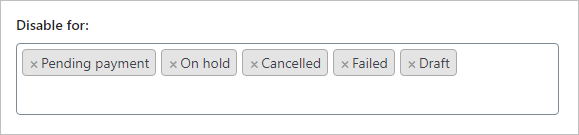
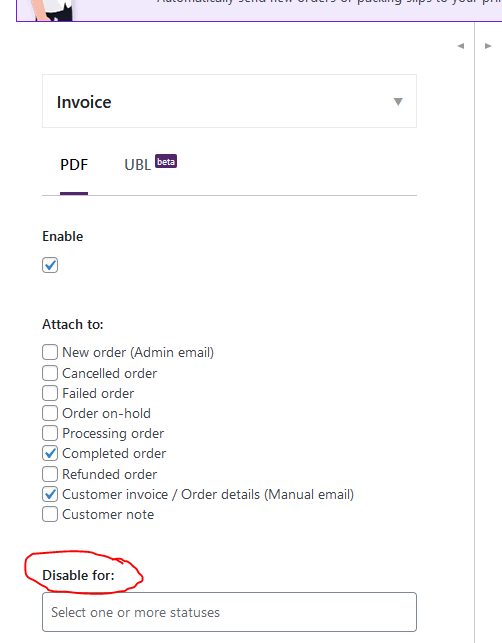
Please check this in WooCommerce > PDF Invoices > Documents > Invoice: Here can see if the document is activated and in which order statuses is the document deactivated, under the Disable for setting:
I tried, but I have same button. However, I see that in the bulk action drop-down menu in order list there is availabe PDF invoice option. If I create the PDF from this voice, it generate me the correct file and I see the number in “Invoice number” column.
Can I to display the PDF invoice button in the order detail page as well?
Please go to WooCommerce > Status > System Status, click on Get system report, then click on Download for support, attach the file on https://www.file.io/, and finally paste the download link in a reply here.
Please note that the file will be deleted after the first download, so please do not try to test the download link yourself!
Thank you to you for your support. Disabling “WooCommerce PDF Invoices Italian Add-on” plugin now I have the PDF invoice button in the order detail. But in the past I have used both the plugin…
This confirm that they are disabling our PDF invoice button, maybe to replace it with the receipt document they provide? I would check their settings to see if there is an option to disable this behavior.
Driven by curiosity, I went ahead and installed the “WooCommerce PDF Invoices Italian Add-on” plugin to check the settings myself.
I realized that there is a setting which control the PDF invoices availability, based on whether the customer select the invoice or not:
If you have the “Don’t issue any invoice or receipt” option selected, the invoice will be available when the customer selects the invoice in the document selector field and fills the VAT number field with a valid one:
Otherwise, it will be disabled. Therefore, if you want to have the invoice always available for old or manually created orders, you have to select the “Issue an invoice” option instead to enable the invoice by default.