Viewing 8 replies - 1 through 8 (of 8 total)
  • Plugin Support wfjanet

    (@wfjanet)

    Hi @pieter22,

    Thank you for reaching out to us.

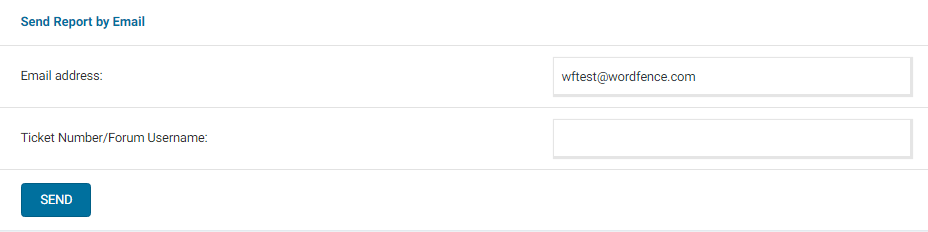
    Can you send a diagnostic report to wftest @ wordfence.com? You can find the link to do so at the top of the Wordfence > Tools > Diagnostics page. Then click on “Send Report by Email”. Please add your forum username where indicated and respond here after you have sent it.


    NOTE: It should look as follows – Screenshot of Tools > Diagnostic > Send by Email

    Thanks,

    Janet

    Thread Starter Pieter22

    (@pieter22)

    Hi @wfjanet I have sent the diagnostic report.

    Plugin Support wfjanet

    (@wfjanet)

    Hi @pieter22,

    Thank you for sending the diagnostic report.

    It looks like Sucuri is blocking your site from connecting back to itself. Can you please whitelist your site’s IP address on Sucuri?

    From the diagnostic report it should be 169.1.110.59. You can also whitelist the additional IP address 185.93.228.2.

    Once done, please try running a scan and let me know how it goes.

    Thanks,
    Janet

    Thread Starter Pieter22

    (@pieter22)

    Thanks @wfjanet

    I have tried whitelisting 169.1.110.59 in both Sucuri and Wordfence. From what I can see the 185.93.228.2 IP is a Spam bot, so I want to keep that blocked.

    I also tried disabling Sucuri on the site, but it made no difference.

    Plugin Support wfjanet

    (@wfjanet)

    Hi @pieter22,

    Thank you for getting back to us.

    With Sucuri disabled, can you please do the following?

    • Stop the existing scan if it is still running (The “Start New Scan” button turns into a “Stop” button while the scan is running).
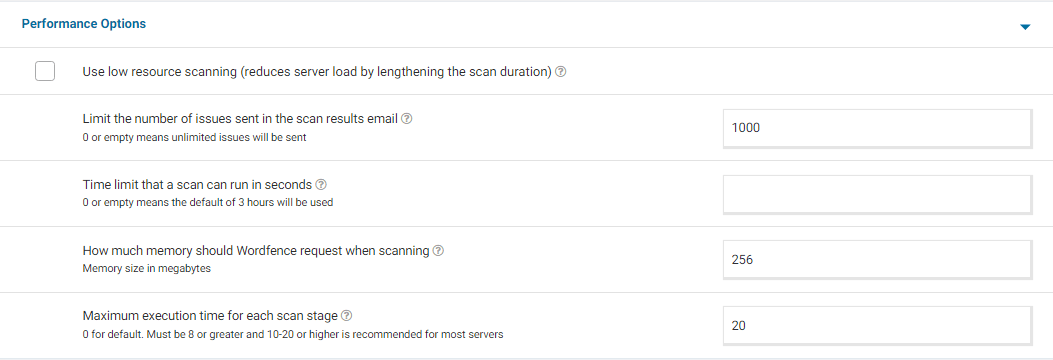
    • Go to your Wordfence > Scan > Manage Scan and locate the “Performance Options” section. Set “Maximum execution time for each scan stage” to 20. 
    • Click to “Save Changes”.
    • Go to the Tools > Diagnostics page.
    • In the “Debugging Options” section check the circle “Enable debugging mode”.
      If “Start scan remotely” is checked, uncheck this option.
    • Click to “Save Changes”.
    • Start a new scan on the Scan page.
    • If the scan fails again, copy the last 20 lines or so from the Log (click the “Show Log” link) once the scan finishes and paste them in the post.
    • On some sites, this will correct the issue. Adding “20” for the “Maximum execution time for each scan stage” tells the scan to pause every 20 seconds and start again where it left off, which makes the scan more performance-friendly for some servers. If this fixes the issue and scans run again, you can leave all the settings above except for “Enable Debugging Mode”.
    • For a screenshot of my recommended Performance setting options click here.

    Thanks,

    Janet

    Thread Starter Pieter22

    (@pieter22)

    Thank you @wfjanet I will do this and get back to you with the outcome.

    Plugin Support wfjanet

    (@wfjanet)

    Sounds good @pieter22

    Let me know what you find.

    Thanks,

    Janet

    Thread Starter Pieter22

    (@pieter22)

    Hi @wfjanet,

    I am happy to see that this thread is still open. I made the changes suggested above and this is the error that I received in the scan log.

    [May 16 14:13:24] Ajax request received to start scan.
    [May 16 14:13:24] Entering start scan routine
    [May 16 14:13:24] Got value from wf config maxExecutionTime: 20
    [May 16 14:13:24] getMaxExecutionTime() returning config value: 20
    [May 16 14:13:24] Test result of scan start URL fetch: array ( 'headers' => WpOrg\Requests\Utility\CaseInsensitiveDictionary::__set_state(array( 'data' => array ( 'server' => 'Sucuri/Cloudproxy', 'date' => 'Tue, 16 May 2023 14:13:25 GMT', 'content-type' => 'text/html', 'x-sucuri-id' => '20002', 'x-xss-protection' => '1; mode=block', 'x-frame-options' => 'SAMEORIGIN', 'x-content-type-options' => 'nosniff', 'content-security-policy' => 'upgrade-insecure-requests;', 'x-sucuri-block' => 'EXPVP32', ), )), 'body' => ' Sucuri WebSite Firewall - Access Denied <link href="https://fonts.googleapis.com/css?family=Open+Sans:400,300,600,700" rel="stylesheet" type="t
    [May 16 14:13:24] Starting cron via proxy at URL https://noc1.wordfence.com/scanp/carlstromproductions.com/wp-admin/admin-ajax.php?action=wordfence_doScan&isFork=0&scanMode=highsensitivity&cronKey=6eaae371b60bb9e3f6a899e29c4f088d&k=7c97989bac895bbe85668239e15cfb04341ca69e8c32f4ad74c6b70c8283cfc7&ssl=1&signature=96176af1863cc82aa5a159897ac3ff4eaed6248fe555ea4e629603da8e1841ab
    [May 16 14:13:25] Scan process ended after forking.

    here is a screenshot of the current diagnostic and performance options.

    • This reply was modified 3 years ago by Pieter22.
    • This reply was modified 3 years ago by Pieter22.
Viewing 8 replies - 1 through 8 (of 8 total)

The topic ‘Wordfence scan keeps failing’ is closed to new replies.