• Resolved ithelpzi

    (@ithelpzi)


    Dear Support,

    First of all, I would like to thank you for offering the free version of the Booking plugin. We are very satisfied with its functionality and ease of use. However, we have encountered an issue recently. When someone tries to book a slot and fills out the necessary information, the information disappears after clicking “book” and they do not receive a confirmation message that their reservation is in progress. Furthermore, the reservation is not appearing in my dashboard under the “reservations” section. I would greatly appreciate your assistance in resolving this issue as soon as possible, as people are unable to check in for their vacations.

    Thank you.

    The page I need help with: [log in to see the link]

Viewing 7 replies - 1 through 7 (of 7 total)
  • Plugin Author wpdevart

    (@wpdevart)

    Hi.

    Can you send us the URL of the calendar page again?

    Thanks.

    Thread Starter ithelpzi

    (@ithelpzi)

    Our website is on VPN. This website is inside the company and can’t be accessed without VPN. How can you help me? I’ve tried several ways to resolve this issue, but when someone fills out the form and clicks “reserve”, the information disappears and I don’t receive the reservation in my dashboard. Everything was working until ten days ago.

    Plugin Author wpdevart

    (@wpdevart)

    Hi @ithelpzi.

    It looks like the problem is related to the latest version of our plugin, so here’s a workaround. Download the previous version from here – https://downloads.wordpress.org/plugin/booking-calendar.3.2.3.zip, then deactivate and delete the current version from the Plugins page (in this way, you will not lose the old data) and then install 3.2.3 version.

    Check if it is working correctly and let us know.

    If this version works fine, then don’t update to version 3.2.4 until we update our plugin again. Once version 3.2.5 is released and we update it in the WordPress directory, you will be able to update it as well. We will try to fix this error as soon as possible and update the plugin.

    Thanks.

    Thread Starter ithelpzi

    (@ithelpzi)

    Thank you for your help. I deleted the current version and installed the version (3.2.3) you sent me. There’s a problem with this version when I try to create a Calendar. To do this, I need to have a created Theme, Extras, and Forms. When I create and save them, they disappear. It’s the same for all three sections.

    Plugin Author wpdevart

    (@wpdevart)

    Hi @ithelpzi.

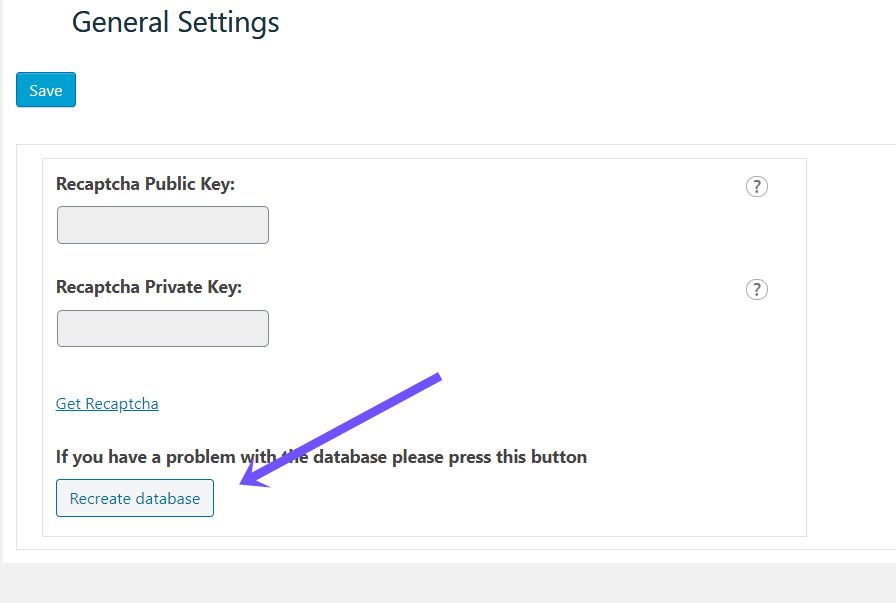
    Oops, sorry, we forgot to mention that you need to re-create our plugin database (don’t worry, this won’t delete the old data of the calendar). From the left admin menu, open our plugin main menu. Then go to the “Global Settings” page and click on the “Recreate database” button. You can check this screenshot – https://wpdevart.com/wp-content/uploads/2022/04/database-issue.png

    This should fix the problem.

    Thanks.

    Plugin Author wpdevart

    (@wpdevart)

    Hi @ithelpzi.

    We have fixed the issue and updated the plugin. Now you can update the plugin, version 3.2.5 should work correctly.

    Thanks.

    Plugin Author wpdevart

    (@wpdevart)

    Hi.

    Since we fixed the bug in the latest version, we will close the topic.

    If you have other questions, please let us know.

    Thanks.

Viewing 7 replies - 1 through 7 (of 7 total)

The topic ‘Booking not working anymore’ is closed to new replies.