Viewing 3 replies - 1 through 3 (of 3 total)
  • Hello @abdullahowolabi,

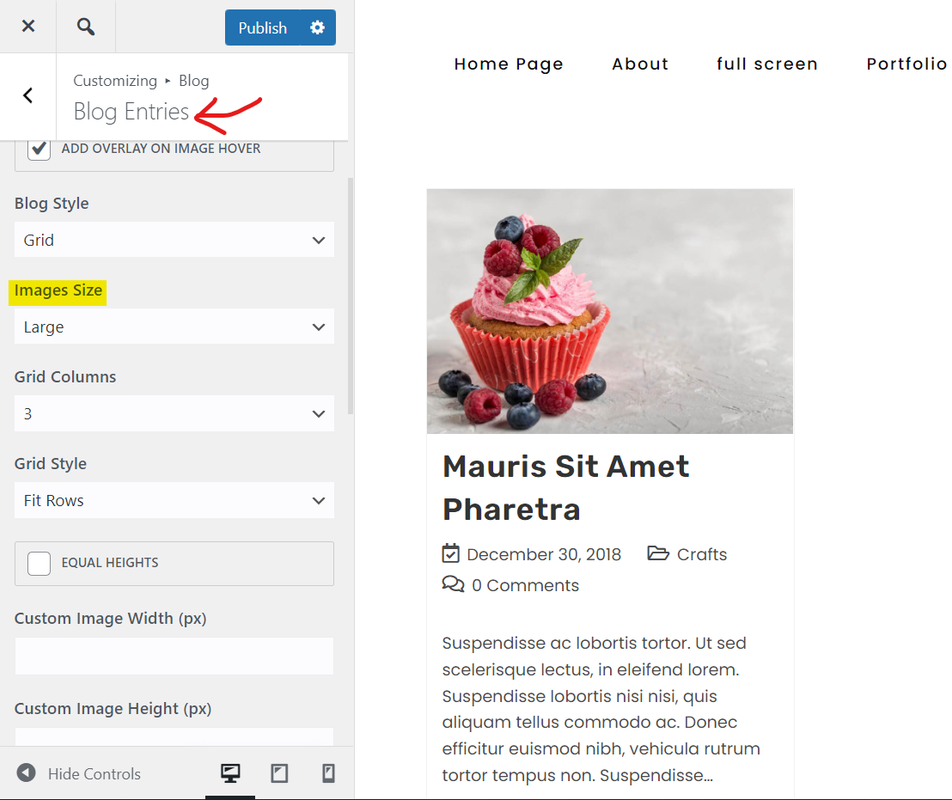
    Regarding the blurry images, please navigate to Customizer > Blog > Blog Entries, then set the “Large” item for the “Image Size” option. Please check this screenshot: https://i.postimg.cc/D02Yp1jg/image.png.

    Regarding the layout issue, it seems you have written some custom CSS, but since you have the CDN or cache plugin on your website, the priority of loading the style changes; Custom CSS should be overridden on the default styles, so make sure all custom CSS are strong by adding the “!important” or using some ID.

    Note: if you have any cache plugin or server cache(CDN / Browser Cache and Cookies and …), you need to clear its cache contents or disable them to see your changes. Also, don’t forget to click on the regenerate all assets file and data in Elementor > Tools.

    I hope that helps.
    Best Regards

    Thread Starter abdullahowolabi

    (@abdullahowolabi)

    Thank you sooo much, problems solved

    You’re most welcome,
    I’m glad we could help.

Viewing 3 replies - 1 through 3 (of 3 total)

The topic ‘Blog post cards cut off’ is closed to new replies.