Hi @pauloportela00,
I am not sure about this one. Perhaps try clicking on the Connect button again in the plugin settings in the first tab. Then when going through the prompts make sure you give the app all asked privileges.
If this still doesn’t work, you can maybe try removing our app from LinkedIn here: https://www.linkedin.com/mypreferences/d/data-sharing-for-permitted-services and then try pressing the connect button again.
Sorry if that doesn’t help, I am just not sure in this situation as I can’t repeat the issue on my end. Thanks,
Hi there,
I tried that but didn´t worked..
Now i was able to connect the profile, but in the posts, for example, when i try to share the post, pressing the button “share now” i receive the following message:
“We tried to send the post but no profile is selected for this post.”
I don’t understand why because i have the profile of the connected account, in the “profile section” turned on with an arrow
Hi @pauloportela00,
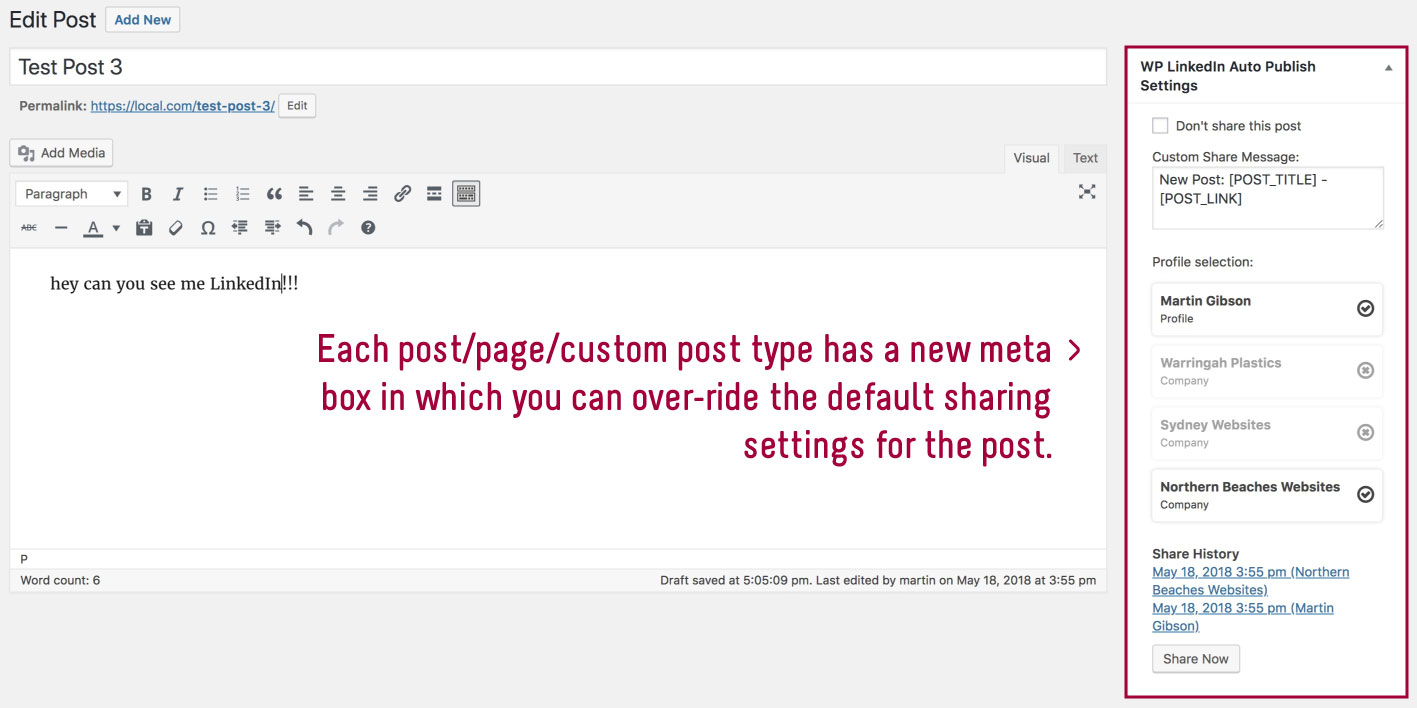
Glad to hear you were able to connect ok. Please go into the specific post edit page and check the metabox, and make sure a profile is enabled. Please see this screenshot as to the metabox I am referring to: https://ps.w.org/wp-linkedin-auto-publish/assets/screenshot-5.jpg?rev=1876943 it might be in a slightly different location on your edit page.
Thanks,
Hi,
Yes i was already able to see that section.
What it´s strange for me now it´s that the section inside of the new for publish does not appear to me – https://snipboard.io/tloPc4.jpg.
But in the news appears to column to share – https://snipboard.io/Oq1p3I.jpg.
In the definition i think that i have all well defined https://snipboard.io/R9BtPU.jpg and https://snipboard.io/Ek89Xw.jpg. But even when it publish the new.
Hi @pauloportela00,
In your screenshot here: https://snipboard.io/tloPc4.jpg click the 3 dots in the very top right hand corner of the page, and click “Preferences” at the bottom of that menu. Then go to the “Panels” tab and make sure “WP LinkedIn Auto Publish Settings” is enabled.
Thanks,
Hi @northernbeacheswebsites,
If you noticed i have that section enabled as you can see in the picture.
However as you can see in the picture as well, the section does not appear in the section of the new.
https://snipboard.io/F4qJ1m.jpg
Any help regarding that?
Have you checked everywhere on the page for the metabox? It may not be on the left hand side, it might have been moved somewhere else? You could even try doing a browser search for “WP LinkedIn” and see if anything shows on the page.
I am not sure why it would be hidden, I haven’t seen this issue reported before.
Thanks,
Hi,
I tried to find it but im not able to find the WP Linkedin inside of a new to publish it.
However in the page news when i press the button to “Share now” in the column of the WP Linkedin the following appears:
https://snipboard.io/PDnBZw.jpg
What its strange because i have all defined as should be, i guess.
https://snipboard.io/xMvWKh.jpg
https://snipboard.io/SA95zl.jpg
Hi @pauloportela00,
In the plugin settings you have 2 categories selected for “Don’t share select post categories on LinkedIn” as shown here: https://snipboard.io/SA95zl.jpg
This looks like the problem. Emphasis on “Don’t Share”. I hope that solves the issue 🙂
Hi again,
Thanks for the help provided until now.
Im already able to see the section of the WP Linkedin. However when i try to share a post the following message appears to me https://snipboard.io/7zkAPU.jpg
It´s strange because i have the profile “Test Envio” selected right?
Hi again,
Another one question.
Which is the format that you advise me to write the news in the wordpress for they be well formatted in the LinkedIn?
Im asking these because in the LinkedIn my news always are published like this:
https://www.linkedin.com/feed/update/urn:li:activity:6983062814890291200/
Notice the paragraphs between the phrases.
How should i write the news here, in the wordpress:
https://snipboard.io/YTXgfy.jpg
Hi @pauloportela00,
On first question, that does look odd, I am not sure what the issue could be there. Do you want to check your javascript log and see if there are any errors?
Have you tried deactivating all other plugins and trying?
On your second question, just try sharing what you have done (which looks ok to me) and then see the result. If it doesn’t look right, you may need to adjust the formatting, or if that is not reasonable, you can share the content you want to share with me and I can try and update the plugin so it looks ok when shared to LinkedIn.
Thanks,
Hi,
There´s something that should be affecting this.
Can you try to help me finding the problem what should be affecting this?
In the other hand, regarding the post in the linkedin it´s seem´s like this https://www.linkedin.com/feed/update/urn:li:activity:6983727315016933376
and my question it´s that space for the “paragraphs” it´s to big it should be in the other line but not with that space all
Where should i send you the credentials for you to check?
Hi @northernbeacheswebsites ,
I find which is the plugin that it´s causing “Troubles” with yours.
Can you please help me to try to figure out if there´s any way to see if it´s possible to have both working as expected?
If yes, i will be kindly to provide the credentials or make a session with you to solve and explain to you that.
Thanks for your help!!