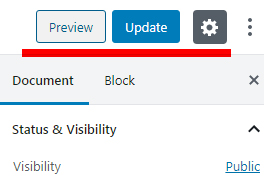
In the Gutenberg editor there is only an update button once the post/page is already published. If you want to change the publication status, go to “Document” and select the status under “Visiblity”. See also:
https://motopress.com/wp-content/uploads/2019/12/gutenberg-update-button.jpg
I’ve done that. I didn’t know there was no publish button, but I did change the public/private setting back and forth to try. Under the publish section in status and visibility, there is a date to publish. If I set his to immediate, and then update to save, it puts the date back on as about 6 hours from whatever time I did that. I’ve waited out that ime to see if it publishes the change, it does not.
No matter what I do or change the changes will not appear outside the editor. Just tried on a device that has never opened the site before.
So your real problem is that a post isn’t visible to the public, even though you actually saved it correctly? Where on your page would you expect this post to be? And what is the name of this post?
Also, since the post doesn’t seem to be timed out, could you please look under Tools > Site Health to see if any anomalies are mentioned there?
There’s a section called “the story,” and a link in that section called “details of count 3” that leads to a page called Appendix
Says enable google analytics 4 under critical
remove inactive plugins, remove unused themes, and and automatic updates are disabled under recommended
“Count 3 Details” opens a pop-up window with a text and an image. What specifically is missing here now?
I changed the text. The old text shows up but the new will not. I replaced some words and added several paragraphs.
You use the Popup Maker plugin for this display. If necessary, you should ask their support why the content of the popup generated by the plugin does not update: https://wordpress.org/support/plugin/popup-maker/
Also, you are using W3Total Cache, a cache plugin, which could also be responsible for the problem. You could deactivate it for a test and see if it changes anything. If so, you should contact their plugin support: https://wordpress.org/support/plugin/w3-total-cache/
No on W3
Posted about popup-maker
. Reason: Moved to Fixing WordPress, this is not an Everything else WordPress topic