Thanx for the report. Will be fixed in the next version.
Joseph
Can you tell me when the next version will fix the problem? I can’t add any albums or change anything, until the problem is fixed.
And, please note, not all the text looks like html in the screenshot sent – for most of the over 6,000 photos, the text runs in one paragraph, not as it was.
This is how it looks now on this short post with less text but it is the same for posts with more text.
PBA/NAHA 2022 BARBER- Winner Hair: Navin Ramgoolam, Salon Deauville, Montreal, QC Makeup: Kris Christodoulou Fashion Stylist: Kim Rivka Photo: Vanessa Secondino All rights reserved © Helen Oppenheim
And suddenly, there is now one big photo.
On the website, it is still good but I am very concerned.
Only when you edit existing descriptions, the linebreaks will vanish.
You can install this pre-release to get it fixed:
https://downloads.wordpress.org/plugin/wp-photo-album-plus.8.2.01.002.zip
Install as described here:
https://wppa.nl/docs-by-subject/development-version/
and delete all caches after install.
Installed dev version cleared caches and no change.
Maybe you edited it before. Re-enter the linebreaks where you want them, click poutside the textarea and re-open the page. The linebreaks will show up again.
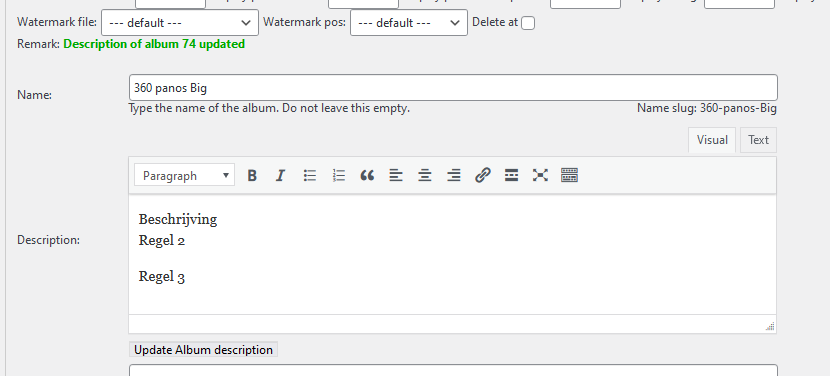
The line breaks and html are in place. The text editor is only displaying HTML without any way to switch to plain text editor.
Most people don’t know how to write in HTML.
I am talking about editing within the backend album admin. The frontend editing is working again.
In version 8.1.0, dated feb 1 2022 i dropped the use of the wp editor to comply with the wp coding rules.
I will investigate if i can re-implement it with the coding rules in mind.
I wonder 2 things:
– why is this only now an issue
– why are you confident with the fe description editor
The owner of the site ahs no HTML ability at all. If you look at the screenshot, it’s in html and all in one line. She can not work with this. She can not handle change well!