Sorry for any inconvenience caused.
Kindly check our changelog here https://wordpress.org/plugins/all-in-one-video-gallery/#developers
We introduced the searchable tags field using the “jQuery AutoComplete UI” in version 2.5.1. To be honest, I thought it was a great improvement. But, as soon as we made the release, we started receiving complaints from the users that the new UI is hard for their visitors to find the tags. We received 7 such complaints and this made me assume that we had made a mistake and released a quick version (2.5.3) immediately by replacing it with a select UI. But, I understand that it would have been better if we made this an option instead of completely removing that. I have taken note of this now and I promise that we would bring back the feature as an option again.
Our next version is coming out today. I promise that the version next to this will support this again.
Thanks for understanding!
Thank you, I can totally understand that – it’s a tricky situation based on user feedback!
I’ll look out for the change! Thanks for the speedy response!
Steve
Hi, I see the tags field has been updated. I just want to check if an issue I am now having with it is related to CSS or something else.
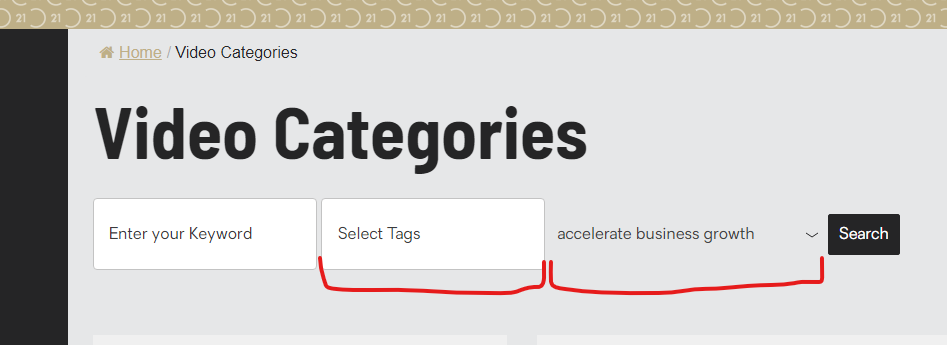
My search form is displaying TWO types of tags fields.
I am rending the search form using the following:
[aiovg_search_form tag="1"]
Render looks like:
https://cfs-prod-s3-corp.s3.ap-southeast-2.amazonaws.com/temp/Screenshot+2022-05-06+141304.png
Temporary fix:
In my _select2.css:
.select2-container {
  box-sizing: border-box;
  display: none; /* WAS: display: inline-block */
Probably a CSS conflict. Kindly get me your site address to check this directly and get you a fix accordingly.