Out of Stock Products still showing on Facebook Shop Page
-
Having a continual issue where products that are out of stock on our website still show in the Shop catalog on our Facebook page. Per my research, this seems to be a big problem judging by the reports from other users that I’ve seen online. I’ve seen it written in the plugin site on github months ago that the problem with “out of stock” products designated as such in Woocommerce but still showing up on the Facebook Shop page “has been fixed” but the issue continues to occur. I’ve tried manual syncing, creating a special “archive” category to have the catalog sync better that way, and I’ve tried other so-called “fixes” I found online only to find they didn’t work either. I can go delete individual out of stock products in the Catalog list within Commerce Manager, but that’s going to become untenable once our inventory is in the hundred and thousands of items. The weird thing is, it appears that some of our older out of stock products are showing up correctly in the Commerce Manager catalog list as “out of stock” and are NOT showing up incorrectly in the Facebook page catalog, but the NEWER out of stock items are displayed in the Commerce Manager as “in stock” and are therefore showing. Could this be a problem with plugin updates not overwriting some things properly or some other software issue? Not sure what to do at this point, but I’m close to just uninstalling everything and starting over, but I’d rather not do that without trying for an answer here.
The page I need help with: [log in to see the link]

-
Hi @jmarkj
Thanks for your question!
Having a continual issue where products that are out of stock on our website still show in the Shop catalog on our Facebook page.
To understand better your WooCommerce site system, so we can accordingly provide better guidance to help troubleshoot the issue, could you please send me a copy of your site’s System Status? You can find it via WP Admin > WooCommerce > Status.
Select “Get system report” and then “Copy for support”. Once you’ve done that, you can paste it here in your reply
### WordPress Environment ### WordPress address (URL): https://www.catherinesloft.com Site address (URL): https://www.catherinesloft.com WC Version: 5.8.0 REST API Version: ✔ 5.8.0 WC Blocks Version: ✔ 5.9.1 Action Scheduler Version: ✔ 3.3.0 WC Admin Version: ✔ 2.7.2 Log Directory Writable: ✔ WP Version: 5.8.1 WP Multisite: – WP Memory Limit: 1 GB WP Debug Mode: – WP Cron: ✔ Language: en_US External object cache: – ### Server Environment ### Server Info: LiteSpeed PHP Version: 7.4.25 PHP Post Max Size: 1 GB PHP Time Limit: 1500 PHP Max Input Vars: 2000 cURL Version: 7.71.0 OpenSSL/1.1.1d SUHOSIN Installed: – MySQL Version: 5.5.5-10.3.31-MariaDB-log-cll-lve Max Upload Size: 1 GB Default Timezone is UTC: ✔ fsockopen/cURL: ✔ SoapClient: ✔ DOMDocument: ✔ GZip: ✔ Multibyte String: ✔ Remote Post: ✔ Remote Get: ✔ ### Database ### WC Database Version: 5.8.0 WC Database Prefix: wpon_ Total Database Size: 26.16MB Database Data Size: 24.85MB Database Index Size: 1.31MB wpon_woocommerce_sessions: Data: 0.82MB + Index: 0.03MB + Engine MyISAM wpon_woocommerce_api_keys: Data: 0.00MB + Index: 0.00MB + Engine MyISAM wpon_woocommerce_attribute_taxonomies: Data: 0.00MB + Index: 0.00MB + Engine MyISAM wpon_woocommerce_downloadable_product_permissions: Data: 0.00MB + Index: 0.00MB + Engine MyISAM wpon_woocommerce_order_items: Data: 0.00MB + Index: 0.00MB + Engine MyISAM wpon_woocommerce_order_itemmeta: Data: 0.00MB + Index: 0.00MB + Engine MyISAM wpon_woocommerce_tax_rates: Data: 0.00MB + Index: 0.01MB + Engine MyISAM wpon_woocommerce_tax_rate_locations: Data: 0.00MB + Index: 0.00MB + Engine MyISAM wpon_woocommerce_shipping_zones: Data: 0.00MB + Index: 0.00MB + Engine MyISAM wpon_woocommerce_shipping_zone_locations: Data: 0.00MB + Index: 0.00MB + Engine MyISAM wpon_woocommerce_shipping_zone_methods: Data: 0.00MB + Index: 0.00MB + Engine MyISAM wpon_woocommerce_payment_tokens: Data: 0.00MB + Index: 0.00MB + Engine MyISAM wpon_woocommerce_payment_tokenmeta: Data: 0.00MB + Index: 0.00MB + Engine MyISAM wpon_woocommerce_log: Data: 0.00MB + Index: 0.00MB + Engine MyISAM wpon_actionscheduler_actions: Data: 0.20MB + Index: 0.09MB + Engine MyISAM wpon_actionscheduler_claims: Data: 0.00MB + Index: 0.00MB + Engine MyISAM wpon_actionscheduler_groups: Data: 0.00MB + Index: 0.01MB + Engine MyISAM wpon_actionscheduler_logs: Data: 0.14MB + Index: 0.11MB + Engine MyISAM wpon_commentmeta: Data: 0.03MB + Index: 0.01MB + Engine MyISAM wpon_comments: Data: 0.02MB + Index: 0.01MB + Engine MyISAM wpon_fusion_forms: Data: 0.00MB + Index: 0.00MB + Engine MyISAM wpon_fusion_form_entries: Data: 0.00MB + Index: 0.00MB + Engine MyISAM wpon_fusion_form_fields: Data: 0.00MB + Index: 0.00MB + Engine MyISAM wpon_fusion_form_submissions: Data: 0.00MB + Index: 0.00MB + Engine MyISAM wpon_links: Data: 0.00MB + Index: 0.00MB + Engine MyISAM wpon_litespeed_url: Data: 0.00MB + Index: 0.00MB + Engine MyISAM wpon_litespeed_url_file: Data: 0.00MB + Index: 0.00MB + Engine MyISAM wpon_loginizer_logs: Data: 0.00MB + Index: 0.00MB + Engine MyISAM wpon_options: Data: 8.65MB + Index: 0.08MB + Engine MyISAM wpon_postmeta: Data: 2.92MB + Index: 0.44MB + Engine MyISAM wpon_posts: Data: 10.83MB + Index: 0.13MB + Engine MyISAM wpon_revslider_css: Data: 0.09MB + Index: 0.01MB + Engine MyISAM wpon_revslider_css_bkp: Data: 0.01MB + Index: 0.00MB + Engine MyISAM wpon_revslider_layer_animations: Data: 0.00MB + Index: 0.00MB + Engine MyISAM wpon_revslider_layer_animations_bkp: Data: 0.00MB + Index: 0.00MB + Engine MyISAM wpon_revslider_navigations: Data: 0.00MB + Index: 0.00MB + Engine MyISAM wpon_revslider_navigations_bkp: Data: 0.00MB + Index: 0.00MB + Engine MyISAM wpon_revslider_sliders: Data: 0.01MB + Index: 0.00MB + Engine MyISAM wpon_revslider_sliders_bkp: Data: 0.00MB + Index: 0.00MB + Engine MyISAM wpon_revslider_slides: Data: 0.14MB + Index: 0.00MB + Engine MyISAM wpon_revslider_slides_bkp: Data: 0.00MB + Index: 0.00MB + Engine MyISAM wpon_revslider_static_slides: Data: 0.00MB + Index: 0.00MB + Engine MyISAM wpon_revslider_static_slides_bkp: Data: 0.00MB + Index: 0.00MB + Engine MyISAM wpon_termmeta: Data: 0.03MB + Index: 0.03MB + Engine MyISAM wpon_terms: Data: 0.00MB + Index: 0.01MB + Engine MyISAM wpon_term_relationships: Data: 0.02MB + Index: 0.04MB + Engine MyISAM wpon_term_taxonomy: Data: 0.01MB + Index: 0.01MB + Engine MyISAM wpon_usermeta: Data: 0.03MB + Index: 0.01MB + Engine MyISAM wpon_users: Data: 0.00MB + Index: 0.01MB + Engine MyISAM wpon_wc_admin_notes: Data: 0.03MB + Index: 0.00MB + Engine MyISAM wpon_wc_admin_note_actions: Data: 0.01MB + Index: 0.00MB + Engine MyISAM wpon_wc_category_lookup: Data: 0.00MB + Index: 0.00MB + Engine MyISAM wpon_wc_customer_lookup: Data: 0.00MB + Index: 0.01MB + Engine MyISAM wpon_wc_download_log: Data: 0.00MB + Index: 0.00MB + Engine MyISAM wpon_wc_order_coupon_lookup: Data: 0.00MB + Index: 0.00MB + Engine MyISAM wpon_wc_order_product_lookup: Data: 0.00MB + Index: 0.01MB + Engine MyISAM wpon_wc_order_stats: Data: 0.00MB + Index: 0.01MB + Engine MyISAM wpon_wc_order_tax_lookup: Data: 0.00MB + Index: 0.00MB + Engine MyISAM wpon_wc_product_meta_lookup: Data: 0.01MB + Index: 0.02MB + Engine MyISAM wpon_wc_reserved_stock: Data: 0.00MB + Index: 0.00MB + Engine MyISAM wpon_wc_tax_rate_classes: Data: 0.00MB + Index: 0.01MB + Engine MyISAM wpon_wc_webhooks: Data: 0.00MB + Index: 0.00MB + Engine MyISAM wpon_yoast_indexable: Data: 0.65MB + Index: 0.09MB + Engine MyISAM wpon_yoast_indexable_hierarchy: Data: 0.02MB + Index: 0.06MB + Engine MyISAM wpon_yoast_migrations: Data: 0.00MB + Index: 0.01MB + Engine MyISAM wpon_yoast_primary_term: Data: 0.01MB + Index: 0.01MB + Engine MyISAM wpon_yoast_seo_links: Data: 0.17MB + Index: 0.04MB + Engine MyISAM wpon_yoast_seo_meta: Data: 0.00MB + Index: 0.00MB + Engine MyISAM ### Post Type Counts ### attachment: 681 custom_css: 1 fusion_element: 16 nav_menu_item: 43 page: 24 post: 10 product: 148 product_variation: 4 revision: 191 shop_order: 1 slide: 6 wpcf7_contact_form: 2 ### Security ### Secure connection (HTTPS): ✔ Hide errors from visitors: ✔ ### Active Plugins (13) ### Akismet Anti-Spam: by Automattic – 4.2.1 All-in-One WP Migration: by ServMask – 7.49 Contact Form 7: by Takayuki Miyoshi – 5.5.2 Yoast Duplicate Post: by Enrico Battocchi & Team Yoast – 4.1.2 Facebook for WooCommerce: by Facebook – 2.6.5 Avada Builder: by ThemeFusion – 3.5 Avada Core: by ThemeFusion – 5.5 LiteSpeed Cache: by LiteSpeed Technologies – 4.4.3 Recent Posts Widget Extended: by Idenovasi – 1.1.0 Slider Revolution: by ThemePunch – 6.5.7 Payment Plugins Braintree For WooCommerce: by Payment Plugins support@paymentplugins.com – 3.2.28 WooCommerce: by Automattic – 5.8.0 Yoast SEO: by Team Yoast – 17.4 ### Inactive Plugins (5) ### Coming Soon Chop Chop: by Chop-Chop.org – 2.2.4 Loginizer: by Softaculous – 1.6.7 Mailchimp for WooCommerce: by Mailchimp – 2.5.3 Sold Out Badge for WooCommerce: by Charlie Etienne – 2.0.10 Woo Custom Stock Status: by Softound Solutions – 1.3.0 ### Settings ### API Enabled: – Force SSL: – Currency: USD ($) Currency Position: left Thousand Separator: , Decimal Separator: . Number of Decimals: 2 Taxonomies: Product Types: external (external) grouped (grouped) simple (simple) variable (variable) Taxonomies: Product Visibility: exclude-from-catalog (exclude-from-catalog) exclude-from-search (exclude-from-search) featured (featured) outofstock (outofstock) rated-1 (rated-1) rated-2 (rated-2) rated-3 (rated-3) rated-4 (rated-4) rated-5 (rated-5) Connected to WooCommerce.com: ✔ ### WC Pages ### Shop base: #16552 - /shop-full-width/ Cart: #16564 - /cart/ Checkout: #16586 - /checkout/ My account: #16576 - /my-account/ Terms and conditions: ❌ Page not set ### Theme ### Name: Avada Child Version: 1.0.0 Author URL: https://theme-fusion.com Child Theme: ✔ Parent Theme Name: Avada Parent Theme Version: 7.5 Parent Theme Author URL: https://themeforest.net/user/ThemeFusion WooCommerce Support: ✔ ### Templates ### Overrides: Avada/woocommerce/cart/cart.php Avada/woocommerce/checkout/form-pay.php Avada/woocommerce/checkout/review-order.php Avada/woocommerce/checkout/thankyou.php Avada/woocommerce/loop/loop-start.php Avada/woocommerce/single-product/add-to-cart/variable.php Avada/woocommerce/single-product/short-description.php Avada/woocommerce/single-product/tabs/additional-information.php Avada/woocommerce/single-product/tabs/description.php ### Action Scheduler ### Complete: 846 Oldest: 2021-09-29 21:26:19 +0000 Newest: 2021-10-30 03:04:37 +0000 Pending: 1 Oldest: 2021-10-30 09:16:28 +0000 Newest: 2021-10-30 09:16:28 +0000 ### Status report information ### Generated at: 2021-10-29 19:04:40 -08:00Hey @jmarkj
Thanks for sharing the system status report!
It looks good to me:
– Server environment with great values to make sure synchronization job run well
– You also don’t really have a lot of products, (product: 148, product_variation: 4)the problem with “out of stock” products designated as such in Woocommerce but still showing up on the Facebook Shop page
That’s really odd that it didn’t work for you.
I have two working sites connected to Facebook and they’re working fine.
I tried to test the same scenario just now, here’s what I did:
– I updated my product to
out of stockon WooCommerce side
– Then I checked it’s showingout of stockas well on the Facebook catalogHere are two screenshots of the above:
Out of stock on WooCommerce
Link to image: https://d.pr/i/puN3WTOut of stock on Facebook
Link to image: https://d.pr/i/P6I3mbWhat could be the root cause of your issue, with the product stock isn’t updated/reflected on your Facebook catalog?
It could be that you have more than one catalogs perhaps.
Please check if the product you’re seeing doesn’t get update is the product that belongs to the catalog connected to your WooCommerce site.
I mean it could be that you have more than two catalogs.
The one connected to your WooCommerce store is A. You updated the product belonging to this A catalog.
But you’re actually seeing that product in a different catalog.
You can check again the product that isn’t updated on Facebook catalog, take note of the catalog ID.
Then, you can go here: WP Admin > Marketing > Facebook, click on the catalog link here. Is this catalog ID the same or not?
Look forward to your reply.
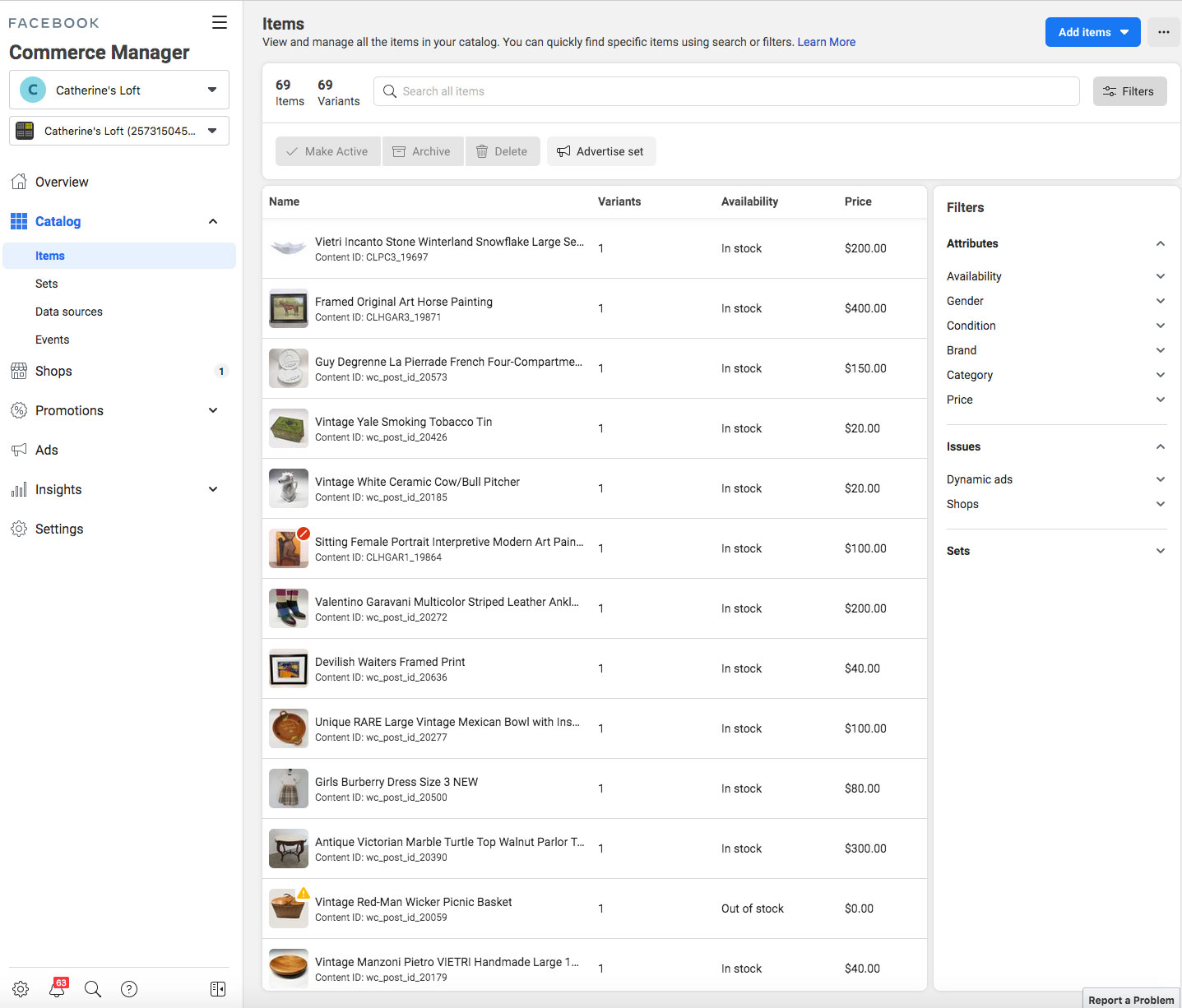
The ID shows up that same in both places: 387700722190657. One thing I’ve noticed. Even though I’ve set products “out of stock” in their product pages on the website in Woocommerce, they’re showing up as “in stock” in the Items list in Facebook Commerce Manager. There’s even a couple of out of stock products showing up twice in the Facebook page Shop (like the Devilish Waiters print and the You Are the Apple of My eye painting. I don’t have two instances of those products, they’re just showing up twice. I took a screen dump of the Items page so you could see something else. Some of the older “out of stock” products (like the Vintage Red-Man Wicker Picnic Basket) show up in the Items list like I think they should: there’s a “!” symbol over the edge of the title noting that there’s a reason as to why the product isn’t showing, and it properly lists the item as “out of stock.” And like it should be, it doesn’t show in the catalog.
Here’s the screen image: https://www.catherinesloft.com/wp-content/uploads/2021/11/fcm_catalog_itemslist.jpg
Hi again @jmarkj,
The ID shows up that same in both places: 387700722190657.
Thank you for confirming that!
I took a screen dump of the Items page so you could see something else. Some of the older “out of stock” products (like the Vintage Red-Man Wicker Picnic Basket) show up in the Items list like I think they should: there’s a “!” symbol over the edge of the title noting that there’s a reason as to why the product isn’t showing, and it properly lists the item as “out of stock.” And like it should be, it doesn’t show in the catalog.
Here’s the screen image: https://www.catherinesloft.com/wp-content/uploads/2021/11/fcm_catalog_itemslist.jpg
Thank you for sending over that screenshot!
I agree—I also see on your screenshot that the Vintage Red-Man Wicker Picnic Basket product is correctly labeled as
Out of Stock, so I would also expect a similar visual cue for newer products that have since had their stock reduced to zero.One thing I’ve noticed. Even though I’ve set products “out of stock” in their product pages on the website in Woocommerce, they’re showing up as “in stock” in the Items list in Facebook Commerce Manager.
This kind of problem can often be caused by a conflict with your theme or with another plugin.
The best way to determine this is to:- Temporarily switch your theme to Storefront
- Disable all plugins except for WooCommerce
- Re-sync your products
If you’re not seeing the same problem after completing the conflict test, then you know the problem was with the plugins and/or theme you deactivated. To figure out which plugin is causing the problem, reactivate your other plugins one by one, testing after each, until you find the one causing conflict. You can find a more detailed explanation on how to do a conflict test here.
Let us know how this goes!
I did as you instructed and the issue still occurs. No difference. And when I reactivated Avada as my theme, I selected the main theme instead of the child version of the theme (which would otherwise activate a child subset of the functions.php file which changes the display of out of stock products from “out of stock” to “sold.” The main theme does not have that code in the main functions.php file. No difference there either.
Hi @jmarkj,
Thanks for the update. Strangely, we’re unable to replicate this issue on our test sites, which often points to something unique to the affected site.
Let’s try a few things:
1. Update the stock quantity to “e.g 5/in stock” and allow it to sync, then, update to “0/out of stock and allow it to sync again and see if it’ll update on the Facebook catalog”.
2. If that doesn’t help, I’d recommend resetting the connection and syncing everything afresh. We have the required code snippet for that here.
Let me know what you find so we can help further.
Well, it looks like the “update to quantity in stock-sync-update to out of stock-re-sync” approach worked! I definitely needed to click “manage stock” and then select a number multiple (I chose 3 for each) as you suggested for it to work. Simply selecting “in stock” didn’t seem to be enough to reverse it. And for some reason a few of the products still showed up twice, but that behavior has finally been removed as well. I’ll keep an eye on it, but maybe something got corrupted in an update or something similar, who knows. Thank you for your help!
Hi @jmarkj, I’m glad to hear that worked. 😃
but maybe something got corrupted in an update or something similar, who knows.
It doesn’t look like the issue was caused by an update as you didn’t update to a newer version to fix it.
Do keep an eye on it and let us know if you need further assistance. Cheers!
Well. the issue is still occurring when an in-stock product is changed to out of stock. It even occurs when I un-publish a product listing and place it into draft mode. I’m having to just repeat the “update to in-stock multiple quantity, sync, revert to out of stock, then re-sync” process each time when I sell a product and place it into out of stock status. Just assuming I’m going to have to keep doing this at this point.
Hey @jmarkj,
Sorry to hear you’re still having trouble getting products to sync automatically as expected. It really doesn’t sound practical to manually resync products each time just to make sure the stock statuses work correctly. I can imagine that’s taking up a lot of your time right now, and that’s not really how we’d expect the plugin to work.
With that in mind, we’d like to take a closer look at this issue in much more detail. To do that, please contact us at WooCommerce.com > My Account > Support. You may need to create an account before you can access that page.
Please include a link to this forum thread, so that we can keep track of what’s already been discussed and tested. We’ll be able to help you further there.
Thank you!
I’m so tired of support saying it’s something else OTHER than there plugin. So many people report the EXACT same issue. We have it too. My catalog shows items that have been gone for over 7 months as in stock. They don’t even exist in woo anymore. Same BS response from plugin support suggesting every answer that’s its someone else’s fault but theirs…it’s NOT..it’s your fault. FIX IT. I’ve spent thousands of dollars on ad spend that goes to 404 pages. We get comments from people calling us spam or a scam because our ads lead to 404 pages.
Hi kbdiverservices,
I wish I could say it’s nice that I’m not the only one, but then we’d both still have the issue, wouldn’t we? Until the plugin finally get fixed, the weird “switching of out of stock products back to in stock with multiple quantities” approach discussed in this thread at least works for now, although it will be a royal pain if you have a lot of inventory items.
We have 1800 products. That’s not an option.
Hi @kbdiverservices,
Same BS response from plugin support suggesting every answer that’s its someone else’s fault but theirs…it’s NOT..it’s your fault. FIX IT. I’ve spent thousands of dollars on ad spend that goes to 404 pages. We get comments from people calling us spam or a scam because our ads lead to 404 pages.
It’s frustrating when things don’t work as they should. We’d love to take a look at your issue and help you find a way to fix all the affected products. Please contact us at WooCommerce.com > My Account > Support. You may need to create an account before you can access that page.
Please include a link to this forum thread, so that we can keep track of what’s already been done.
We will be able to help you further there.
Thanks.


The topic ‘Out of Stock Products still showing on Facebook Shop Page’ is closed to new replies.