Hello @pvtsolver
Yes, that’s possible.
I’ll try to describe the process with a hypothetical example.
Insert multiple radio buttons fields in the form. I’ll assume their names are: fieldname1, fieldname2, fieldname3, and fieldname4. To display every field on a different form’s page, insert “Page Break” controls between them. On the last page, you can insert a summary field with the names of radio buttons fields through its settings to display the user’s answers at the end of the process.
Now, about the radio buttons, you can assign a text and value to every choice. Assuming you have assigned numerical values to the different fields’ choices and you want to calculate the average of the answers selected by the user, you can insert a calculated field with the equation:
SUM(fieldname1, fieldname2, fieldname3, fieldname4)/4
You can include the calculated field in the summary too.
And that’s all.
Best regards.
Thank you for your quick response.
What if the choices are not numerical? What is the alternative script that I need to use in the “Calculated Field” instead?
Please advise.
Hello @pvtsolver
I described a simple example. You can implement a different logic if you want. How do you want to calculate the final score?
Best regards.
Hello @codepeople
I want to calculate the final score based on the users answers in percentage.
For example, if the user answered 30 questions correctly out of the total number of questions (Ex: 40), the score would be 75%.
How could I implement that?
Thank you.
Hello @pvtsolver
The point in your description is:
>> 30 questions correctly out
How do you decide if an answer is correct or not? Or do you want to know only the number of answered questions?
If there are correct and incorrect answers, the usual, and simplest solution, would be to assign the number 1 to the correct answer, and 0 to the incorrect ones, and the equation that calculates the score would be:
SUM(fieldname1,fieldname2,fieldname3,fielname4)/4*100
If you want to count only the number of answered questions, the equation would be:
SUM(IF(fieldname1, 1, 0),IF(fieldname2, 1, 0),IF(fieldname3, 1, 0),IF(fielname4, 1, 0))/4*100
Best regards.
Yes, I understand. I have already assigned number 1 to the correct choice’s value and 0 to other incorrect choices.
And added this script to the “Calculated Field”:
SUM(fieldname1,fieldname2,fieldname3,fielname4)/4*100
But still not displaying any score for me.
Please advise.
-
This reply was modified 4 years, 10 months ago by
 pvtsolver.
Hello @pvtsolver
The equation I sent you was hypothetical, only an example to describe the process. You must edit the equation to use your fields’ names and divide the sum by the number of questions in your form. I did not send you the equation for copying and pasting it directly.
Please, for additional questions, send me the link to your form.
Best regards.
Hello @codepeople
Here is the link to my form:
https://pvtsolver.com/features/
N.B. kindly scroll down, you will find it just above the footer.
Please advise.
Hello @pvtsolver
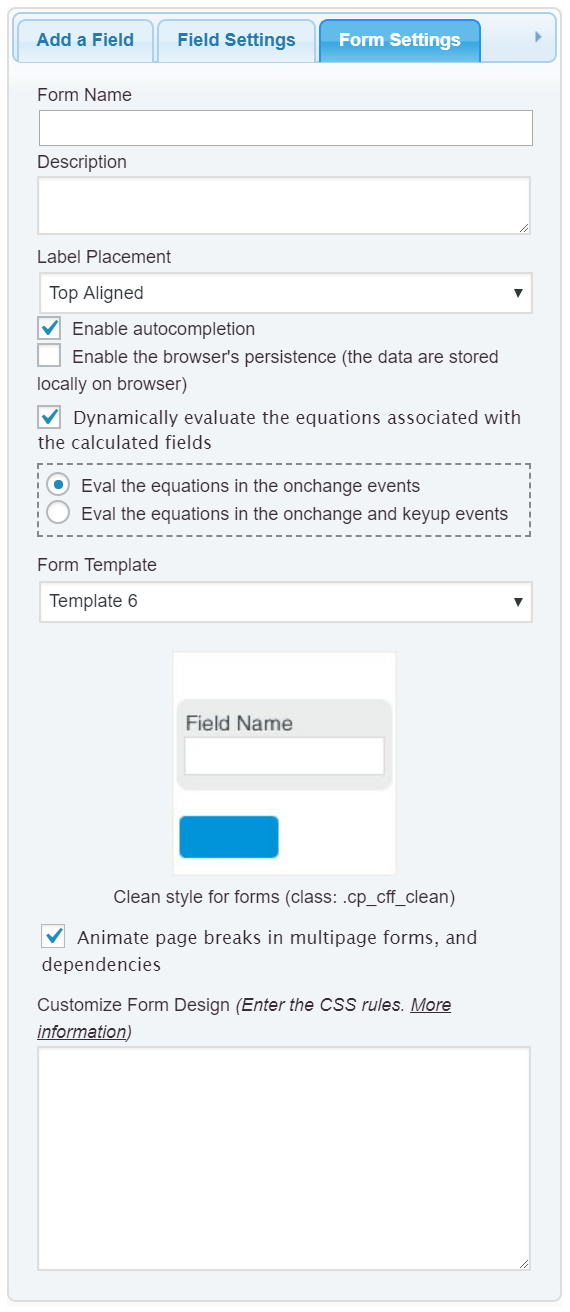
You have unticked the checkbox “Eval dynamically the equations associated to the calculated fields” in the “Form Settings” tab (https://resources.developers4web.com/cff/images/documentation/form-settings-tab.png). So, the equations are not being evaluated.
To evaluate the equations dynamically, you must tick the checkbox in the “Form Settings” tab. If you want to evaluate the equations manually, you must insert a button field in the form and select the “Calculate” option as its type.
Since you are using a plugin to manage the website’s cache, please, purge the cache after editing the form’s settings.
Best regards.
Got it. Thank you so much. 🙂