Elementor modified plugin file
-
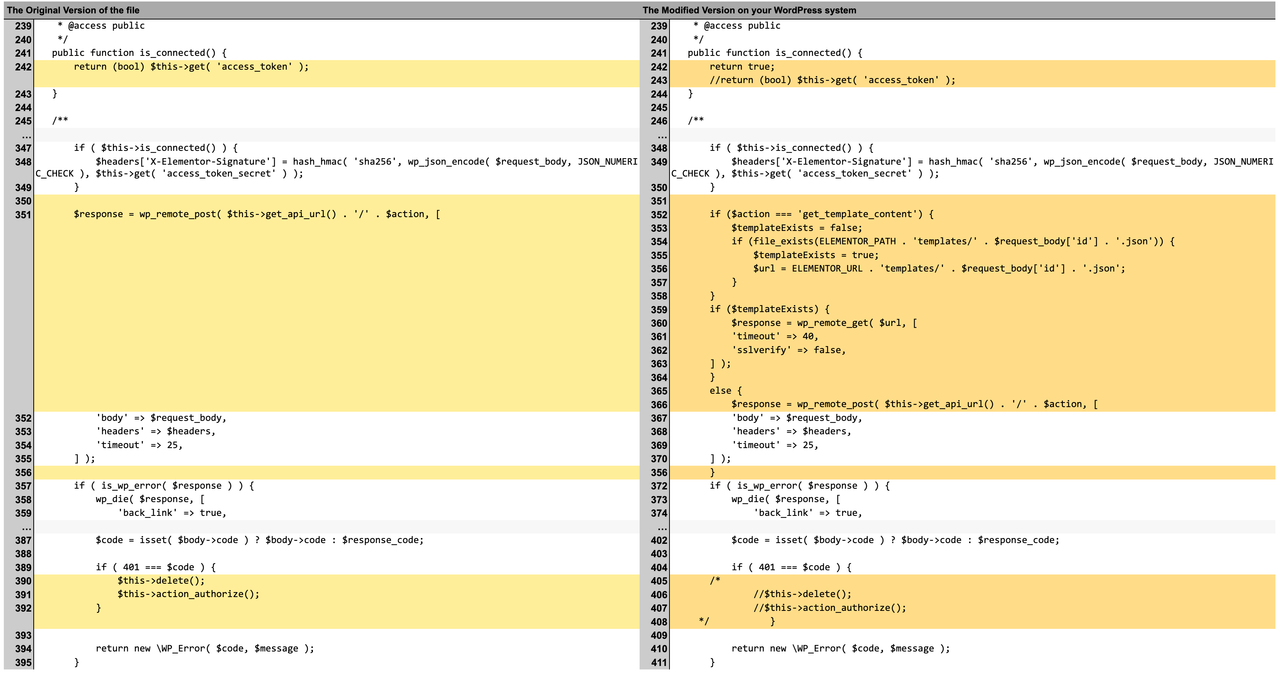
Hi, This morning I installed Wordfence, and it discovered a Malware in a plugin, which I immediately deleted. The scan discovered also a modified plugin file in wp-content/plugins/elementor/core/common/modules/connect/apps/base-app.php (Since one month I have a visualization error in the section “choose image by elementor”: if I go to choose image nothing appears and I have to scroll very down to make sure that the image tab on the right reappears – here the old topic https://wordpress.org/support/topic/problem-with-insert-media-section/) In the link below you can see the difference between the original and mine (on the left the original version, on the right mine). https://i.postimg.cc/br9KN0Hp/Schermata-2021-05-20-alle-14-40-08.png If I fix the error I could have a problem with the website? Is it maybe related with the malware?
-
This topic was modified 5 years ago by
.
-
This topic was modified 5 years ago by
-
This topic was modified 5 years ago by
-
This topic was modified 5 years ago by
.
The page I need help with: [log in to see the link]
-
This topic was modified 5 years ago by


The topic ‘Elementor modified plugin file’ is closed to new replies.