Cannot download products report from Analytics
-
This error pops-out “There was a problem exporting your Products Report. Please try again.” when I click download.
Error shown in console whenever I click download: https://ibb.co/r3qRRJw
Already update all the plugins but still cannot download.

-
Hello,
This may be a conflict issue with your theme or another plugin. Can you temporarily switch your theme to Storefront, disable all plugins except for WooCommerce, and try downloading again? You can find a more detailed explanation on how to do a conflict test here: https://docs.woocommerce.com/document/how-to-test-for-conflicts/
Hi,
I’ve temporarily switch my theme to Storefront and disable all plugins except for WooCommerce. The error still persist.
Also, not just for products report. I can’t download reports for Categories, Stock, Variations and Orders too.
Obviously it’s not my plugins and theme conflict since I already did the testing.
Any help would be much appreciated.
hi @maykato ,
any feedback from my last response please?
Hello can anyone please help me? This is quite urgent.
@maykato who should I contact regarding this issue?
Hi @alyab
I’m sorry for the late reply. Could you go to Settings > Permalink and click on “Save Changes” button and test again to see if the issue is resolved.
If not, please share the following:
1. System Status: You can find it via WooCommerce > Status. Select “Get system report” and then “Copy for support”. Once you’ve done that, paste it here in your response.
2. Error log: share a copy of the fatal error log found under WooCommerce > System Status > Logs (if available)
Hi @maykato
Thanks for replying. Saving the permalink did not work too.
1
### WordPress Environment ###

WordPress address (URL): https://genemartino.com.my
Site address (URL): https://genemartino.com.my
WC Version: 5.3.0
REST API Version: ✔ 5.3.0
WC Blocks Version: ✔ 4.9.1
Action Scheduler Version: ✔ 3.1.6
WC Admin Version: ✔ 2.2.6
Log Directory Writable: ✔
WP Version: 5.7.2
WP Multisite: –
WP Memory Limit: 768 MB
WP Debug Mode: –
WP Cron: ✔
Language: en_US
External object cache: –

### Server Environment ###

Server Info: Apache
PHP Version: 7.3.28
PHP Post Max Size: 256 MB
PHP Time Limit: 120
PHP Max Input Vars: 3000
cURL Version: 7.66.0
OpenSSL/1.1.1k-fips

SUHOSIN Installed: –
MySQL Version: 5.7.32-35-log
Max Upload Size: 256 MB
Default Timezone is UTC: ✔
fsockopen/cURL: ✔
SoapClient: ✔
DOMDocument: ✔
GZip: ✔
Multibyte String: ✔
Remote Post: ✔
Remote Get: ✔

### Database ###

WC Database Version: 5.3.0

### Security ###

Secure connection (HTTPS): ✔
Hide errors from visitors: ✔

### Settings ###

API Enabled: ✔
Force SSL: –
Taxonomies: Product Types: external (external)
grouped (grouped)
simple (simple)
variable (variable)

Taxonomies: Product Visibility: exclude-from-catalog (exclude-from-catalog)
exclude-from-search (exclude-from-search)
featured (featured)
outofstock (outofstock)
rated-1 (rated-1)
rated-2 (rated-2)
rated-3 (rated-3)
rated-4 (rated-4)
rated-5 (rated-5)

Connected to WooCommerce.com: –

### Action Scheduler ###

Canceled: 27
Oldest: 2021-04-25 12:41:53 +0800
Newest: 2021-05-09 02:29:33 +0800

Complete: 10,656
Oldest: 2021-04-24 21:56:40 +0800
Newest: 2021-05-25 21:54:40 +0800

Failed: 3
Oldest: 2020-05-15 14:15:52 +0800
Newest: 2020-06-01 16:45:44 +0800

Pending: 1
Oldest: 2021-05-26 19:08:27 +0800
Newest: 2021-05-26 19:08:27 +0800

### Status report information ###

Generated at: 2021-05-25 21:57:14 +08:00
2. 2021-04-30T03:47:39+00:00 CRITICAL Allowed memory size of 805306368 bytes exhausted (tried to allocate 46141440 bytes)
Hi @alyab
Thank you for your reply. Looking at your system status, everything seems fine except that the plugins area is cut off.
Typically, issues with downloading a report from a specific place is caused by a conflict with your theme, plugin or custom codes. I understand you’ve already run a conflict test, but could you try one more time?
If you have a staging site, you may want to test on the staging site so it won’t affect the live site. OR you can create a staging site using a plugin called WP Staging: https://wordpress.org/plugins/wp-staging/
Hi @maykato
I will try that again later. In the meantime I noticed the 3 failed scheduled actions are “woocommerce_admin_report_export”
1 of the failed action: https://ibb.co/vxhfmWR
Don’t know if this is related or not since it’s from 2020.
Could this issue might be related to my web server if the issue is not fixed during the 2nd conflict test?
@maykato ,
Also, please note that I can automatically download it locally if the data is small for example I set the date range to ‘last week’.
The error happens only when the data is huge which requires the file to be send through an email.
Hi @alyab,
Thanks for providing more details.
I was just wondering if increasing the
PHP Max Input Varsvalue would have any effect on this issue. For that you could contact your hosting provider or follow this article.Let us know how it goes.
I tried to increase max_input_vars from 3000 to 10000, still getting 404 error though.
Hi @alyab,
Thanks for trying that. There are a few more things you can try.
First is to enable debug logging in WordPress. To do that, edit the
wp-config.phpfile in the root folder of the site on the server. Add this:define( 'WP_DEBUG', true ); define( 'WP_DEBUG_DISPLAY', false ); define( 'WP_DEBUG_LOG', true );Right above this line:
/* That's all, stop editing! Happy publishing. */That will cause an error log to be created in the
/wp-content/folder which may give clues to this. Once you have that enabled, try to run a report and see if it catches any errors.Another option is to go to Analytics > Settings in your dashboard. Look down to the Import Historical Data section. Clear out the existing data there. Once that’s finished, run a fresh import. Sometimes this can clear up odd issues with the Analytics.
Let us know how this goes.
Hi @3sonsdevelopment ,
I’ve enabled debug logging and then try to download a report but it didn’t catch any error in the log though. The only errors are all from my theme. Since the error doesn’t go away even if I switch my theme to storefront, these errors are not related right..
Secondly, how do I exactly clear out the existing data there?
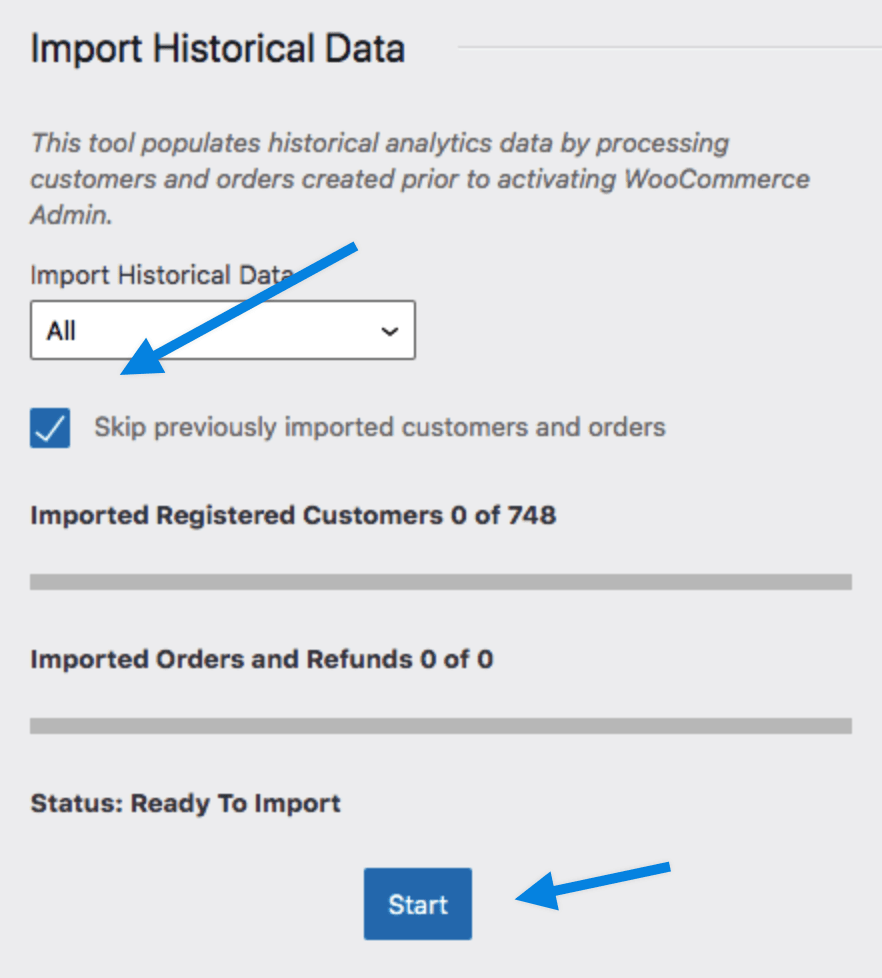
https://ibb.co/02t88TK
I’ve never activated Woocommerce Admin.
and if I click the ‘Start’ button, will I lose my previous data?Hey @alyab,
Thanks for trying that and sending the screenshot. Let’s do this. Uncheck the box to skip previously imported customers and orders. Then click on the start button.
Then see if it works once that has finished. If it still doesn’t, go back and see if the button to delete the existing data is available. Deleting this does not affect your orders at all. WooCommerce copies order data to special database tables for these reports. It’s designed so you can delete the data and reimport it in case something goes awry.
Let us know how that goes.


The topic ‘Cannot download products report from Analytics’ is closed to new replies.
