Hello @spacebom
There are some errors in your equation:
First, javascript is a case-sensitive language, and the structure of the “if” conditional statement in your equation is incorrect.
Second, you cannot use the fields’ names as variables that receive values because the plugin replaces them in the equations by their corresponding values.
I guess you are interpreting the problem in the wrong way. The values of the radio buttons are always the same: blue and red. You interpret them as you want as part of the equations.
I cannot give you a fixed structure of your equation because I don’t understand it. However, I’ll try to describe the process with a hypothetical example:
Assuming the size field is the fieldname1 and the radio buttons for colors the fieldname2. Furthermore, you have another two fields for width and height: fieldname3 and fieldname4, respectively.
And you want to evaluate the equation: size*color*width*height
But the numeric number of color depends on size and color:
If 50<size and the color selected is red, then the value would be 18, and if the color selected is blue, the value would be 34. However, if size<=50, the corresponding values for colors would be 15 and 30.
A possible equation corresponding to this hypothetical example would be:
(function(){
    var color_value;

    if(fieldname1<=50)
    {
        if(fieldname2 == 'red') color_value = 15;
        else color_value = 30;
    }
    else
    {
        if(fieldname2 == 'red') color_value = 18;
        else color_value = 34;
    }

    return fieldname1*color_value*fieldname3*fieldname4;
})()
Best regards.
Thank you very much, you are amazing.
I think I am very near to solve the problem. Your function works fine, except I think it don’t match the second “if”, because it always return “30” and “34” values no matter what colour (fieldname2) you select.
I am using you function:
(function(){
    var color_value;

    if(fieldname18<=180)
    {
        if(fieldname17 == 'red') color_value = 15;
        else color_value = 30;
    }
    else
    {
        if(fieldname17 == 'red') color_value = 18;
        else color_value = 34;
    }

    return color_value;
})()
And you can test here: https://hormitech.es/?cff-form=10 what I am saying. It always use “red” value, never “catch” the blue value/selection.
I am very grateful for your support.
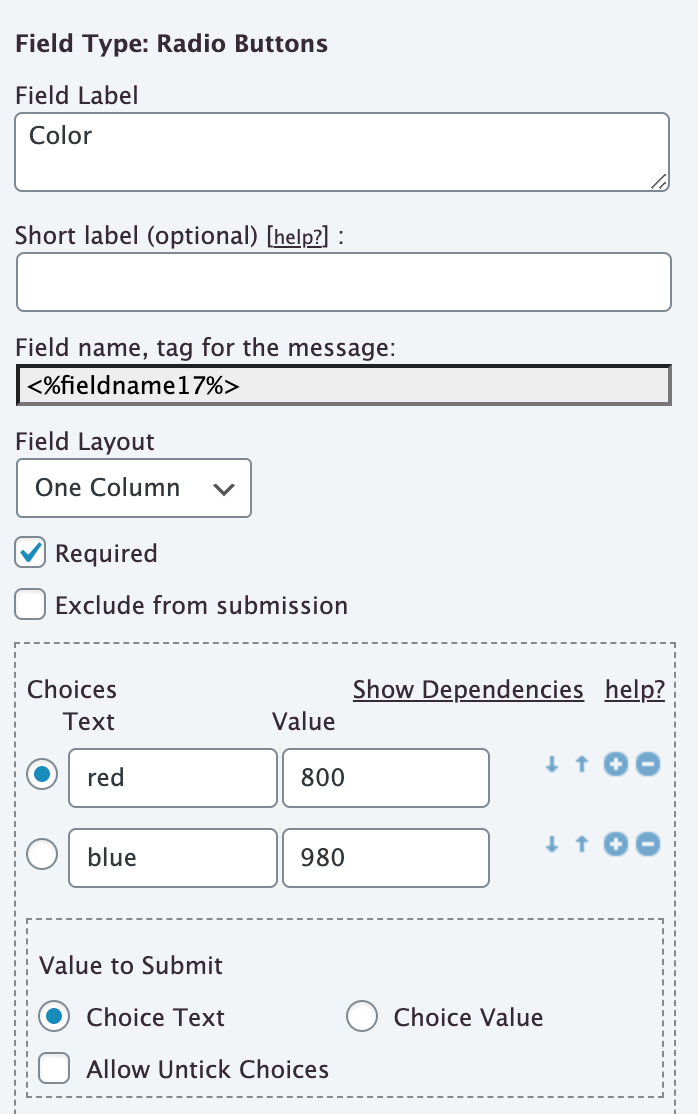
And this is my radio field configuration if it helps to add information to explain the problem: https://hormitech.es/wp-content/uploads/2021/03/radio-conf.png
Thank you again.
Hello @spacebom
In the code I sent you previously, the values of radio buttons’ choices must be red and blue and not 800 and 980 (the checkbox ticked in the field’s settings affects only the information to submit, but the equations always use the choices’ values.)
If you don’t want to edit the values of the choices, then you must use the correct choices’ values in the equation:
(function(){
    var color_value;

    if(fieldname18<=180)
    {
        if(fieldname17 == 800) color_value = 15;
        else color_value = 30;
    }
    else
    {
        if(fieldname17 == 800) color_value = 18;
        else color_value = 34;
    }

    return color_value;
})()
Best regards.
Oh, you are awesome. Now it is working perfect. Thank you very much for your help.
Best Regards.
David.