Store Filter
-
Hello experts.
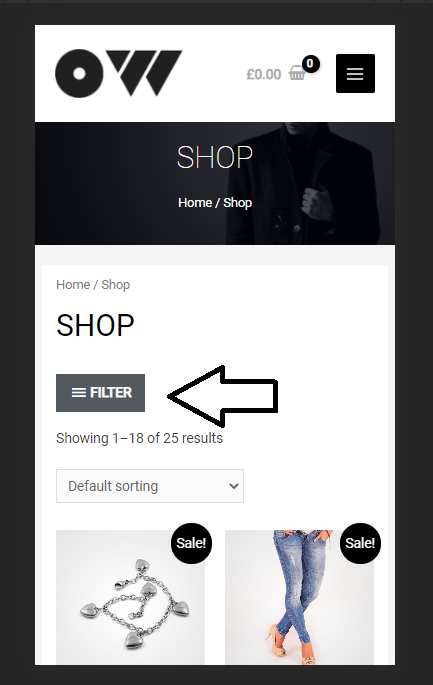
I would so like to purchase and use GeneratePress Pro. However, I know that TOM has not added a mobile store filter.
Can you tell me why? Will this feature be added in the future? Thanks
The page I need help with: [log in to see the link]

-
Hi there,
Do you have any examples of the feature you’re hoping for?
We’re currently collecting suggestions for WooCommerce features, we’ll be doing a big WC update soon.
Thanks!
Hello Tom
What an honor to be asked for advice by the boss himself.
2 features are definitely the most important.
1. mobile store filter
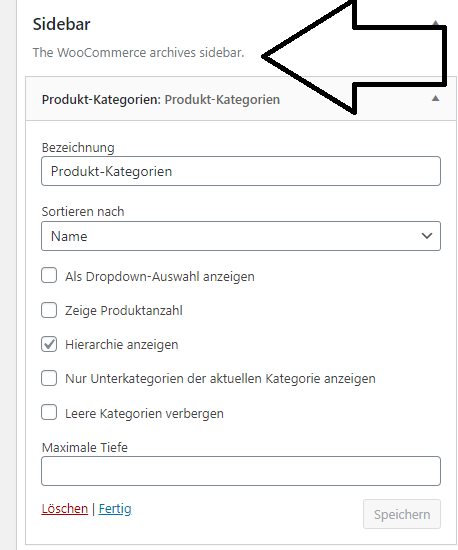
https://s12.directupload.net/images/210210/ugpcygnz.png2. extra widget for woocommerce filter, like in shopoptimizer theme https://s12.directupload.net/images/210210/ii3ceof7.png
*//
Maybe it will help you to program this feature. Shoptimizer uses the archive principle. So the store page is divided into 2 columns. on the left side is the widget and on the right side is the store page.
https://share-your-photo.com/f8ffa326a2*//
i wish that tom’s woocommerce stuff played better with elementor’s woo bells and whistles. but i think that’s wishing for apples and oranges to feel the same in your mouth, so probably not more than a fantasy.-
This reply was modified 5 years, 2 months ago by
spammx3.
Distraction free payment process, would be something else, for less bounce rate
Thanks for the feedback here – really appreciate it! Have added your suggestions to our notes.
A WooCommerce-specific off-canvas panel triggered by a Filter button is in the plans for our pro version – should be coming soon!
The pro version does have a distraction-free mode for the checkout at the moment. It can always be extended if needed as well.
Thanks again!
Hello Tom
I’m very happy to do so. I love your theme! One of the best there is!
The template Decor from LH Consulting goes in the right direction, really great performance. The search alleridgens causes problems with the Samsung S5. With the following code you can prevent this
@media (max-width: 768px) {
.gb-container {
display: none;
}
}However, you should also avoid display:none
Greetings from Switzerland
(Maybe you can find a better, standard solution)I answer you here, for the general overview for you =)
Samsung Display
DISPLAY
Display size
Resolution W x H 1,080 x 1,920 pixels
Diagonal inch 5.1 inch
Diagonal mm 129.5 mm
Type Super AMOLED
Pixel density 432 ppi
Material Gorilla Glass 3
Display format 16:9Hi there,
That code would hide all GenerateBlocks Containers on mobile. Can you maybe share a screenshot of the issue you’re seeing so I can see if there’s a better solution?
Thanks!
Hi boss, yeah sure. No problem
Let’s start…
Step. 1
https://share-your-photo.com/060573466f
Step. 2
https://share-your-photo.com/16fda88c47
Step. 3
https://share-your-photo.com/72f4258807
Step. 4
https://share-your-photo.com/c647f6cac5
Step. 5
https://share-your-photo.com/b62ed7636d
Step. 6
https://share-your-photo.com/c1d07655fe
Step. 7
https://share-your-photo.com/a9c1cca6d9
Step. 8
https://share-your-photo.com/81b6630353
Step. 9
https://share-your-photo.com/7864f94666Hi boss, yeah sure. No problem
Let’s start…
Step. 1
https://share-your-photo.com/060573466f
Step. 2
https://share-your-photo.com/16fda88c47
Step. 3
https://share-your-photo.com/72f4258807
Step. 4
https://share-your-photo.com/c647f6cac5
Step. 5
https://share-your-photo.com/b62ed7636d
Step. 6
https://share-your-photo.com/93905186f3
Step. 7
https://share-your-photo.com/a9c1cca6d9
Step. 8
https://share-your-photo.com/5c611ea594
Step. 9
https://share-your-photo.com/7864f94666
Step. 7
https://share-your-photo.com/a9c1cca6d9
Step. 8
https://share-your-photo.com/8110f3e50b
Step. 9
https://share-your-photo.com/7864f94666-
This reply was modified 5 years, 1 month ago by
Hi there,
are you wanting to remove the Shop Grid Items from the top of the Search results page?
Hey David
Actually not! But the Imports design causes problems. Therefore the search must go away.
Have you figured out what problem I meant? Maybe put the search function in the Functions.php.
After that you should be able to disable it normally, without display: none;
}
}I am still not sure what it is your trying to achieve.
Are you wanting to more/remove the search field in the Mobile Navigation ?Hello David
Thanks for your time
I’m sure it’s because of the language barrier.I need ( want ) to remove the search field in the Mobile Navigation so that there is a nice overview.
See picture 7 and 9The screenshots are showing that you are using one of the templates from our site library that’s recently released.
Can you open a support topic in our premium forum?
https://generatepress.com/support/We are not able to support premium options/templates in the free support forum here – it’s WordPress rule.
Thanks!
-
This reply was modified 5 years, 1 month ago by
Leo.
good morning
You have misunderstood me, for me my CSS works fine. I think everyone else using this template will have problems.
All the best
-
This reply was modified 5 years, 2 months ago by


The topic ‘Store Filter’ is closed to new replies.