Social Cards showing wrong image
-
Hello! I am trying to set a custom image for my Facebook social cards when sharing my website.
So when I go to WordPressAdmin dashboard > Yoast SEO > Social > Facebook, my page looks like this:
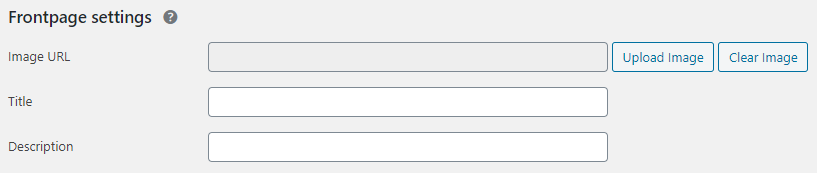
https://i.imgfly.me/jfFa0z.pngAnd I think it’s supposed to look like this:
https://yoast.com/app/uploads/2020/04/fb-frontpage-settings.pngThat’s according to an article I was reading here: https://yoast.com/help/custom-open-graph-tags/#:~:text=you%20additional%20options.-,Click%20on%20’Social’.,Click%20’Save%20Changes’.
I think this ‘Upload Image’ thing is where the problem is. It wants me to use an image in my gallery that I have for my site images, and when I upload the one I want, it doesn’t go through to the og:image code on the Facebook Sharing Debugger. That og:image code remains a default image from the homepage of the site, not the custom image I want to use or uploaded in the Social section.
I assume it’s not supposed to have this option. From what I’m seeing online, it should be an empty field I can type in and paste the image link in. As it is currently, I can ONLY upload from my website gallery and there are no other custom fields like description, etc.
Please help!


The topic ‘Social Cards showing wrong image’ is closed to new replies.