Hi dear user.
Did you created available days from the admin panel?
Thanks.
Thread Starter
 tushal
(@tushal)
hi sir,
yes i have created available days from the admin panel. if i click start date and end date , dates are shown in the form…but gray color selection for multiple days is not reflecting in version 1.8.4 . if go for version 2.7.1 gray color selection is reflecting but in version 2.7.1 payment option is not getting disable as result of which dollar sign gets display on booking. which i don’t want in my website
Hi dear user.
The 1.8.4 version is an old version, so we will fix all issues for the next version(2.7.3). Can you tell the problem(or bug) of the new version of our plugin(detailed information, maybe with screenshots)?
We will check it and fix the bug.
Thanks.
Thread Starter
tushal
(@tushal)
Hi sir
now i have installed booking calendar version 2.7.2. i have disabled payment option in the theme but still dollar sign is reflecting on user side on selecting start and end date. i don’t want payment option ,how to disable it?
Regards
Tushal
Hi dear user.
Can you send us the calendar page URL?
Thanks.
Thread Starter
tushal
(@tushal)
Hi sir
Actually I had downloaded the booking calendar version 2.7.2 using the new plugin option in WordPress.
Hi dear user.
We didn’t understand you well. If you send us the calendar page URL, we will check it and send some CSS code.
Thanks.
Thread Starter
tushal
(@tushal)
https://wpdevart.com/wordpress-booking-calendar-plugin/
i am not able to select multiple days in gray even after making days available.
Dear user.
We meant the page URL where your calendar is located, can you send it?
Thanks.
Thread Starter
tushal
(@tushal)
Hi! Sir
i upgraded the software from version 1.8.4 to version 2.7.2, so the issue of selecting multiple days has been resolved but now new i have noticed that in reservation no records are show. this error was not there in version 1.8.4.
my website is on localhost , so wont be able to share with you the link.
please help me to resolve the issue.
Hi dear user.
We are working on this problem, once we fix it, we will let you know.
Thanks.
Hi dear user.
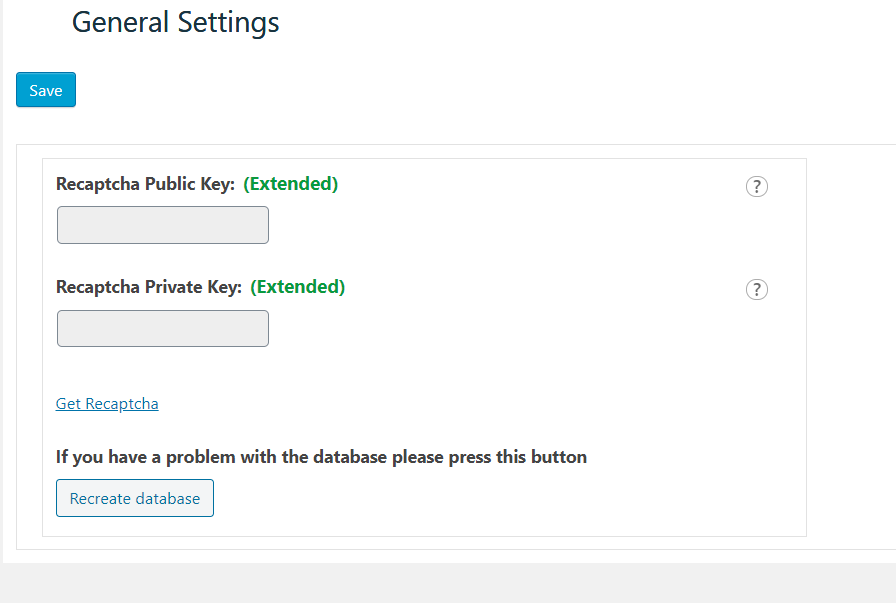
We updated our plugin and added a solution for this problem. First of all, update our plugin, if it doesn’t fix the problem, then open our plugin “Global Settings” page(from our plugin admin menu) and click on the “Recreate database” button. It should fix the problem. Also, you can check this screenshot – https://wpdevart.com/wp-content/uploads/2021/02/2021-02-10.png.
If it doesn’t fix the problem, just let us know.
Thanks.