Could you explain a bit more please. What exactly doesn’t work?
– Loading a post in the block editor.
– The “classic block” in the block editor (which is used by default when loading old posts) doesn’t work.
– Doing “Convert to blocks” fails/doesn’t work.
The button option is not there to change classic to block editor doesn’t work
Doing “Convert to block” fails/doesn’t work
How long will you take to answer @azaozz ?
Come On, Man
How long is it going to take you?
I need to finish this thing off right now
@daryl2698 Sorry to hear you are having problems with switching editors and converting old posts to blocks, I understand your frustration. However all of this works properly here and (as far as I see) at few million WP sites. Frankly I don’t know what the problem may be…
– The button for switching from classic to block editor (which is added by this plugin) is in a “postbox” when the old Edit post screen is used. The postbox can be shown or hidden from Screen Options (top/right). In addition you can open an existing post directly in the block editor from the Posts listing screen. Look at the links under each post title.
– “Convert to blocks” is functionality of the block editor. Can be done after opening an old post (without blocks) in the block editor. Then the post is shown as “Classic Block” and the menu to convert it is on the block toolbar. It doesn’t depend on having this plugin installed, it is a standard feature of the block editor.
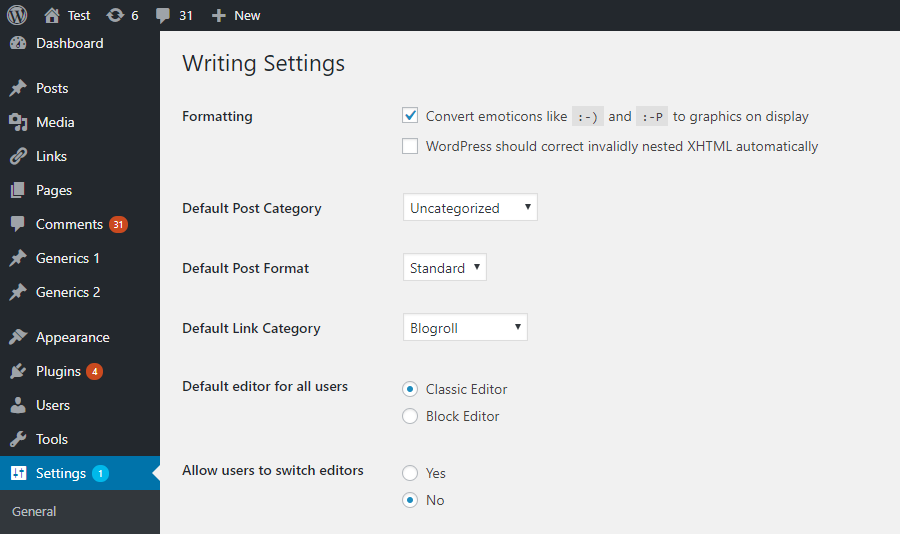
Perhaps review the Classic Editor settings, see https://ps.w.org/classic-editor/assets/screenshot-1.png?rev=1998671. If all looks good (you’ve enabled editor switching), look at all the plugins you’re using to see which one, apart from Classic Editor, may be affecting/hiding/disabling the block editor.
-
This reply was modified 5 years, 5 months ago by
 Andrew Ozz.
-
This reply was modified 5 years, 5 months ago by Andrew Ozz.