Store in not publishing and Additional Information is not working
-
Hello,
Old stores are appearing with all of the information.
1. Additional information no longer works. When I click on it, nothing happens.
2. When I publish a new store, it does not appear on the front end.
All other stores and maps are appearing though so I don’t think there is an issue with the api.
Thanks in advance.

-
If you click on ‘show response’ on the WPSL settings page, does this show any errors?
Are you using a caching pluging? If so, can you flush the cache.
The new store does have data set in the lat / lng fields, and the marker on the preview map on the right side shows up in the expected location?
As for the additional information tab, do any errors show up in the browser console ( F12 )? Any other Google Maps plugins that your using? If so, can you disable them for a second. Also try to enable the compatibility mode on the WPSL settings page.
Hello, Tijmen –
1. Show Response – When I click on it, nothing happens at all.
2. No caching plugin
3. Data is included in the lat/long fields. Nothing is appearing in the right side expected location.
**I can’t access the info to even edit the old stores for additional information. It just appears on the front end correctly for the old stores.
4. No other Google Map plugins.
Errors:
Uncaught TypeError: Cannot read property ‘hasClass’ of undefined
at HTMLDocument.<anonymous> (wp-auth-check.min.js?ver=5.5.1:2)
at HTMLDocument.dispatch (jquery.js?ver=1.12.4-wp:3)
at HTMLDocument.r.handle (jquery.js?ver=1.12.4-wp:3)
at Object.trigger (jquery.js?ver=1.12.4-wp:3)
at HTMLDocument.<anonymous> (jquery.js?ver=1.12.4-wp:3)
at Function.each (jquery.js?ver=1.12.4-wp:2)
at n.fn.init.each (jquery.js?ver=1.12.4-wp:2)
at n.fn.init.trigger (jquery.js?ver=1.12.4-wp:3)
at Object.<anonymous> (heartbeat.min.js?ver=5.5.1:2)
at i (jquery.js?ver=1.12.4-wp:2)
edit.css:1 Failed to load resource: the server responded with a status of 404 ()Your site URL to be authorized: https://wp-admin/post.php?post=481&action=edit#wpsl-additional-information
_.te @ js?language=en®ion=us&key=AIzaSyBggcG63b1A4OnWJrLyAxxxn9DAAjSacUs&libraries=places&v=quarterly&ver=2.2.233:79
(anonymous) @ common.js:73
(anonymous) @ common.js:152
c @ common.js:67
(anonymous) @ AuthenticationService.Authenticate?1shttps%3A%2F%2F%2Fwp-admin%2Fpost.php%3Fpost%3D481%26action%3Dedit%23wpsl-additional-information&4sAIzaSyBggcG63b1A4OnWJrLyAxxxn9DAAjSacUs&callback=_xdc_._2fvpdn&key=AIzaSyBggcG63b1A4OnWJrLyAxxxn9DAAjSacUs&token=26268:1I’m having the same problem with this error:
1. Additional information no longer works. When I click on it, nothing happens.
The problem is in the back end where I can not open the cards for openings times and additional information. (Using WordPress in German, so these are called “Öffnungszeiten” and “Zusätzliche Informationen”.)
However am not having an issue with publishing a new entry; I even can edit opening times and additional info normally when creating a new store entry. However if I want to edit after it is saved I can’t.
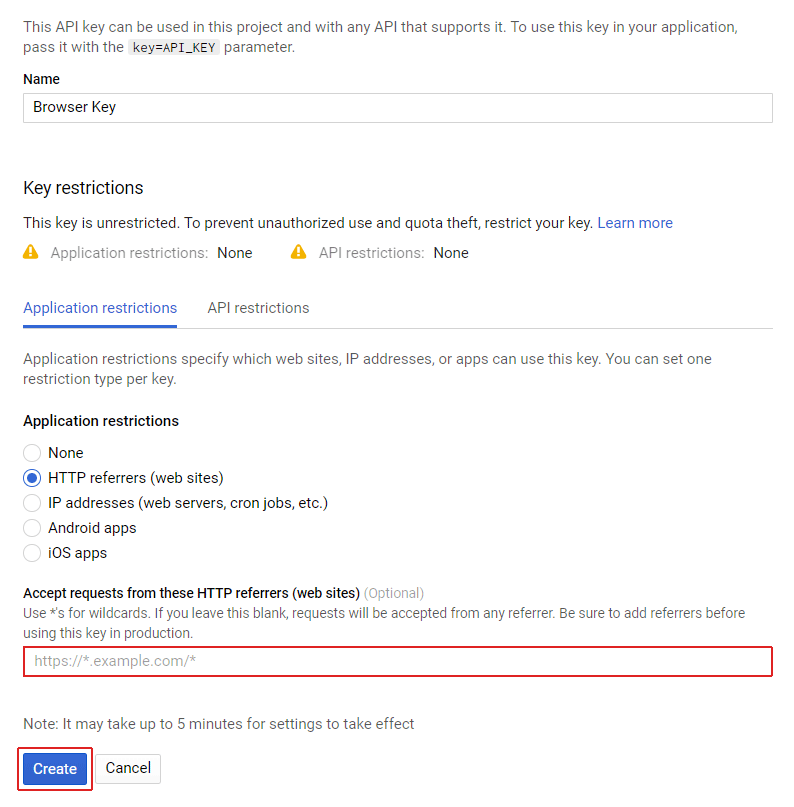
@gensupport if you go to the WPSL settings page and click on ‘show response’ in the map section. Does it show any errors? If any errors show up that are related to the browser API key, then make sure to set the correct referrer in the Google API Console.
@w-sky if you for a second change the language of your site to another language, does it then still not work?
Hi,
Nothing happens when I click on Show Response.
@gensupport can you see which errors show up in the browser console ( F12 )?
Errors:
Errors:
Uncaught TypeError: Cannot read property ‘hasClass’ of undefined
at HTMLDocument.<anonymous> (wp-auth-check.min.js?ver=5.5.1:2)
at HTMLDocument.dispatch (jquery.js?ver=1.12.4-wp:3)
at HTMLDocument.r.handle (jquery.js?ver=1.12.4-wp:3)
at Object.trigger (jquery.js?ver=1.12.4-wp:3)
at HTMLDocument.<anonymous> (jquery.js?ver=1.12.4-wp:3)
at Function.each (jquery.js?ver=1.12.4-wp:2)
at n.fn.init.each (jquery.js?ver=1.12.4-wp:2)
at n.fn.init.trigger (jquery.js?ver=1.12.4-wp:3)
at Object.<anonymous> (heartbeat.min.js?ver=5.5.1:2)
at i (jquery.js?ver=1.12.4-wp:2)
edit.css:1 Failed to load resource: the server responded with a status of 404 ()Your site URL to be authorized: https://wp-admin/post.php?post=481&action=edit#wpsl-additional-information
_.te @ js?language=en®ion=us&key=AIzaSyBggcG63b1A4OnWJrLyAxxxn9DAAjSacUs&libraries=places&v=quarterly&ver=2.2.233:79
(anonymous) @ common.js:73
(anonymous) @ common.js:152
c @ common.js:67
(anonymous) @ AuthenticationService.Authenticate?1shttps%3A%2F%2F%2Fwp-admin%2Fpost.php%3Fpost%3D481%26action%3Dedit%23wpsl-additional-information&4sAIzaSyBggcG63b1A4OnWJrLyAxxxn9DAAjSacUs&callback=_xdc_._2fvpdn&key=AIzaSyBggcG63b1A4OnWJrLyAxxxn9DAAjSacUs&token=26268:1You can fix this by setting the correct referrer for the browser API key.
Set it in the yourdomain.com/* format, but it can take a few minutes before changes are processed correctly.
if you for a second change the language of your site to another language, does it then still not work?
I tried, changed to English and sadly, it does not help. When I click “opening hours”, the browser URL even does change from
…/wp-admin/post.php?post=27736&action=edit
to
…/wp-admin/post.php?post=27736&action=edit#wpsl-opening-hours
but nothing happens on the screen. Tested with Firefox and Chrome.Maybe this error is unrelated to gensupports error?
My referrer is set to https://*.domain.com
Maps load correctly on the front end with that format.
The back end “additional information” tab will not open.
You mean domain.com/* ?
Any other Google Maps plugins that your using? If so, can you disable them for a second and see if that fixes it?
Nope, I am using https://*.domain.com and it is working. I tried both, but the former works.
No other map plugins. I actually disabled every plugin to troubleshoot.
‘Nope, I am using https://*.domain.com and it is working. I tried both, but the former works.’
But the error for the correct referrer format still shows up in the browser console ( F12 ) ?
Can you open a support ticket here and include details for a temp login account so I can take a quick look myself?
The correct referrer shows up in browser console.
I just can’t get the additional tab to toggle or open.
The link you provided doesn’t accept tickets. I only see documentation.
The link you provided doesn’t accept tickets. I only see documentation.
If you follow the steps below ‘Reason for contacting us?’, then you can send a message with a temp login account so I can take a look myself.
-
This reply was modified 5 years, 7 months ago by
Tijmen Smit.
-
This reply was modified 5 years, 7 months ago by


The topic ‘Store in not publishing and Additional Information is not working’ is closed to new replies.