Ok I found the log. It is being showed on right hand side of the order. As you can see in the following screenshot, when I removed product “Black Star” from the order, it changes stock from 0 to 1.
But when I added product “Mickey Mouse” then it didn’t do anything to stock. Why is that?
View post on imgur.com
Hi there!
Did you set the quantity on the second product you added?
Yes. It was 1 and then I had to manually change it to 0 after going into product.
When customer place order on website, system reduces stock.
When admin creates order from back end, system reduces stock.
When admin edits existing order and adds a new item in that order, system doesn’t reduce stock.
Hi @techman,
When admin edits existing order and adds a new item in that order, system doesn’t reduce stock.
Stock reduction happens with certain order status changes. Here’s a workflow you could use when editing an existing order.
1. Set the status to “pending payment.”
2. Edit the order and add new products.
3. Update the order.
4. Change the status to “on hold” and update the order.
That should trigger the stock to be reduced. Here are notes from an order where I used this workflow to see how it changes.
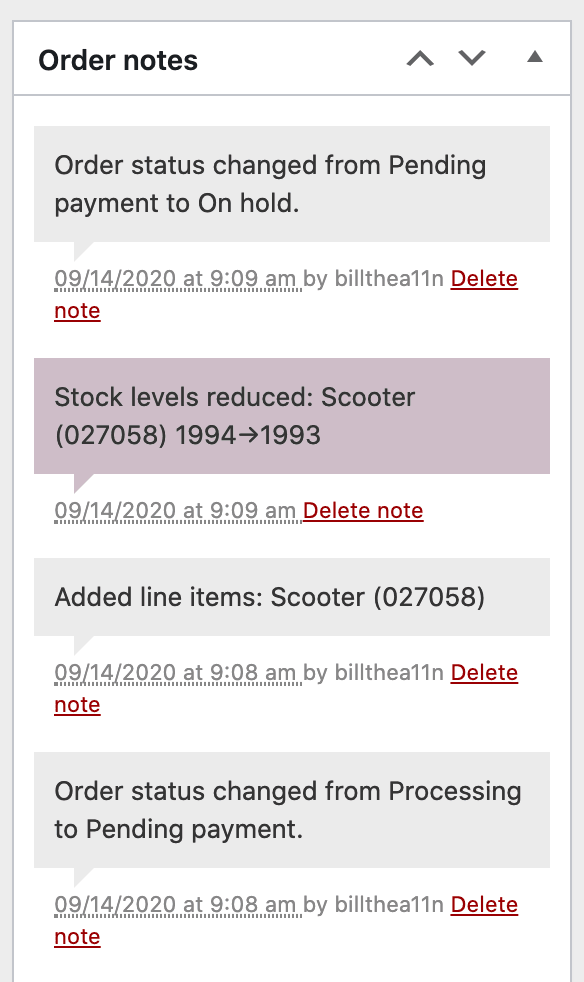
After that, you can then change the order status to whatever status fits your needs. If you have any questions, please let us know.
Cheers
Hi @techman,
Since we haven’t heard from you in a while, we’re hoping that means you were able to get this resolved. I’m going to close this thread out now.
If you’re still having trouble, please open up a new topic and we’ll be happy to help out.
Take care


