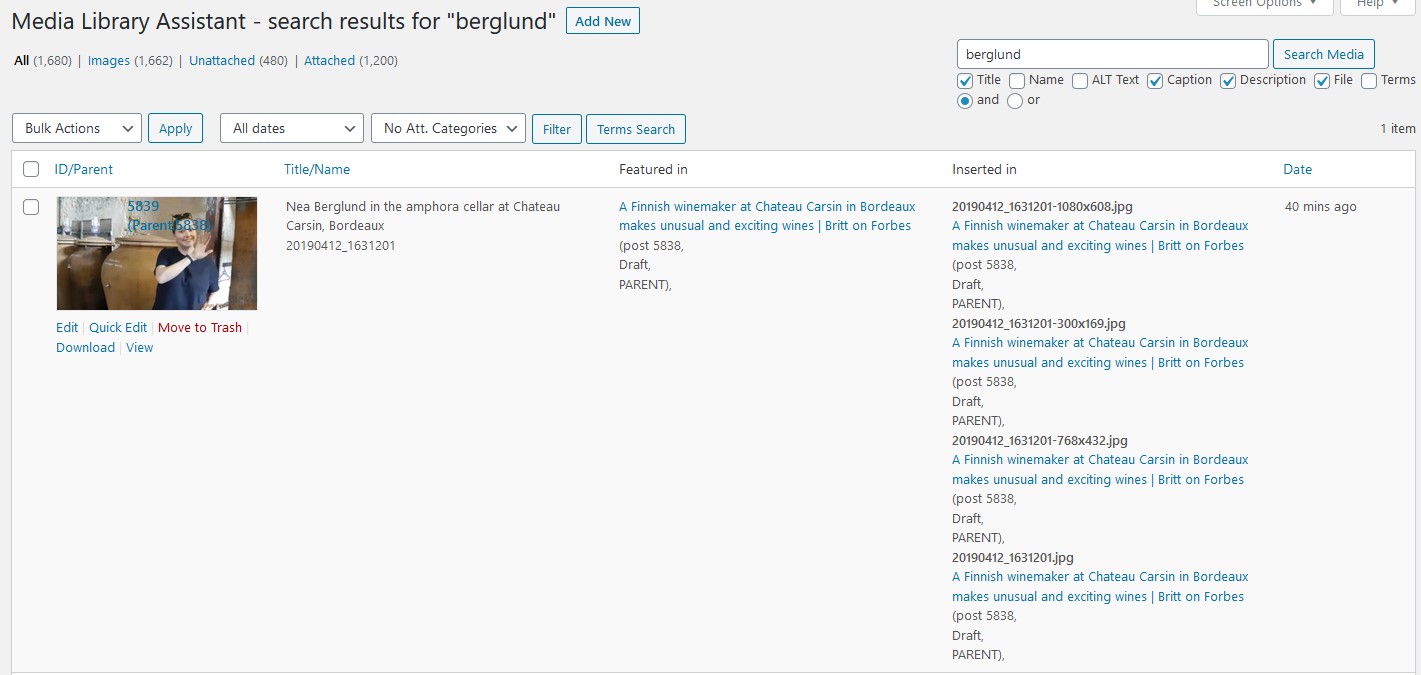
Thanks for your question and for including a link to the example screen shot; very helpful.
If you look carefully you can see that each of the “included” entries has a different file name, mostly for the “intermediate sizes” of the file in question. For whatever reason (e.g., responsive/scalable display) different sizes of the image file are included in the page content.
If you change your “Inserted in” setting from “Enabled” to “Base” you should eliminate the multiple entries and get just one entry per item (per post). If that doesn’t resolve the issue, please post a link to one or more of the posts in question so I can investigate further.
I am marking this topic resolved, but please update it if you have problems or further questions regarding the above suggestion. Thanks for your interest in the plugin.
Hi David,
You’re absolutely right. I had not spotted that. It’s the various sizes that are put in the code by WordPress/Elementor. And they go away with “base”.
Thank you!
/Per
By the way, if I could add one thing, which is a feature suggestion:
In the Library assistant page it would be very useful to have the option to add a column with image dimension (in pixels). (You have lots of other column options there.)
To know the dimension of an image is very important, at least for us. The dimensions of the images that we upload have increased over time. Today, if we want to use an image in a post we need to know that it is “big enough”. Many older images are far too small to use in new posts but the only way to know if it is big enough is to inspect the details of every image, which is tedious.
Currently I use another plugin for that (Show image dimensions in library, I think), but it seems to be something that would be a natural inclusion in you plugin.
Just a suggestion.
/Per
Thanks for your suggestion, which is along the same lines as this earlier topic:
Image file size, image dimensions
I will consider adding a Dimensions column to the core MLA table, but in the interim the solution outlined in the earlier topic might be of interest for your application.
Thank you, that’s excellent.
For the moment I think I’ll stick to the simpler plugin solution, but it’s nice to see that I can do it with MLA if needed.