Siddy
Siddy
(@sidharthuseagility)
Hello @gerardphilippe,
try this:
Amending Your wp-config.php File
First, try to edit the wp-config.php file on your WordPress site. It is located in your WordPress site’s root folder.
Edit this file, for example with the command:
sudo nano /var/www/html/wp-config.php
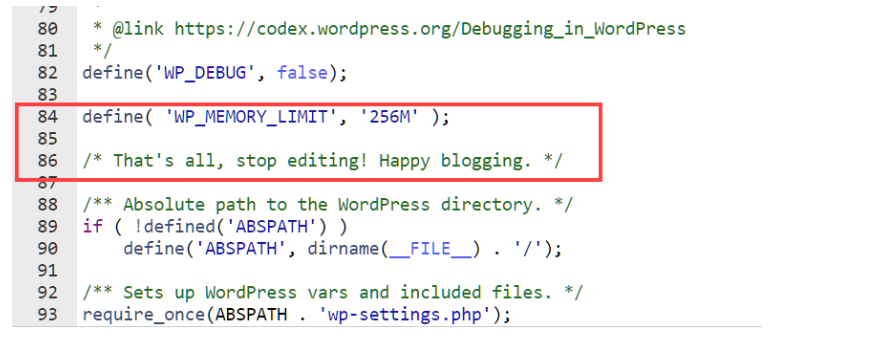
Next, you need to paste this code in wp-config.php file just before the line that says ‘That’s all, stop editing! Happy blogging.’
Define(‘WP_MEMORY_LIMIT’, ‘256M’);
https://i.gyazo.com/43fbb44d266796a981cd3b3767f0d3cb.png
This code tells WordPress to increase the PHP memory limit to 256MB.
You can customize the number to increase the memory limit to a higher amount if you wish. Then you need to save changes and upload your wp-config.php file back to your server.
You can visit your WordPress site and memory exhausted error should disappear now.
If the error is still occurring, you may need to increase the WordPress memory limit to a higher number.
Siddy
(@sidharthuseagility)
Hi @gerardphilippe
In your post title have lots of dots. that’s why it’s come in your url. You can see the url will be create by post title. In you post tilte have dots. it will messy with your post url. SO whenever you will create you post it will be dot free title.
I hope It will help you
Thanks
Siddy
(@sidharthuseagility)
@gerardphilippe I was commented on another issue. I am not able to delete my comment. Last comment not for your issue.