Hi @bertomolina98
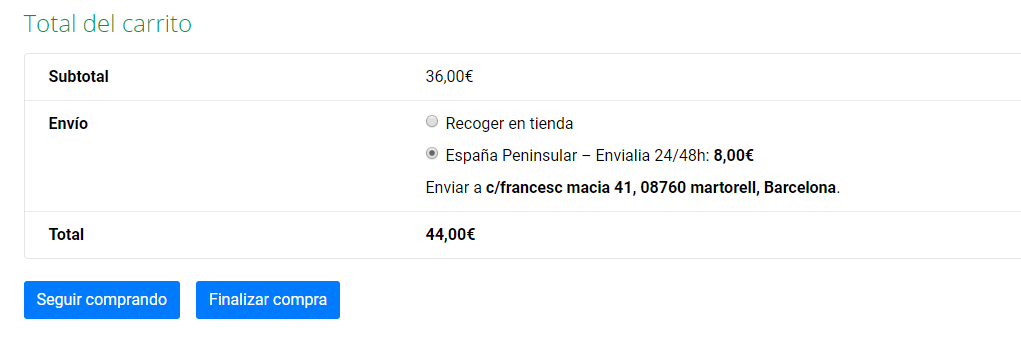
I would like to eliminate the part that sais “ENVÍO”.
Is that screenshot from your cart page? If so, you can stop the shipping from showing there if you uncheck this box in the WooCommerce>settings>shipping> shipping options area

Link to image: https://d.pr/i/dPX4x6
Also I would like to put after “TOTAL” a little string that sais “IVA incluido”.
You can do this by using a free translation plugin like Loco Translate (https://wordpress.org/plugins/loco-translate/). This will allow you to find that phrase and change it to be what you’d like.
Thanks for the translation answer!
About the shipping, I have the option as you show me but it still being in the cart but ONLY when is the second purchase in that computer or when you are logged.
Hi @bertomolina98
I have the option as you show me but it still being in the cart but ONLY when is the second purchase in that computer or when you are logged.
In that case, it sounds like there may be a conflict happening on the site, as this is not the default and expected behaviour.
The best way to determine this is to:
- Temporarily switch your theme to Storefront
- Disable all plugins except for WooCommerce
- Repeat the action that is causing the problem
If you’re not seeing the same problem after completing the conflict test, then you know the problem was with the plugins and/or theme you deactivated. To figure out which plugin is causing the problem, reactivate your other plugins one by one, testing after each, until you find the one causing conflict. You can find a more detailed explanation on how to do a conflict test here.
I’ll mark this thread as resolved now. If you have any further questions, I recommend creating a new thread.