Awesome Plugin – After Update
-
Dear Team,
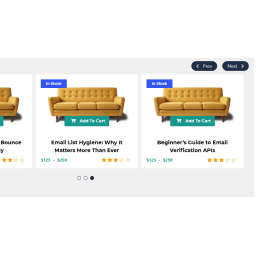
Greetings!Indeed an awesome plugin. After the recent plugin update, it stopped showing the products on the page. Also noticed that the ‘slider navigation’ and ‘slider dots’ are still there, only products are hidden. Please sort out the issue. Thank you.
Best, Rifhan
rifhantly@gmail.comThe page I need help with: [log in to see the link]

-
HTML Source –
<div id=”wcps-container-16528″ class=”wcps-container wcps-container-16528″><div class=”wcps-ribbon “></div><div id=”wcps-16528″ class=”wcps-items owl-carousel owl-theme owl-loaded owl-drag”><div class=”owl-stage-outer”><div class=”owl-stage” style=”transition: all 1s ease 0s; width: 6854px; transform: translate3d(-4283px, 0px, 0px);”><div class=”owl-item cloned” style=”width: 428.333px;”><div class=”item “><div class=”elements-wrapper layout-“></div></div></div><div class=”owl-item cloned” style=”width: 428.333px;”><div class=”item “><div class=”elements-wrapper layout-“></div></div></div><div class=”owl-item cloned” style=”width: 428.333px;”><div class=”item “><div class=”elements-wrapper layout-“></div></div></div><div class=”owl-item” style=”width: 428.333px;”><div class=”item “><div class=”elements-wrapper layout-“></div></div></div><div class=”owl-item” style=”width: 428.333px;”><div class=”item “><div class=”elements-wrapper layout-“></div></div></div><div class=”owl-item” style=”width: 428.333px;”><div class=”item “><div class=”elements-wrapper layout-“></div></div></div><div class=”owl-item” style=”width: 428.333px;”><div class=”item “><div class=”elements-wrapper layout-“></div></div></div><div class=”owl-item” style=”width: 428.333px;”><div class=”item “><div class=”elements-wrapper layout-“></div></div></div><div class=”owl-item” style=”width: 428.333px;”><div class=”item “><div class=”elements-wrapper layout-“></div></div></div><div class=”owl-item” style=”width: 428.333px;”><div class=”item “><div class=”elements-wrapper layout-“></div></div></div><div class=”owl-item active” style=”width: 428.333px;”><div class=”item “><div class=”elements-wrapper layout-“></div></div></div><div class=”owl-item active center” style=”width: 428.333px;”><div class=”item “><div class=”elements-wrapper layout-“></div></div></div><div class=”owl-item active” style=”width: 428.333px;”><div class=”item “><div class=”elements-wrapper layout-“></div></div></div><div class=”owl-item cloned” style=”width: 428.333px;”><div class=”item “><div class=”elements-wrapper layout-“></div></div></div><div class=”owl-item cloned” style=”width: 428.333px;”><div class=”item “><div class=”elements-wrapper layout-“></div></div></div><div class=”owl-item cloned” style=”width: 428.333px;”><div class=”item “><div class=”elements-wrapper layout-“></div></div></div></div></div><div class=”owl-nav flat”><button type=”button” role=”presentation” class=”owl-prev”><i class=”fas fa-chevron-left”></i></button><button type=”button” role=”presentation” class=”owl-next”><i class=”fas fa-chevron-right”></i></button></div><div class=”owl-dots”><button role=”button” class=”owl-dot”><span></span></button><button role=”button” class=”owl-dot”><span></span></button><button role=”button” class=”owl-dot”><span></span></button><button role=”button” class=”owl-dot”><span></span></button><button role=”button” class=”owl-dot”><span></span></button><button role=”button” class=”owl-dot”><span></span></button><button role=”button” class=”owl-dot”><span></span></button><button role=”button” class=”owl-dot”><span></span></button><button role=”button” class=”owl-dot active”><span></span></button><button role=”button” class=”owl-dot”><span></span></button></div></div></div>
-
This reply was modified 6 years, 1 month ago by
ANBI Trading. Reason: link - screenshot
Thanks for your post,
Have you completed the data migration process? please watch this video
Please let me know if you found any issue after data migrate.
RegardsDear PickPlugin Author,
Greetings!Yes I did migrate a few days back, but still I see this only, even after the refresh.
“WCPS settings upgrade status
PendingWCPS post data upgrade status
Pending”Please advise.
Regards, Rifhan
The data migration process should run in the background, you can run this data migration by force by using the following shortcode
[wcps_cron_upgrade_settings]just create a new page and use follwoing shortcode, it will not showing anything, hope after few minutes migration will be completed.Please let me know the update.
RegardsDear PickPlugins,
Thank you.I tried that too, fortunately, I figured out that the issue was with the ‘WCPS layout’ after the upgrade – Layout become empty.
So I created a new layout and used your suggested shortcode [wcps_cron_upgrade_settings] on the new page to do the migration by force. Voila, now It’s working. Thank you so much.
But I figured out a bug –
In Layout builder
-> Customize layout settings,Text align – ‘center’ is not working for the ‘Product category’. Please check and advise. Thank you once again.
Best, Rifhan
rifhantly@gmail.com -
This reply was modified 6 years, 1 month ago by

The topic ‘Awesome Plugin – After Update’ is closed to new replies.