Thread Starter
 hemdom
(@hemdom)
This also happens when opening up the source code from threads
Hi @hemdom,
Please try this CSS code. Put it in Forums > Settings > Styles > Custom CSS Code textarea, save it, delete all caches, navigate to forum front-end and press Ctrl+F5 to reset browser cache.
.mce-label{ color: black !important;}
.mce-textbox{ color: black !important;}
.mce-foot .mce-container-body button{ color: black !important;}
Thread Starter
hemdom
(@hemdom)
Thank you! It’s fixed.
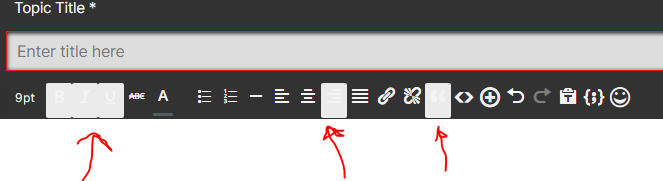
However, I’m also having the same issue with the icons on the header of threads.
(Where the font size, bold, italics, underline… is)
They are making it difficult to see what I’m selecting. Do you have a code I can put in my CSS to fix this issue?
Thread Starter
hemdom
(@hemdom)
This also happens in the “topic tag” pop ups.
@hemdom,
Please leave screenshots. I can’t help you without seeing the problem.
Thread Starter
hemdom
(@hemdom)
Here.
https://i.postimg.cc/02vY6tMq/image.png
https://postimg.cc/w3SH1tqq
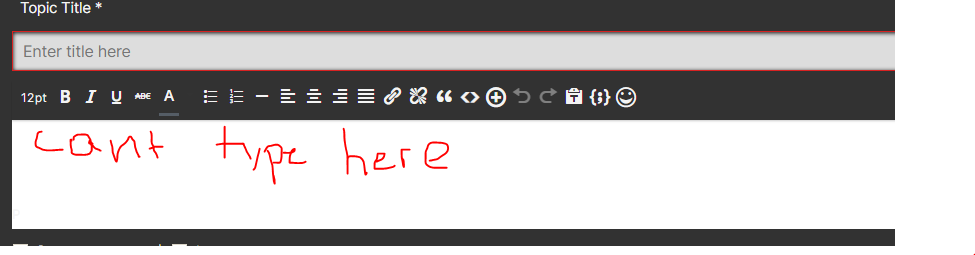
Also, I’m having a new issue. After inserting that code, I cannot type in the main “paragraph” section. I have to go in full screen in order for it to work.
https://i.postimg.cc/fLwsSQN9/image.png
-
This reply was modified 6 years, 1 month ago by
 hemdom.
Hi @hemdom,
Please leave your forum URL to allow us to check the issues.
Thread Starter
hemdom
(@hemdom)
[ Link moved to link field in first post and unlinked ]
it is an adult forum so beware! You can use the off topic thread to test if you’d like
Hi
Also, I’m having a new issue. After inserting that code, I cannot type in the main “paragraph” section.
We don’t see such an issue. Everything is working fine.
https://i.postimg.cc/02vY6tMq/image.png
https://postimg.cc/w3SH1tqq
This is a small CSS issue. To solve it, just put the CSS code in the “Custom CSS code” textarea, located in the Dashboard > Forums > Settings > Style Tab.
ul.wpf_ac_results {
    color: #000 !important;
}

.wpf_ac_results li {
    margin: 0;
}
Please don’t forget to delete all caches and press Ctrl+F5 (twice) on the frontend before checking to reload the updated CSS file.