• Resolved mockapapella

    (@mockapapella)


    I have a set of picture-buttons that hide and unhide fields by adding and removing a “hide” CSS class (mentioned here). I have a calculated field which looks at those fields as well as a dropdown and sets its value based on that. Here is the code for it:

    
    (function(){
    	if(!$(fieldname324).hasClass(hide) && fieldname10 == 1) return 1;
    	if(!$(fieldname324).hasClass(hide) && fieldname10 == 2) return 2;
    	if(!$(fieldname325).hasClass(hide) && fieldname10 == 1) return 3;
    	if(!$(fieldname325).hasClass(hide) && fieldname10 == 2) return 4;
    	if(!$(fieldname326).hasClass(hide) && fieldname10 == 1) return 5;
    	if(!$(fieldname326).hasClass(hide) && fieldname10 == 2) return 6;
    	if(!$(fieldname332).hasClass(hide) && fieldname10 == 1) return 7;
    	if(!$(fieldname332).hasClass(hide) && fieldname10 == 2) return 8;
    	if(!$(fieldname333).hasClass(hide) && fieldname10 == 1) return 9;
    	if(!$(fieldname333).hasClass(hide) && fieldname10 == 2) return 10;
    	if(!$(fieldname334).hasClass(hide) && fieldname10 == 1) return 11;
    	if(!$(fieldname334).hasClass(hide) && fieldname10 == 2) return 12;
    	if(!$(fieldname335).hasClass(hide) && fieldname10 == 1) return 13;
    	if(!$(fieldname335).hasClass(hide) && fieldname10 == 2) return 14;
    	if(!$(fieldname336).hasClass(hide) && fieldname10 == 1) return 15;
    	if(!$(fieldname336).hasClass(hide) && fieldname10 == 2) return 16;
    })();
    

    More specifically, I want to check which field is not hidden and the value of fieldname10. I’m not too familiar with javascript so I’m not even sure if the syntax is right, but from some basic testing if(fieldname10 == 1) return 1; works as well as if(1==1 alert(true);, but when I try to find a field’s classlist using either javascript’s document.getElementByID("fieldname#").classList.contains or jQuery’s .hasClass neither work.

    How can I accomplish this?

Viewing 6 replies - 1 through 6 (of 6 total)
  • Plugin Author codepeople

    (@codepeople)

    Hello @mockapapella,

    There are some issues in in your equation.

    First, the plugin replaces all texts with the structure fieldname# by the corresponding field’s value.

    Second, the id attribute assigned to the fields’ tags have the structure: fieldname#_#, where the second # corresponds to a number that prevents the conflict between fields with the same names when there are multiple forms in the same page.

    Third, if “hide” is a class name, you should close it between single or double quotes.

    I’m not totally sure about what do you want to implement, but at least the correct structure would be:

    
    (function(){
    	if(!$('[id*="fieldname'+'324_"]').hasClass('hide') && fieldname10 == 1) return 1;
    	if(!$('[id*="fieldname'+'324_"]').hasClass('hide') && fieldname10 == 2) return 2;
    	if(!$('[id*="fieldname'+'325_"]').hasClass('hide') && fieldname10 == 1) return 3;
    	if(!$('[id*="fieldname'+'325_"]').hasClass('hide') && fieldname10 == 2) return 4;
    	if(!$('[id*="fieldname'+'326_"]').hasClass('hide') && fieldname10 == 1) return 5;
    	if(!$('[id*="fieldname'+'326_"]').hasClass('hide') && fieldname10 == 2) return 6;
    	if(!$('[id*="fieldname'+'332_"]').hasClass('hide') && fieldname10 == 1) return 7;
    	if(!$('[id*="fieldname'+'332_"]').hasClass('hide') && fieldname10 == 2) return 8;
    	if(!$('[id*="fieldname'+'333_"]').hasClass('hide') && fieldname10 == 1) return 9;
    	if(!$('[id*="fieldname'+'333_"]').hasClass('hide') && fieldname10 == 2) return 10;
    	if(!$('[id*="fieldname'+'334_"]').hasClass('hide') && fieldname10 == 1) return 11;
    	if(!$('[id*="fieldname'+'334_"]').hasClass('hide') && fieldname10 == 2) return 12;
    	if(!$('[id*="fieldname'+'335_"]').hasClass('hide') && fieldname10 == 1) return 13;
    	if(!$('[id*="fieldname'+'335_"]').hasClass('hide') && fieldname10 == 2) return 14;
    	if(!$('[id*="fieldname'+'336_"]').hasClass('hide') && fieldname10 == 1) return 15;
    	if(!$('[id*="fieldname'+'336_"]').hasClass('hide') && fieldname10 == 2) return 16;
    })();
    

    Best regards.

    Thread Starter mockapapella

    (@mockapapella)

    Maybe it’s a case of how I’m using the returned value, because your solution seems to have the same result as my code. I feel like I’m close to a solution. I think the easiest way to fix this is to give you a full overview of how this system is intended to work.

    I have 8 pictures which are buttons. When I click a picture, the corresponding Dropdown DS appears (for a total of 8 Dropdown DS’s) along with a normal Dropdown that gives you the option of “1” or “2”. The Dropdown DS automatically has a value selected by virtue of a MySQL search query, so all the user has to do is select “1” or “2”. When they do this, the calculated field updates its value and displays one of 16 Line Text DS’s. These Line Text DS’s are updated based on the value of the corresponding Dropdown DS from above (with Line Text DS’s 1 and 2 corresponding to Dropdown DS 1, Line Text DS’s 3 and 4 corresponding to Dropdown DS 2, etc.).

    No matter which image I initially select, only Line Text DS 1 and 2 appear (depending on whether I select “1” or “2” from the normal Dropdown). The 8 Dropdown DS’s still change as expected, but the Line Text DS can’t seem to update past the second one.

    Plugin Author codepeople

    (@codepeople)

    Hello @mockapapella,

    I’m sorry, but I’m not sure how the previous code satisfies your project’s description.

    Could you send me the link to the webpage where the form is inserted for checking the form’s structure in detail, please?

    Best regards.

    Thread Starter mockapapella

    (@mockapapella)

    http://preview.energybankinc.com/7-2/

    The password is password1234

    The only thing of concern at the moment is in the first page “Step 1: Determine your solution.” I only have 3 pictures for testing purposes.

    Plugin Author codepeople

    (@codepeople)

    Hello @mockapapella

    I’ve checked your form, and I think you are trying to reinvent the wheel.

    First, for the images, instead to use a HTML Content field, would be better to insert a radio button field, entering the images tags as the choices texts (<img src="the URL to the image">), and hiding the radio buttons with CSS rules. The radio buttons fields accept the definition of dependencies (https://cff.dwbooster.com/documentation#dependencies), so, you don’t need to show/hide the fields programmatically.

    Note: To hide the radio buttons in this field you simply should:

    1. Assign a class name to the field, for example: my-images-options (the class names are assigned to the fields through their attributes: “Add CSS Layout Keywords”)
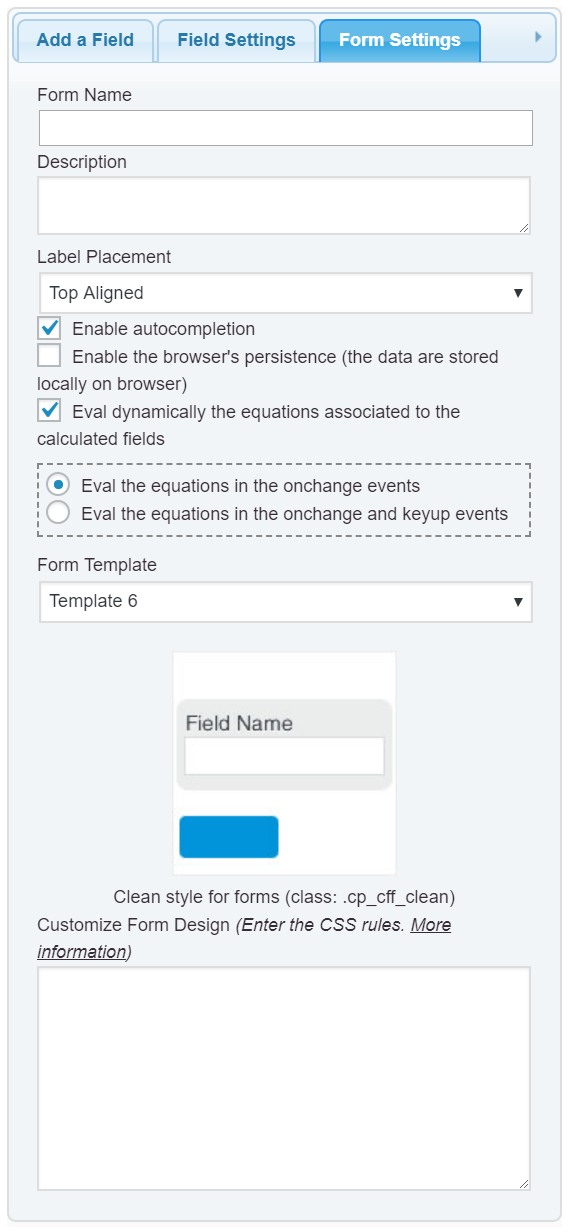
    2. Define the new class into the “Customize Form Design” attribute in the “Form Settings” tab (https://cff.dwbooster.com/images/documentation/form-settings-tab.png)

    
    #fbuilder .my-images-options input{display: none !important;}
    #fbuilder .my-images-options img{
        cursor: pointer;
        border-style: solid;
        border-radius: 10px;
        border-color: rgb(150,150,150);
        border-width: 5px;
        padding: 20px;
        outline: none;
    }
    #fbuilder .my-images-options input:checked+span img{border-color:rgb(0,0,0);}
    

    Now, you don’t need any special code to display the fields that depend on the image selected.

    If you need a second level of dependencies. As you cannot create dependencies into a DropDown DS field, because their values are read at runtime, you will need a calculated field, but in this case, you simply should insert a different calculated field per image (that was defined as dependents on the image). And then, manage the dependencies into this field, but only for the fields that are related to the image selected. So, you don’t need to check if a field is visible or not.

    Best regards.

    Thread Starter mockapapella

    (@mockapapella)

    This looks like it does what I needed it to. Thanks!

Viewing 6 replies - 1 through 6 (of 6 total)

The topic ‘In a function in a calculated field, how do I check if a field has a CSS class?’ is closed to new replies.