• Mortgage

    (@tzeweic)


    Hi,

    I am not sure but, suddenly I cannot login to WP admin page.

    I have tried the Database method, and the FTP method in https://codex.wordpress.org/Resetting_Your_Password

    1. For Database method, I went into the table – wp_users, and use the password to update into http://139.162.10.242:8000/wp-login.php?checkemail=confirm but it doesn’t work.

    2. I have tried the password reset but I guess my email server was not setup.

    3. I tried the FTP method, and I need help if below is the correct way to enter the code.

    <?php
    wp_set_password(‘password’,’admin’);
    /**

    Please advise. Many thanks for this help.

    The page I need help with: [log in to see the link]

Viewing 3 replies - 1 through 3 (of 3 total)
  • Hi tzeweic,

    I am not sure how did you try for database method and here is my suggestion. Please follow below steps to reset the password.

    1. Go to phpMyAdmin from cPanel and select your current database which is running your site. To Confirm the correct database(If multiple DBs are there in phpMyAdmin) open the wp-config.php file available at the root folder of your installation and see the DB_NAME here.

    2. Now select the wp_users table(if DB prefix is wp_) and click on edit button in the row for the user you like to change the password for.

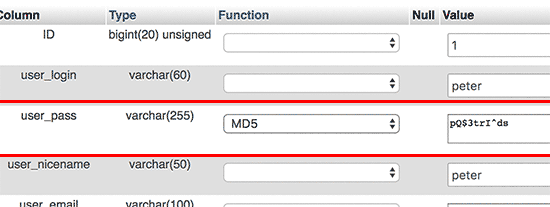
    3. Now select MD5 function form function column in the row user_pass and enter the password you like to change in the “Value” column and hit the “Go” button.

    That’s it. Now you should be able to login with this new password.
    I hope this will help you.

    helldog2018

    (@helldog2018)

    Hi @tzeweic,

    I don’t understand why the database option won’t work (eventually, all datat is being grabbed from database).

    Are you sure you did it the right way?

    • Go to Database and browse wp_users
    • Select edit on the username you wish to alter
    • Delete the password and write a new one. Make sure the function is set to MD5 else the new password won’t be recognized

    Thread Starter Mortgage

    (@tzeweic)

    Thanks for your help.

    I am not not using the above database, thus, not sure if it is MD5 issue.

    Anyway, I have resolved with emergency password approach, and it works!

    Thanks for your advice.

Viewing 3 replies - 1 through 3 (of 3 total)

The topic ‘Password Admin reset’ is closed to new replies.